Ana içeriğe geç
Onarım Topluluğuna Katılın - Hesap Oluşturun

Dell Studio 1537 Hard Drive Replacement

Neye ihtiyacın var

  1. Dell Studio 1537 Hard Drive Replacement, Battery: adım 1, 2 resimden 1. Dell Studio 1537 Hard Drive Replacement, Battery: adım 1, 2 resimden 2.
    • Ensure the laptop is turned off and unplugged before attempting to remove any piece.

    • Place the laptop lid down so the underside is visible.

    • Pull battery release switch and gently pull the battery directly away from the switch.

    FixBot'a Sor

    Yorum Ekle

  2. Dell Studio 1537 Hard Drive Replacement, Back Cover: adım 2, 1 resimden 1.
    • Identify the back cover of the laptop.

    FixBot'a Sor

    Yorum Ekle

  3. Dell Studio 1537 Hard Drive Replacement: adım 3, 1 resimden 1.
    • Unscrew and remove all of the 6.0mm screws with a Phillips #1 screwdriver.

    FixBot'a Sor

    Yorum Ekle

  4. Dell Studio 1537 Hard Drive Replacement: adım 4, 1 resimden 1.
    • Lift the back cover off of the laptop.

    FixBot'a Sor

    Yorum Ekle

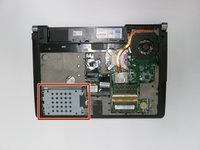
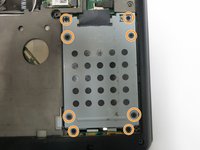
  5. Dell Studio 1537 Hard Drive Replacement, Hard Drive: adım 5, 2 resimden 1. Dell Studio 1537 Hard Drive Replacement, Hard Drive: adım 5, 2 resimden 2.
    • Unscrew all of the 6.0 mm screws with a Phillips #1 screwdriver holding the hard drive cage on the computer.

    FixBot'a Sor

    Yorum Ekle

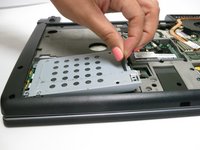
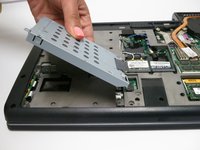
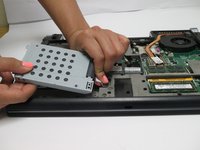
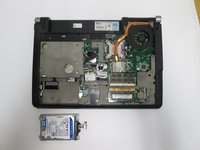
  6. Dell Studio 1537 Hard Drive Replacement: adım 6, 2 resimden 1. Dell Studio 1537 Hard Drive Replacement: adım 6, 2 resimden 2.
    • Lift the hard drive cage out of the laptop.

    FixBot'a Sor

    Yorum Ekle

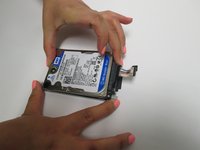
  7. Dell Studio 1537 Hard Drive Replacement: adım 7, 3 resimden 1. Dell Studio 1537 Hard Drive Replacement: adım 7, 3 resimden 2. Dell Studio 1537 Hard Drive Replacement: adım 7, 3 resimden 3.
    • Pull tab to unplug the drive from the computer

    • Pull the hard drive out of the hard drive tray.

    FixBot'a Sor

    Yorum Ekle

Sonuç

To reassemble your device, follow these instructions in reverse order.

İptal et: Bu kılavuzu tamamlamadım.

3 farklı kişi bu kılavuzu tamamladı.

Zach Dylag

Üyelik tarihi: 03/24/15

575 İtibar

4 adet Kılavuz yazıldı

Ekip

Baylor, Team 6-2, Shaver Spring 2015 Baylor, Team 6-2, Shaver Spring 2015 üyesi

BU-SHAVER-S15S6G2

3 Üyeler

4 adet Kılavuz yazıldı

1Rehber Yorum

Straightforward process with step by step guide. Thank you Zach.

Katharine Church - Yanıt Paylaş

Yorum Ekle

İstatistikleri Görüntüle:

Son 24 Saat: 6

Son 7 gün: 8

Son 30 gün: 36

Her zaman: 2,796