Ana içeriğe geç
Onarım Topluluğuna Katılın - Hesap Oluşturun

Dell Studio 1555 RAM Replacement

Neye ihtiyacın var

    1. Dell Studio 1555 RAM Replacement, Battery: adım 1, 1 resimden 1.
      • Turn off and unplug the laptop.

      • Failure to properly turn off device before handling the battery could result in electrical shock.

      • Flip the laptop so the underside is facing up with the battery closest to you.

      FixBot'a Sor

      Yorum Ekle

    2. Dell Studio 1555 RAM Replacement: adım 2, 3 resimden 1. Dell Studio 1555 RAM Replacement: adım 2, 3 resimden 2. Dell Studio 1555 RAM Replacement: adım 2, 3 resimden 3.
      • Slide the locking switch to the left to release the battery.

      FixBot'a Sor

      Yorum Ekle

    3. Dell Studio 1555 RAM Replacement: adım 3, 1 resimden 1.
      • Gently pull the battery away from the device.

      FixBot'a Sor

      Yorum Ekle

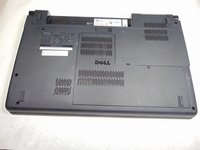
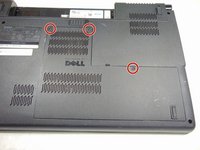
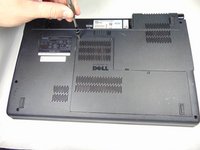
    1. Dell Studio 1555 RAM Replacement, Back Panel: adım 4, 3 resimden 1. Dell Studio 1555 RAM Replacement, Back Panel: adım 4, 3 resimden 2. Dell Studio 1555 RAM Replacement, Back Panel: adım 4, 3 resimden 3.
      • Loosen the three 5mm screws from the back panel using the # 1 Philips screwdriver.

      • The three 5mm screws will stay in place on the back panel.

      FixBot'a Sor

      Yorum Ekle

    2. Dell Studio 1555 RAM Replacement: adım 5, 1 resimden 1.
      • Carefully remove the separated back panel.

      • If the back panel is difficult to remove and feels like it is going to break, DO NOT force it. Check to confirm that all the screws are unscrewed all the way before attempting again.

      FixBot'a Sor

      Yorum Ekle

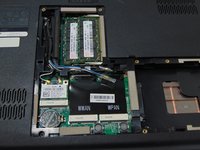
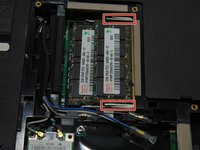
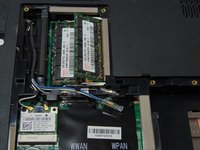
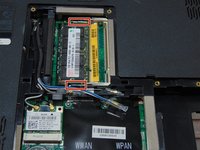
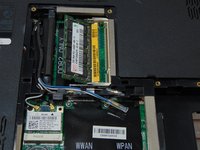
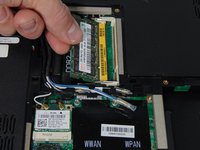
    1. Dell Studio 1555 RAM Replacement, RAM: adım 6, 3 resimden 1. Dell Studio 1555 RAM Replacement, RAM: adım 6, 3 resimden 2. Dell Studio 1555 RAM Replacement, RAM: adım 6, 3 resimden 3.
      • Press the tabs outwards to release the tabs. The memory stick is spring loaded and will be released at an angle.

      FixBot'a Sor

      Yorum Ekle

    2. Dell Studio 1555 RAM Replacement: adım 7, 1 resimden 1.
      • Gently remove the memory stick from the slot.

      FixBot'a Sor

      Yorum Ekle

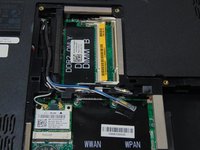
    3. Dell Studio 1555 RAM Replacement: adım 8, 2 resimden 1. Dell Studio 1555 RAM Replacement: adım 8, 2 resimden 2.
      • Once the first memory stick is removed, press the tabs outwards to release the tabs. The memory stick is spring loaded and will be released at an angle.

      FixBot'a Sor

      Yorum Ekle

    4. Dell Studio 1555 RAM Replacement: adım 9, 2 resimden 1. Dell Studio 1555 RAM Replacement: adım 9, 2 resimden 2.
      • Gently remove the memory stick from the slot.

      FixBot'a Sor

      Yorum Ekle

Sonuç

To reassemble your device, follow these instructions in reverse order.

İptal et: Bu kılavuzu tamamlamadım.

3 farklı kişi bu kılavuzu tamamladı.

Josh Boone

Üyelik tarihi: 10/10/16

586 İtibar

4 adet Kılavuz yazıldı

Ekip

Sam Houston State, Team 12-3, Blackburne Fall 2016 Sam Houston State, Team 12-3, Blackburne Fall 2016 üyesi

SHSU-BLACKBURNE-F16S12G3

3 Üyeler

60 adet Kılavuz yazıldı

0Kılavuz Yorumları

Yorum Ekle

İstatistikleri Görüntüle:

Son 24 Saat: 0

Son 7 gün: 10

Son 30 gün: 30

Her zaman: 1,452