Ana içeriğe geç
Onarım Topluluğuna Katılın - Hesap Oluşturun

Dell XPS 18 Battery Replacement

Neye ihtiyacın var

    1. Dell XPS 18 Battery Replacement, Back Cover: adım 1, 1 resimden 1.
      • Turn the device on its screen.

      • Remove the ten 4mm screws using a T8 Torx screwdriver.

      FixBot'a Sor

      Yorum Ekle

    2. Dell XPS 18 Battery Replacement: adım 2, 1 resimden 1.
      • Gently flip out support feet located near the bottom of device.

      FixBot'a Sor

      Yorum Ekle

    3. Dell XPS 18 Battery Replacement: adım 3, 1 resimden 1.
      • Gently lift the back cover off the device. The back cover should come off easily.

      FixBot'a Sor

      Yorum Ekle

    1. Dell XPS 18 Battery Replacement, Internal Cover: adım 4, 1 resimden 1.
      • Use the opening tool's angled edge to lift the clasps securing the screen and motherboard cables.

      FixBot'a Sor

      Yorum Ekle

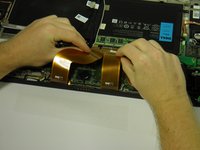
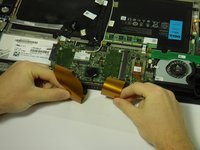
    2. Dell XPS 18 Battery Replacement: adım 5, 2 resimden 1. Dell XPS 18 Battery Replacement: adım 5, 2 resimden 2.
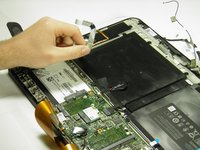
      • Disconnect the screen and copper colored motherboard cables and tuck them under the device to prevent future hassle.

      FixBot'a Sor

      Yorum Ekle

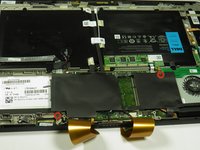
    3. Dell XPS 18 Battery Replacement: adım 6, 2 resimden 1. Dell XPS 18 Battery Replacement: adım 6, 2 resimden 2.
      • Remove the two black 3mm screws from the internal cover with a Phillips 00 screwdriver.

      • Remove the internal cover.

      FixBot'a Sor

      Yorum Ekle

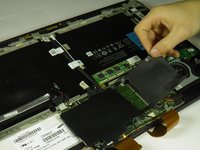
    1. Dell XPS 18 Battery Replacement, Touch Control Board: adım 7, 2 resimden 1. Dell XPS 18 Battery Replacement, Touch Control Board: adım 7, 2 resimden 2.
      • Disconnect the black camera cable and pull it back to prevent future hassle.

      FixBot'a Sor

      Yorum Ekle

    2. Dell XPS 18 Battery Replacement: adım 8, 2 resimden 1. Dell XPS 18 Battery Replacement: adım 8, 2 resimden 2.
      • Use the angled edge of the plastic opening tool to lift the clasp securing the touch control board cable.

      • Disconnect the silver and blue touch control board cable.

      FixBot'a Sor

      Yorum Ekle

    3. Dell XPS 18 Battery Replacement: adım 9, 2 resimden 1. Dell XPS 18 Battery Replacement: adım 9, 2 resimden 2.
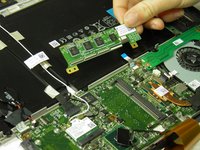
      • Remove the two silver 3mm screws holding the touch control board in place with a Phillips 00 screwdriver.

      • Remove the touch control board.

      FixBot'a Sor

      Yorum Ekle

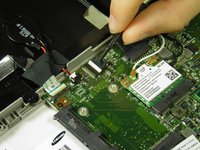
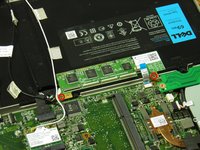
    1. Dell XPS 18 Battery Replacement, Wireless WLAN Card Wires: adım 10, 1 resimden 1.
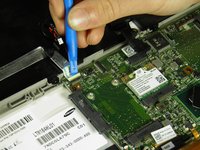
      • Use the plastic opening tool's angled edge to remove the black and white wires connected to the wireless WLAN card.

      FixBot'a Sor

      Yorum Ekle

    2. Dell XPS 18 Battery Replacement: adım 11, 2 resimden 1. Dell XPS 18 Battery Replacement: adım 11, 2 resimden 2.
      • Pull back the cables.

      FixBot'a Sor

      Yorum Ekle

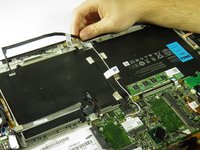
    1. Dell XPS 18 Battery Replacement, Battery: adım 12, 1 resimden 1.
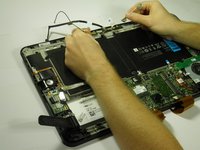
      • Use the plastic opening tool's angled edge to pry the black battery cable loose.

      FixBot'a Sor

      Yorum Ekle

    2. Dell XPS 18 Battery Replacement: adım 13, 1 resimden 1.
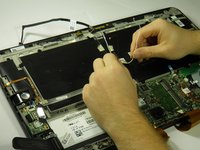
      • Use the plastic opening tool's angled edge to remove the red and black CMOS battery cable.

      FixBot'a Sor

      Yorum Ekle

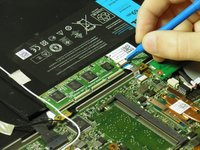
    3. Dell XPS 18 Battery Replacement: adım 14, 2 resimden 1. Dell XPS 18 Battery Replacement: adım 14, 2 resimden 2.
      • Use the plastic opening tool's angled edge to lift the clasp securing the silver circuit board cable.

      • Pull back the circuit board cable to prevent future hassle.

      FixBot'a Sor

      Yorum Ekle

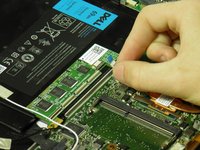
    4. Dell XPS 18 Battery Replacement: adım 15, 1 resimden 1.
      • Use the opening tool's angled edge to remove the CMOS battery.

      • The CMOS battery is adhered with strong adhesive; you may need to use extra force when removing.

      FixBot'a Sor

      Yorum Ekle

    5. Dell XPS 18 Battery Replacement: adım 16, 1 resimden 1.
      • Remove the eleven black 4mm screws holding the battery in place with a Phillips 00 screwdriver.

      FixBot'a Sor

      Yorum Ekle

    6. Dell XPS 18 Battery Replacement: adım 17, 1 resimden 1.
      • Remove the battery.

      FixBot'a Sor

      Yorum Ekle

Sonuç

To reassemble your device, follow these instructions in reverse order.

İptal et: Bu kılavuzu tamamlamadım.

14 farklı kişi bu kılavuzu tamamladı.

Austin Weir

Üyelik tarihi: 01/31/15

1.308 İtibar

8 adet Kılavuz yazıldı

Ekip

Cal Poly, Team 6-29, Amido Winter 2015 Cal Poly, Team 6-29, Amido Winter 2015 üyesi

CPSU-AMIDO-W15S6G29

4 Üyeler

16 adet Kılavuz yazıldı

9Kılavuz Yorumları

needs the help to repair the Dell XPS18

anrew waleta - Yanıt Paylaş

This is an excellent doc! Pictures are really clear and accurate, steps are concise and best of all they are correct. I was able to solve my issue the first go round with these instructions. Kudos to the author and thanks a million for the assistance!

stacysaw - Yanıt Paylaş

It all worked good. Thanks.

Kenneth Macdonald - Yanıt Paylaş

Excellent!

What is the battery type and where to buy, thanks

Mohammad - Yanıt Paylaş

My unit is missing the right foot stand. Is there anywhere else I can find the model number. Need to purchase a new power supply?

Also might need to replace the touchscreen its cracked. Have to power her up first to find out. Do you have a video for touchscreen replacement?

Frank Schofield - Yanıt Paylaş

Yorum Ekle

İstatistikleri Görüntüle:

Son 24 Saat: 0

Son 7 gün: 23

Son 30 gün: 59

Her zaman: 17,074