Ana içeriğe geç

Disassembling 8BitDo Pro 2 Wired Joystick Board

Neye ihtiyacın var

  1. Disassembling 8BitDo Pro 2 Wired Joystick Board, Remove R2 and L2 pads: adım 1, 2 resimden 1. Disassembling 8BitDo Pro 2 Wired Joystick Board, Remove R2 and L2 pads: adım 1, 2 resimden 2.
    • Remove both pads by pushing them up.

  2. Disassembling 8BitDo Pro 2 Wired Joystick Board, Remove T6 Screws: adım 2, 1 resimden 1.
    • Remove both Torx T6 screws from the back.

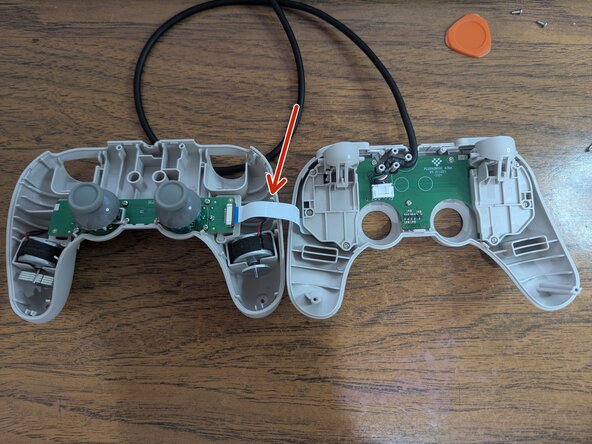
  3. Disassembling 8BitDo Pro 2 Wired Joystick Board, Open the controller: adım 3, 3 resimden 1. Disassembling 8BitDo Pro 2 Wired Joystick Board, Open the controller: adım 3, 3 resimden 2. Disassembling 8BitDo Pro 2 Wired Joystick Board, Open the controller: adım 3, 3 resimden 3.
    • With an opening pick, detach the seven clips holding the faceplate. Start from the sides, towards the bottom.

    • Detach the remaining clips by carefully raising the faceplate away from the clips.

    • A flex cable joins both plates.

    • Move the faceplate to the side.

  4. Disassembling 8BitDo Pro 2 Wired Joystick Board, Remove the flex cable: adım 4, 1 resimden 1.
    • Push the sides of the connector away from it to free the cable.

  5. Disassembling 8BitDo Pro 2 Wired Joystick Board, Remove the #0 screws: adım 5, 1 resimden 1.
    • Remove the 8 screws using a Phillips #0 screwdriver.

    • You can remove the joystick caps by lifting them.

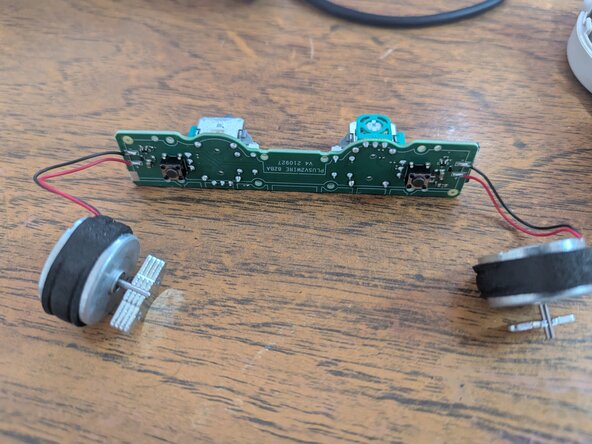
  6. Disassembling 8BitDo Pro 2 Wired Joystick Board, Remove the board: adım 6, 2 resimden 1. Disassembling 8BitDo Pro 2 Wired Joystick Board, Remove the board: adım 6, 2 resimden 2.
    • Slowly lift the board from the controller. Make sure to lift both rumble motors as well.

Sonuç

To reassemble your device, follow these instructions in reverse order.

Adrián

Üyelik tarihi: 01/22/23

173 İtibar

1 Kılavuz yazıldı

0Kılavuz Yorumları

Yorum Ekle

İstatistikleri Görüntüle:

Son 24 Saat: 5

Son 7 gün: 19

Son 30 gün: 88

Her zaman: 441