Ana içeriğe geç
Onarım Topluluğuna Katılın - Hesap Oluşturun

Disassembling Canon EOS 60D Removing Back Panel

Neye ihtiyacın var

    1. Disassembling Canon EOS 60D Removing Back Panel, Eye piece and Battery door: adım 1, 2 resimden 1. Disassembling Canon EOS 60D Removing Back Panel, Eye piece and Battery door: adım 1, 2 resimden 2.
      • Removing the eyepiece is easy. There are two methods, you can do it yourself, or put it in your camera bag a dozen times and at least once, it will fall off.

      • Grip the eyepiece by the sides firmly (index finger and thumb). Wiggle it upwards until it is off.

      FixBot'a Sor

      Yorum Ekle

    2. Disassembling Canon EOS 60D Removing Back Panel: adım 2, 2 resimden 1. Disassembling Canon EOS 60D Removing Back Panel: adım 2, 2 resimden 2.
      • Open the battery door

      • Rotate the door so the one side of the hinge pops out (see photo #2)

      • Slide other pin out (it pops out the same, but this is easier)

      FixBot'a Sor

      Yorum Ekle

    1. Disassembling Canon EOS 60D Removing Back Panel, Rubber grips: adım 3, 1 resimden 1.
      • Use a thin piece of plastic, spudger, or fingernail (if you have them) to lift up the edge of the grip, and pull up slowly.

      • Repeat for the other two grips

      • The large one on the battery-side is the easiest to start with. This is required to remove the front & back panels

      • The small one on the back is a bit difficult to get started, but not really difficult to remove.

      • The one on the AV panel will be easier if you open up the AV port cover.

      • Remove the adhesive like you would rubber cement, just rub your finger against it, it will come off.

      • Optionally throw the balled up adhesive at people pretending its a booger :)

      FixBot'a Sor

      Yorum Ekle

    1. Disassembling Canon EOS 60D Removing Back Panel, Left-Side Port Cover: adım 4, 1 resimden 1.
      • Remove 3 screws

      FixBot'a Sor

      Yorum Ekle

      • Remove the small Screw under the Flip cover too

      FixBot'a Sor

      Yorum Ekle

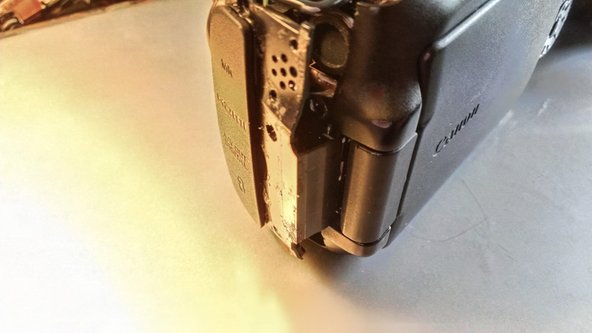
    2. Disassembling Canon EOS 60D Removing Back Panel: adım 6, 1 resimden 1.
      • Using a Spudger, fingernail, or other thin plastic tool to wedge the panel off of the camera

      • Start at the camera's front. Pulling on the rubber av-cover may be enough to get it to move off the body

      • Only pull about 1/4" (3-5mm). There is a tab that will need to slide out

      FixBot'a Sor

      Yorum Ekle

    3. Disassembling Canon EOS 60D Removing Back Panel: adım 7, 1 resimden 1.
      • Slide the rear part of the cover out.

      FixBot'a Sor

      Yorum Ekle

    4. Disassembling Canon EOS 60D Removing Back Panel: adım 8, 2 resimden 1. Disassembling Canon EOS 60D Removing Back Panel: adım 8, 2 resimden 2.
      • At this point, the only thing holding on is the dust-cover is hooked onto the front panel

      • Slide down to remove without damaging the cover. (see photo with cover removed)

      • You can see how the cover, and side piece fit together in the second image.

      FixBot'a Sor

      Yorum Ekle

Sonuç

To reassemble your device, follow these instructions in reverse order.

İptal et: Bu kılavuzu tamamlamadım.

4 farklı kişi bu kılavuzu tamamladı.

Eric D

Üyelik tarihi: 11/13/12

1.377 İtibar

5 adet Kılavuz yazıldı

0Kılavuz Yorumları

Yorum Ekle

İstatistikleri Görüntüle:

Son 24 Saat: 2

Son 7 gün: 9

Son 30 gün: 49

Her zaman: 5,748