Ana içeriğe geç
Onarım Topluluğuna Katılın - Hesap Oluşturun

Disassembling Nokia E61i Antenna

Neye ihtiyacın var

  1. Disassembling Nokia E61i Antenna, Battery: adım 1, 2 resimden 1. Disassembling Nokia E61i Antenna, Battery: adım 1, 2 resimden 2.
    • First, gather all necessary tools.

    • Remove the back cover to access the battery by pushing the tab on the bottom of the cover.

    • Slide the back cover downwards off of the phone while pressing down on the tab.

    FixBot'a Sor
  2. Disassembling Nokia E61i Antenna: adım 2, 1 resimden 1.
    • Locate the bottom-left corner of the phone where there is a spot to remove the battery.

    FixBot'a Sor
  3. Disassembling Nokia E61i Antenna: adım 3, 1 resimden 1.
    • Lift the battery out using your finger.

    • The E61i uses a Nokia BP-4L standard battery.

    FixBot'a Sor
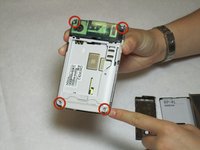
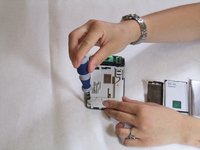
  4. Disassembling Nokia E61i Antenna, Front Cover: adım 4, 2 resimden 1. Disassembling Nokia E61i Antenna, Front Cover: adım 4, 2 resimden 2.
    • To remove the top of the back cover, pry the sides and pop it off.

    • Remove the four screws that secure the front cover to the rest of the phone using a T7 screwdriver.

    FixBot'a Sor
  5. Disassembling Nokia E61i Antenna: adım 5, 1 resimden 1.
    • Remove the cover by pulling it up and off.

    FixBot'a Sor
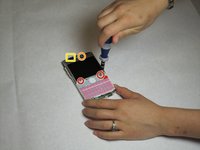
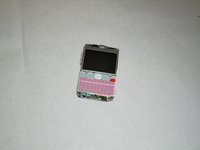
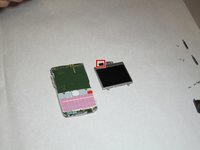
  6. Disassembling Nokia E61i Antenna, Display: adım 6, 2 resimden 1. Disassembling Nokia E61i Antenna, Display: adım 6, 2 resimden 2.
    • Take off the casing and keyboard.

    • Remove the screws while holding the screen in place using a Torx T6 screwdriver.

    • Remove the single screw while holding the screen in place using a Torx T5 screwdriver.

    • Lift the ribbon, disconnecting contact with the motherboard.

    • Firmly press the contacts into place to connect the ribbon and the motherboard when reassembling.

    FixBot'a Sor
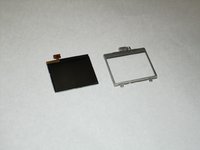
  7. Disassembling Nokia E61i Antenna: adım 7, 2 resimden 1. Disassembling Nokia E61i Antenna: adım 7, 2 resimden 2.
    • Gently pull the screen off of the phone.

    • Be sure not to rip the sticker that connects the display and the motherboard.

    • Pull the silver case off to completely free the cracked or damaged screen.

    FixBot'a Sor
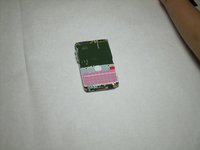
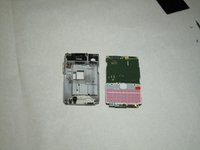
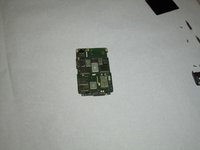
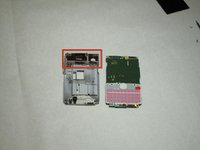
  8. Disassembling Nokia E61i Antenna, Motherboard: adım 8, 3 resimden 1. Disassembling Nokia E61i Antenna, Motherboard: adım 8, 3 resimden 2. Disassembling Nokia E61i Antenna, Motherboard: adım 8, 3 resimden 3.
    • Pull the green motherboard from the back casing.

    FixBot'a Sor
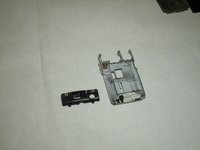
  9. Disassembling Nokia E61i Antenna, Antenna: adım 9, 2 resimden 1. Disassembling Nokia E61i Antenna, Antenna: adım 9, 2 resimden 2.
    • After the logic board has been removed, there is nothing else securing the antenna to the back cover. Simply remove the antenna by pushing outward from the interior side.

    FixBot'a Sor
Sonuç

To reassemble your device, follow these instructions in reverse order.

Bir başkası bu kılavuzu tamamladı.

Christopher Patton

Üyelik tarihi: 04/07/11

208 İtibar

12 adet Kılavuz yazıldı

Ekip

Cal Poly, Team 9-63, Walters Spring 2011 Cal Poly, Team 9-63, Walters Spring 2011 üyesi

CPSU-WALTERS-S11S9G63

5 Üyeler

12 adet Kılavuz yazıldı

0Kılavuz Yorumları

Yorum Ekle

İstatistikleri Görüntüle:

Son 24 Saat: 1

Son 7 gün: 9

Son 30 gün: 70

Her zaman: 2,318