Giriş
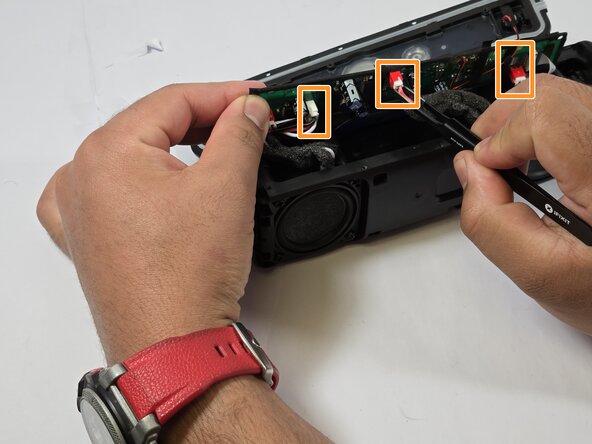
Use this guide to check and replace the battery in your DOSS E-Go II wireless speaker. Before replacing the battery, make sure to check that the charging port is working, try charging the speaker fully and visit the troubleshooting page for other possible issues. Carefully open the speaker by removing the screws and back cover, locate the battery and disconnect it either by unplugging or desoldering the wires.
Neye ihtiyacın var
-
-
Peel the backing off of the speaker.
-
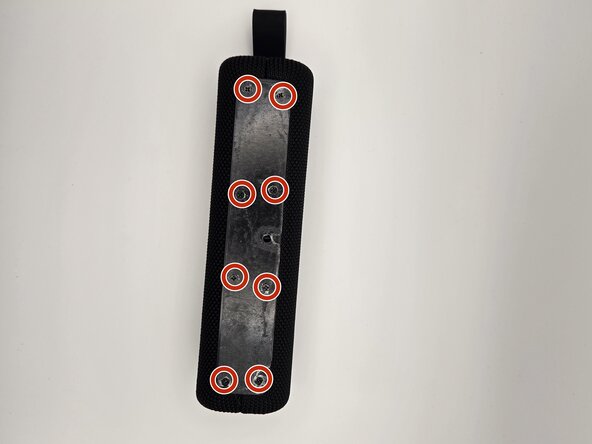
Remove eight 7.9 mm screws using the Phillips #00 screwdriver.
-
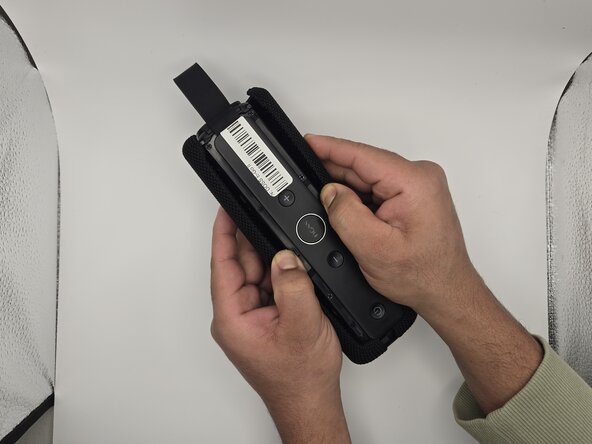
Gently pull apart the grille on the sides of the speaker.
-
-





To reassemble your device, follow these instructions in reverse order.



Ekip

Idaho State University, Team 1-6, Watkins Spring 2025 Idaho State University, Team 1-6, Watkins Spring 2025 üyesi
ISU-WATKINS-S25S1G6
3 Üyeler
5 adet Kılavuz yazıldı
