Ana içeriğe geç
Onarım Topluluğuna Katılın - Hesap Oluşturun

Droid Ultra XT1080 Battery Replacement

Neye ihtiyacın var

  1. Droid Ultra XT1080 Battery Replacement, Battery: adım 1, 1 resimden 1.
    • Remove the SIM card tray from the side of the device using a plastic opening tool.

    FixBot'a Sor

    Yorum Ekle

  2. Droid Ultra XT1080 Battery Replacement: adım 2, 1 resimden 1.
    • After properly removing the SIM card tray take your spudger and press it in between the plastic case and the frame of the device until you hear a snap.

    • Work your way from the top and the other side to confirm all the clips are disconnected.

    • Be gentle when performing this so you don't crack or break the plastic.

    FixBot'a Sor

    Yorum Ekle

  3. Droid Ultra XT1080 Battery Replacement: adım 3, 1 resimden 1.
    • Remove the five screws on top of the device with a T5 Torx.

    • Remove the single screw holding the camera with a T4 Torx.

    • Remove the two screws on the bottom of the device with a T5 Torx.

    FixBot'a Sor

    Yorum Ekle

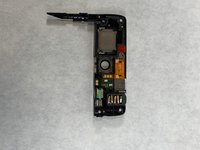
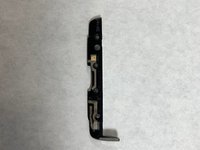
  4. Droid Ultra XT1080 Battery Replacement: adım 4, 2 resimden 1. Droid Ultra XT1080 Battery Replacement: adım 4, 2 resimden 2.
    • After the top and bottom screws are removed remove the top and bottom plastic pieces that were secured to the device.

    FixBot'a Sor

    Yorum Ekle

  5. Droid Ultra XT1080 Battery Replacement: adım 5, 1 resimden 1.
    • Begin to gently pry up the battery from the frame with a plastic opening tool to release it from its adhesive securing.

    FixBot'a Sor

    Yorum Ekle

  6. Droid Ultra XT1080 Battery Replacement: adım 6, 1 resimden 1.
    • Remove the four T5 Torx screws securing the motherboard.

    FixBot'a Sor

    Yorum Ekle

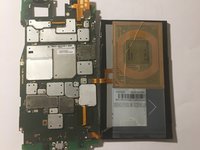
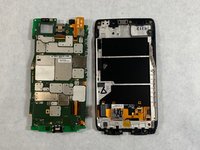
  7. Droid Ultra XT1080 Battery Replacement: adım 7, 2 resimden 1. Droid Ultra XT1080 Battery Replacement: adım 7, 2 resimden 2.
    • Gently pry the motherboard out of the frame using the nylon spudger.

    • Make sure not to damage the LCD cable in the process.

    FixBot'a Sor

    Yorum Ekle

  8. Droid Ultra XT1080 Battery Replacement: adım 8, 1 resimden 1.
    • Disconnect the LCD cable with a spudger from the motherboard by gently lifting up the two connectors.

    FixBot'a Sor

    Yorum Ekle

Sonuç

To reassemble your device, follow these instructions in reverse order.

İptal et: Bu kılavuzu tamamlamadım.

3 farklı kişi bu kılavuzu tamamladı.

knoyes

Üyelik tarihi: 10/30/18

785 İtibar

5 adet Kılavuz yazıldı

Ekip

UMass Dartmouth, Team S3-G8, Peak Fall 2018 UMass Dartmouth, Team S3-G8, Peak Fall 2018 üyesi

UMASSD-PEAK-F18S3G8

3 Üyeler

10 adet Kılavuz yazıldı

0Kılavuz Yorumları

Yorum Ekle

İstatistikleri Görüntüle:

Son 24 Saat: 2

Son 7 gün: 15

Son 30 gün: 56

Her zaman: 3,429