Ana içeriğe geç

Ematic Model FTABMP2 Case Replacement

Neye ihtiyacın var

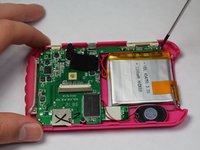
  1. Ematic Model FTABMP2 Case Replacement, Case: adım 1, 2 resimden 1. Ematic Model FTABMP2 Case Replacement, Case: adım 1, 2 resimden 2.
    • Use a spudger to open your device's case, revealing the inside.

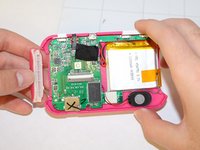
  2. Ematic Model FTABMP2 Case Replacement: adım 2, 2 resimden 1. Ematic Model FTABMP2 Case Replacement: adım 2, 2 resimden 2.
    • Disconnect the LCD cable from the motherboard by pressing the two sides of the clamp together.

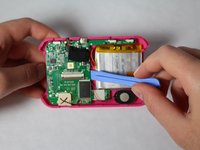
  3. Ematic Model FTABMP2 Case Replacement: adım 3, 1 resimden 1.
    • Use the spudger to pry the LCD from the clamps that hold it in the case.

  4. Ematic Model FTABMP2 Case Replacement: adım 4, 2 resimden 1. Ematic Model FTABMP2 Case Replacement: adım 4, 2 resimden 2.
    • If you need to remove the back part of the casing:

    • After disconnecting the LCD from the motherboard, remove the screws that hold down the motherboard.

    • Remove the plastic power and volume buttons.

    • Remove the two side grips of the device.

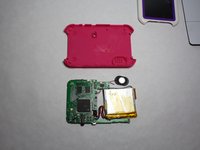
  5. Ematic Model FTABMP2 Case Replacement: adım 5, 2 resimden 1. Ematic Model FTABMP2 Case Replacement: adım 5, 2 resimden 2.
    • Remove the motherboard, the speaker, and the battery, leaving just the back casing of the device.

Sonuç

To reassemble your device, follow these instructions in reverse order.

Timothy

Üyelik tarihi: 01/21/15

505 İtibar

5 adet Kılavuz yazıldı

Ekip

USF Tampa, Team 9-2, Brown Winter 2015 USF Tampa, Team 9-2, Brown Winter 2015 üyesi

USFT-BROWN-W15S9G2

5 Üyeler

10 adet Kılavuz yazıldı

0Kılavuz Yorumları

Yorum Ekle

İstatistikleri Görüntüle:

Son 24 Saat: 0

Son 7 gün: 3

Son 30 gün: 7

Her zaman: 253