Ana içeriğe geç
Onarım Topluluğuna Katılın - Hesap Oluşturun

Garmin Approach S2 Screen Replacement

Neye ihtiyacın var

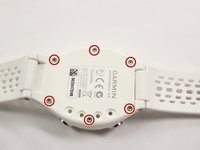
    1. Garmin Approach S2 Screen Replacement, Back Cover: adım 1, 2 resimden 1. Garmin Approach S2 Screen Replacement, Back Cover: adım 1, 2 resimden 2.
      • Remove the six T5 Torx 6.32mm screws securing the back cover to the watch.

      FixBot'a Sor

      Yorum Ekle

    2. Garmin Approach S2 Screen Replacement: adım 2, 1 resimden 1.
      • Remove the back cover carefully.

      • Even after the screws have been removed, the back cover can still be quite difficult to take off. Moderate to extensive prying may be required. Be gentle, but firm.

      FixBot'a Sor

      Yorum Ekle

    1. Garmin Approach S2 Screen Replacement, Water Proof Gasket: adım 3, 1 resimden 1.
      • Remove the orange gasket.

      FixBot'a Sor

      Yorum Ekle

    1. Garmin Approach S2 Screen Replacement, Screen: adım 4, 1 resimden 1.
      • Remove the screen and motherboard assembly from the case.

      FixBot'a Sor

      Yorum Ekle

    2. Garmin Approach S2 Screen Replacement: adım 5, 1 resimden 1.
      • Use a metal spudger to remove the golden retaining clip from the screen. There will be some adhesive to break.

      FixBot'a Sor

      Yorum Ekle

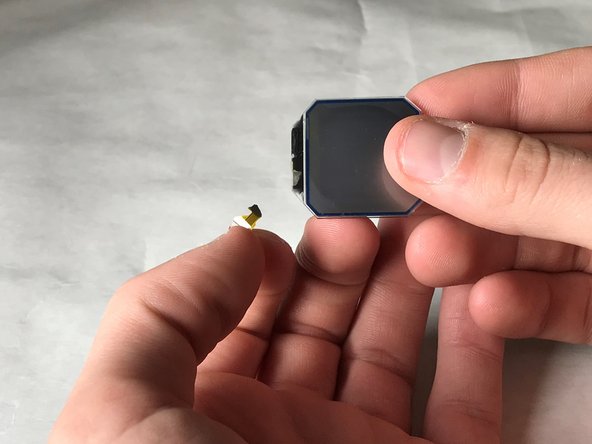
    3. Garmin Approach S2 Screen Replacement: adım 6, 1 resimden 1.
      • Remove the screen from the golden metal clip.

      FixBot'a Sor

      Yorum Ekle

    4. Garmin Approach S2 Screen Replacement: adım 7, 1 resimden 1.
      • Unhinge the black retaining hinge by prying it open with the metal spudger; Your fingernails will work as well.

      FixBot'a Sor

      Yorum Ekle

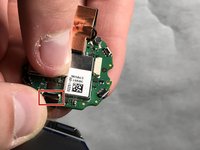
    5. Garmin Approach S2 Screen Replacement: adım 8, 2 resimden 1. Garmin Approach S2 Screen Replacement: adım 8, 2 resimden 2.
      • Remove the connector from the motherboard by pulling it free at the base.

      • Make sure to pull from the base of the connector wire, as it is very easy to rip the wire from the screen.

      FixBot'a Sor

      Yorum Ekle

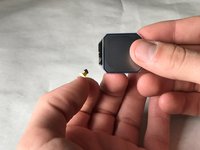
    6. Garmin Approach S2 Screen Replacement: adım 9, 1 resimden 1.
      • Remove the screen from the motherboard.

      • Notice our tape retaining the connector to the screen. This is so easy to rip!

      FixBot'a Sor

      Yorum Ekle

Sonuç

To reassemble your device, follow these instructions in reverse order.

İptal et: Bu kılavuzu tamamlamadım.

Bir başkası bu kılavuzu tamamladı.

Evan Miller

Üyelik tarihi: 03/21/18

250 İtibar

2 adet Kılavuz yazıldı

Ekip

IUPUI, Team S4-G1, Baechle Spring 2018 IUPUI, Team S4-G1, Baechle Spring 2018 üyesi

IUPUI-BAECHLE-S18S4G1

3 Üyeler

5 adet Kılavuz yazıldı

0Kılavuz Yorumları

Yorum Ekle

İstatistikleri Görüntüle:

Son 24 Saat: 1

Son 7 gün: 8

Son 30 gün: 17

Her zaman: 1,138