Bu çeviri bir makine tarafından oluşturulmuştur ve henüz bir kişi tarafından incelenmemiştir. Bu dili konuşuyor musunuz? İnceleme için.
Giriş
Garmin Nuvi 200 cihazınızın pilini değiştirme
Neye ihtiyacın var
-
-
-
İki vidayı ortaya çıkarmak için cihazın altındaki etiketi kaldırın.
 FixBot'a Sor
-
-
-
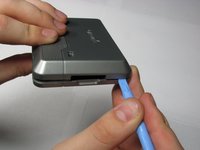
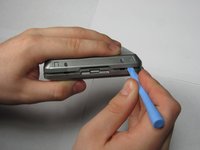
Ön ve arka kasa arasındaki boşluğa bir plastik açma aleti yerleştirin.
-
Kasanın iki yarısını ayırmak için aleti boşluk boyunca dikkatlice ilerletin.
-
-
-
-
-
-
Ribbon kabloyu yerinde tutan bandı soyarak çıkarın.
-
Plastik kanırtma aparatını kullanarak ZIF konnektör üzerindeki tutucu çentiği kaldırın ve ribbon kabloyu ayırın. Ardından kabloyu nazikçe çıkarın.
-
-
-
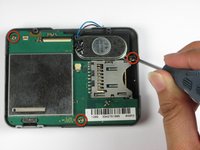
#00 Yıldız tornavidayı kullanarak anakart üzerindeki üç vidayı sökün.
-
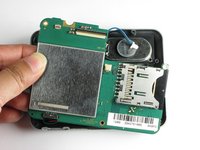
Anakartı kasadan ayırın ancak tamamen dışarı çekmeyin; çünkü hala bir kablo ile bataryaya bağlı durumdadır.
-
-
-






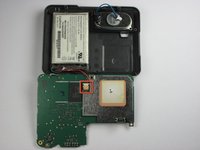
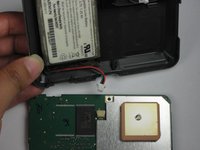


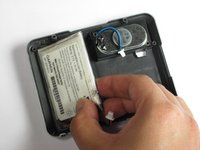
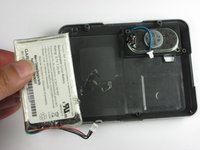
Cihazınızı tekrar toplamak için bu talimatları ters sırayla uygulayın.
İptal et: Bu kılavuzu tamamlamadım.
19 farklı kişi bu kılavuzu tamamladı.

Ekip

Cal Poly, Team 25-90, Amido Spring 2010 Cal Poly, Team 25-90, Amido Spring 2010 üyesi
CPSU-AMIDO-S10S25G90
4 Üyeler
20 adet Kılavuz yazıldı
13Kılavuz Yorumları
This document could be improved by including information about where to acquire a replacement battery, and any modifications that might be required to a generic battery.
Seems like there are some on Amazon and Ebay. Not sure how to verify getting the right one. Not that expensive, so maybe worth the risk.
It was a huge mistake to peel away the ribbon cable. It needs matched up precisely and exactly in the same alignment as it was before during reassembly, an apparently impossible task once it's been detached. I'd advise opening the halves in book form, leaving the ribbon cable as a hinge. Have about given up trying to position it.
Nice tutorial, except for the booby trap.
Yep, fell into this trap, too. The Nuvi powers up but no video. Can't place the ribbon cabe just exactly so. Ugh.
Cannot stress enough that the step 5 calling for the removal of the tape holding the ribbon cable be removed from this guide! My Nuvi will not work anymore because I can't get that ribbon cable aligned. I wish I had read all the comments as the above poster warned of this very problem. Please update the guide and remove step 5!
