Ana içeriğe geç
Onarım Topluluğuna Katılın - Hesap Oluşturun

Gateway NV59C66u RAM Replacement

Neye ihtiyacın var

  1. Gateway NV59C66u RAM Replacement, RAM: adım 1, 1 resimden 1.
    • Remove the four Phillips #0 screws from the back cover.

    FixBot'a Sor

    Yorum Ekle

  2. Gateway NV59C66u RAM Replacement: adım 2, 1 resimden 1.
    • Gently remove the cover with a plastic opening tool to gain access to the RAM.

    FixBot'a Sor

    Yorum Ekle

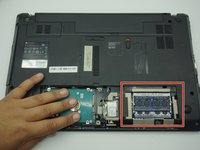
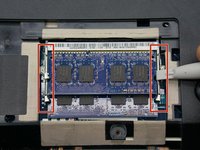
  3. Gateway NV59C66u RAM Replacement: adım 3, 2 resimden 1. Gateway NV59C66u RAM Replacement: adım 3, 2 resimden 2.
    • Free the RAM by unlatching the holders. The two arms on either side of the RAM card should be pried away from one another.

    • The RAM will then pop up to rest at an angle to the laptop.

    FixBot'a Sor

    Yorum Ekle

  4. Gateway NV59C66u RAM Replacement: adım 4, 1 resimden 1.
    • Slide the RAM out from the port.

    FixBot'a Sor

    Yorum Ekle

    • Follow the previous steps in reverse to replace the RAM card.

    FixBot'a Sor

    Yorum Ekle

Sonuç

To reassemble your device, follow these instructions in reverse order.

İptal et: Bu kılavuzu tamamlamadım.

Jackson Gandee

Üyelik tarihi: 10/30/19

521 İtibar

4 adet Kılavuz yazıldı

Ekip

ETECH Holdings ETECH Holdings üyesi

Community

2 Üyeler

8 adet Kılavuz yazıldı

0Kılavuz Yorumları

Yorum Ekle

İstatistikleri Görüntüle:

Son 24 Saat: 0

Son 7 gün: 3

Son 30 gün: 27

Her zaman: 406