Bu çeviri bir makine tarafından oluşturulmuştur ve henüz bir kişi tarafından incelenmemiştir. Bu dili konuşuyor musunuz? İnceleme için.

GoPro Hero Micro USB/MicroSD Kart Ara Kart Değişimi

River Drake ve 3 diğer katkıda bulunanlar
En son 17 Ağu 2026 tarihinde güncellendi
Görüntüleme: 5,9 B
İstatistikleri görüntüle:
- Son 24 Saat:
- 3
- Son 7 Gün:
- 26
- Son 30 Gün:
- 116
- Her zaman:
- 5.914
Yorumlar: 4
4 guide comments.
Go to guide commentsTamamlandı: 5 6
5 kişi bu kılavuzu "tamamlandı" olarak işaretledi. Sıradaki sen olacak mısın?
6 kişi bu kılavuzu "tamamlandı" olarak işaretledi. Siz de dahil - harika iş!
Sık Kullanılanlar: 1 2
1 kişi bu kılavuzu favorilerine ekledi (ve abone oldu). Sıradaki sen olacak mısın?
Siz de dahil olmak üzere 2 kişi bu kılavuzu favorilerine ekledi (ve abone oldu)!
İşlem Görüntüleri
Öykünün yıldızı olun! Belirli eylemlerin nasıl gerçekleştirileceğini daha iyi göstermek için bu kılavuza resimler gerekli.
Daha iyi giriş
Girişi tamamlayarak ya da daha iyi hale getirerek bu kılavuzu geliştirin.
Neye ihtiyacın var
Parçalar

-
-
-
Plastik kanırtma aparatını kasa ile arka panel arasına yerleştirerek arka kısmı nazikçe açın.
-
-
-
Kırmızı, beyaz ve siyah kabloları beyaz adaptörden çıkararak bataryanın anakart ile bağlantısını kesin.
-
-
-
Siyah mandalı kaldırarak ve ribbon kabloyu yuvadan nazikçe çekerek ribbon kabloyu lensten ayırın.
-
-
-
Beyaz plastik parçanın çevresindeki dört vidayı bir yıldız tornavida (PH000) kullanarak çıkarın.
-
-
-
-
-
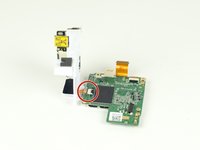
Siyah mandalı kaldırıp ribbon kabloyu soketten nazikçe çekerek daha büyük olan ribbon kabloyu alt karttan ayırın.
-
Beyaz plastik parçadan gelen daha küçük ribbon kabloyu, doğrudan soketinden çekerek ayırın.
-
-
-
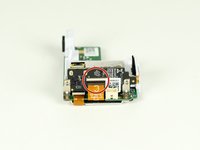
Kartın her iki yanında bulunan iki vidayı bir yıldız tornavida ile çıkarın.
-
-

 FixBot'a Sor




Cihazınızı tekrar monte etmek için bu talimatları ters sırayla uygulayın.
İptal et: Bu kılavuzu tamamlamadım.
5 farklı kişi bu kılavuzu tamamladı.

Ekip

Cal Poly, Team 12-2, Lancaster Spring 2015 Cal Poly, Team 12-2, Lancaster Spring 2015 üyesi
CPSU-LANCASTER-S15S12G2
4 Üyeler
72 adet Kılavuz yazıldı
4Kılavuz Yorumları
Wo kann ich ein daughterboard kaufen habt ihr da was für mich?
Terrific guide. Does anyone know where to buy the “daughter board”?
ide. Does anyone know where to buy the “daughter board”?
fedebossert - 05/27/20
<a href="https://www.w3schools.com/">Visit W3Schools.com!</a>
