Ana içeriğe geç
Onarım Topluluğuna Katılın - Hesap Oluşturun

Google Pixel C Headphone Jack Replacement

Neye ihtiyacın var

  1. Google Pixel C Headphone Jack Replacement, Screen: adım 1, 1 resimden 1.
    • Ensure that the device is completely powered down before beginning to take it apart

    • Use a heat gun to melt the adhesive that holds the screen to the device

    • Move the heat gun around the edge of the screen for approximately 1 minute, or until the screen can be lifted off in the next step.

    • Make sure not to heat the screen for too long because too much can damage other components inside the tablet.

    FixBot'a Sor
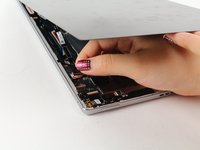
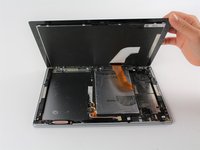
  2. Google Pixel C Headphone Jack Replacement: adım 2, 2 resimden 1. Google Pixel C Headphone Jack Replacement: adım 2, 2 resimden 2.
    • Use a suction cup to assist in lifting the screen while prying around its edges with a plastic spudger.

    • If necessary use a metal spudger to pry the screen up, taking care not to scratch the device.

    • Be careful not to pull the screen too far off. It will still be attached to the device by a cable for the front facing camera and the wide display data cable.

    • Reattaching the screen will require adhesive to ensure that it stays in place.

    FixBot'a Sor
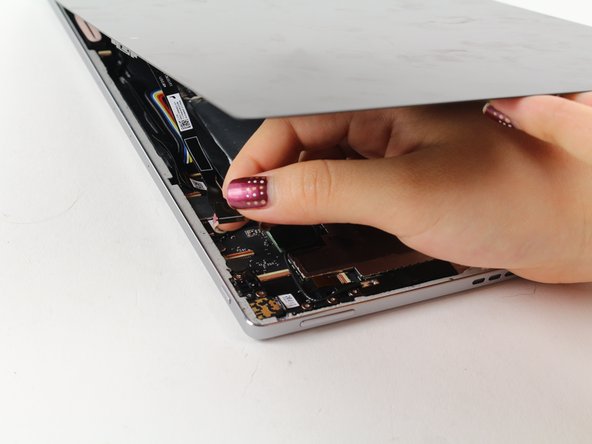
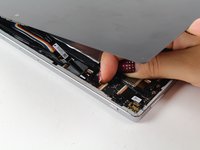
  3. Google Pixel C Headphone Jack Replacement: adım 3, 2 resimden 1. Google Pixel C Headphone Jack Replacement: adım 3, 2 resimden 2.
    • Detach the cables for the camera by lifting the small flap using the tip of your fingernail or a spudger. Gently pull the ribbon cable out.

    FixBot'a Sor
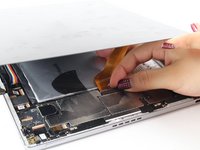
  4. Google Pixel C Headphone Jack Replacement: adım 4, 2 resimden 1. Google Pixel C Headphone Jack Replacement: adım 4, 2 resimden 2.
    Bu adımda kullanılan alet:
    Tweezers
    $4.99
    • Follow the same removal procedure to detach the wide gold cable.

    • When reattaching cables, it is helpful to use tweezers to slide the cable in before securing it down with the flap.

    • This device is missing a battery, so the device that you are working on may appear slightly different inside.

    FixBot'a Sor
  5. Google Pixel C Headphone Jack Replacement, Headphone Jack: adım 5, 1 resimden 1.
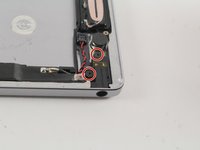
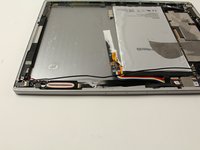
    • Orient the device so that the headphone jack is in the bottom right corner.

    FixBot'a Sor
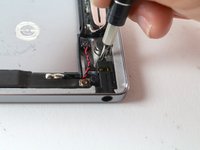
  6. Google Pixel C Headphone Jack Replacement: adım 6, 2 resimden 1. Google Pixel C Headphone Jack Replacement: adım 6, 2 resimden 2.
    • Remove the two 3.5mm Phillips #000 screws.

    FixBot'a Sor
  7. Google Pixel C Headphone Jack Replacement: adım 7, 1 resimden 1.
    • Locate and remove the two 2.5mm Phillips #000 screws on either side of the wire coil.

    FixBot'a Sor
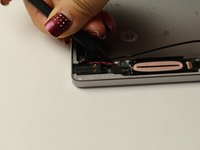
  8. Google Pixel C Headphone Jack Replacement: adım 8, 2 resimden 1. Google Pixel C Headphone Jack Replacement: adım 8, 2 resimden 2.
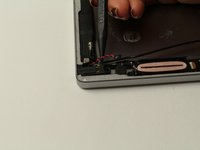
    • Detach the red and black cable using a narrow spudger.

    FixBot'a Sor
  9. Google Pixel C Headphone Jack Replacement: adım 9, 2 resimden 1. Google Pixel C Headphone Jack Replacement: adım 9, 2 resimden 2.
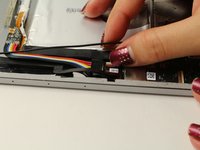
    • Detach the cable connecting to the headphone jack.

    FixBot'a Sor
  10. Google Pixel C Headphone Jack Replacement: adım 10, 2 resimden 1. Google Pixel C Headphone Jack Replacement: adım 10, 2 resimden 2.
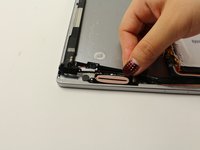
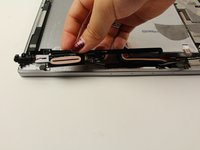
    • Lift the headphone jack, coiled wire, and cable, peeling the adhesive back.

    • Reassembly will require adhesive to ensure that the components are secured to the device.

    FixBot'a Sor
Sonuç

To reassemble your device, follow these instructions in reverse order.

Deborah Iwakiri

Üyelik tarihi: 04/25/17

522 İtibar

2 adet Kılavuz yazıldı

Ekip

Cal Poly, Team S21-G4, Livingston Spring 2017 Cal Poly, Team S21-G4, Livingston Spring 2017 üyesi

CPSU-LIVINGSTON-S17S21G4

4 Üyeler

11 adet Kılavuz yazıldı

0Kılavuz Yorumları

Yorum Ekle

İstatistikleri Görüntüle:

Son 24 Saat: 0

Son 7 gün: 3

Son 30 gün: 67

Her zaman: 1,300