Ana içeriğe geç
Onarım Topluluğuna Katılın - Hesap Oluşturun

Google Pixelbook Go Back Panel Replacement

Neye ihtiyacın var

  1. Google Pixelbook Go Back Panel Replacement, Back Panel: adım 1, 2 resimden 1. Google Pixelbook Go Back Panel Replacement, Back Panel: adım 1, 2 resimden 2.
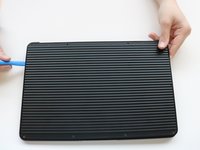
    • Flip the device so that the back is facing up.

    • Peel the rubber stoppers off the top and bottom of the device.

  2. Google Pixelbook Go Back Panel Replacement: adım 2, 2 resimden 1. Google Pixelbook Go Back Panel Replacement: adım 2, 2 resimden 2.
    • Remove ten 3 mm screws from around the edge of the back panel using a T5 Torx screwdriver.

  3. Google Pixelbook Go Back Panel Replacement: adım 3, 3 resimden 1. Google Pixelbook Go Back Panel Replacement: adım 3, 3 resimden 2. Google Pixelbook Go Back Panel Replacement: adım 3, 3 resimden 3.
    • Use an iFixit opening tool to pry up the back panel cover.

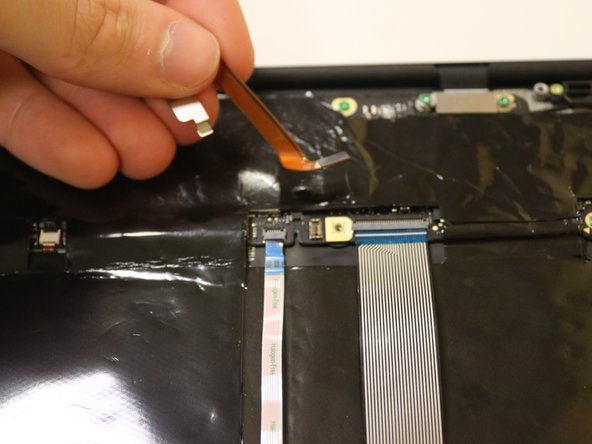
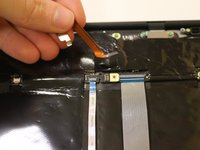
    • There is an orange ribbon cable that connects the cover to the base, so don't separate the two pieces completely.

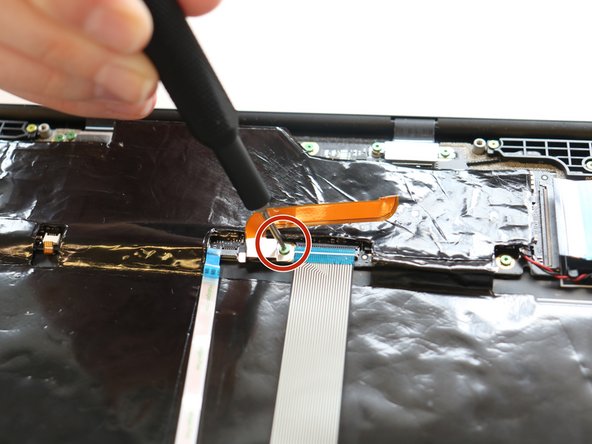
    • Remove the single 2 mm screw using a Torx T3 screwdriver.

    • Disconnect the orange cable from the base of the device.

  4. Google Pixelbook Go Back Panel Replacement: adım 4, 1 resimden 1.
    • Insert wisdom here.

Sonuç

To reassemble your device, follow these instructions in reverse order.

Kristen Gismondi

Üyelik tarihi: 11/12/14

105.901 İtibar

267 adet Kılavuz yazıldı

Ekip

iFixit iFixit üyesi

Staff

123 Üyeler

25.679 adet Kılavuz yazıldı

0Kılavuz Yorumları

Yorum Ekle

İstatistikleri Görüntüle:

Son 24 Saat: 1

Son 7 gün: 27

Son 30 gün: 71

Her zaman: 1,248