Ana içeriğe geç
Onarım Topluluğuna Katılın - Hesap Oluşturun

HMD Barbie Keypad Replacement

Neye ihtiyacın var

  1. HMD Barbie Keypad Replacement, Battery: adım 1, 3 resimden 1. HMD Barbie Keypad Replacement, Battery: adım 1, 3 resimden 2. HMD Barbie Keypad Replacement, Battery: adım 1, 3 resimden 3.
    • Fully power off the phone.

    • Remove the backplate by gripping it around the edges and pulling away from the phone.

    FixBot'a Sor

    Yorum Ekle

  2. HMD Barbie Keypad Replacement: adım 2, 3 resimden 1. HMD Barbie Keypad Replacement: adım 2, 3 resimden 2. HMD Barbie Keypad Replacement: adım 2, 3 resimden 3.
    • Grip the battery from the top and pull away from the phone.

    • Ensure there is no swelling or damage to the battery. A swollen or damaged battery can be a fire hazard.

    FixBot'a Sor

    Yorum Ekle

  3. HMD Barbie Keypad Replacement, Inner Backplate: adım 3, 1 resimden 1.
    • Remove the six 5mm screws using the T5 Torx screwdriver.

    FixBot'a Sor

    Yorum Ekle

  4. HMD Barbie Keypad Replacement: adım 4, 2 resimden 1. HMD Barbie Keypad Replacement: adım 4, 2 resimden 2.
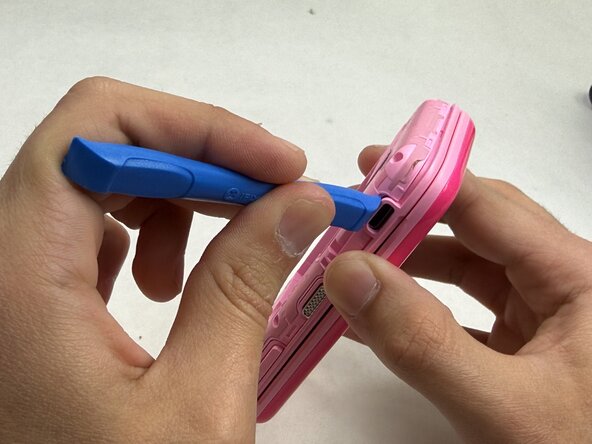
    • Remove the backplate using an opening tool.

    • Find an opening on the phone that makes it easiest to remove the backplate. Any side of the phone will work.

    FixBot'a Sor

    Yorum Ekle

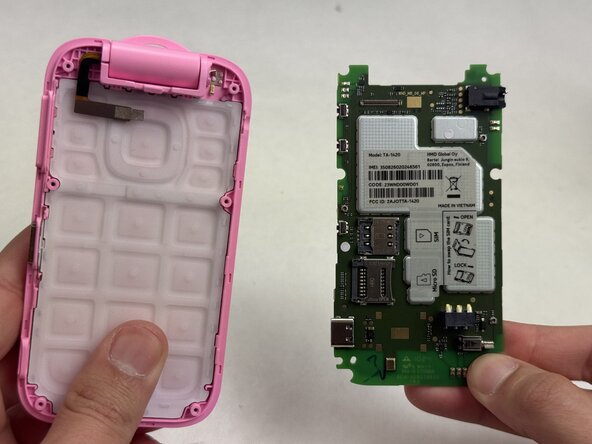
  5. HMD Barbie Keypad Replacement, Motherboard: adım 5, 3 resimden 1. HMD Barbie Keypad Replacement, Motherboard: adım 5, 3 resimden 2. HMD Barbie Keypad Replacement, Motherboard: adım 5, 3 resimden 3.
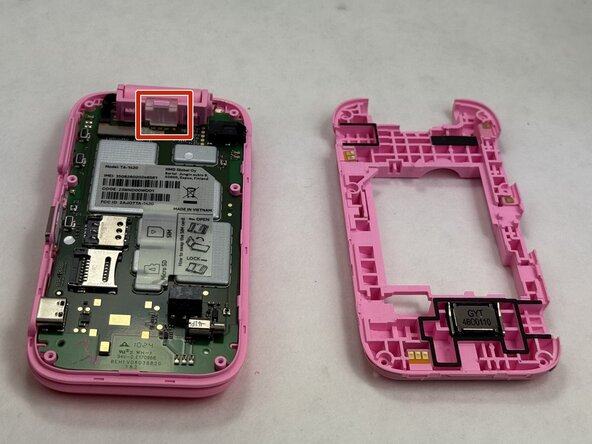
    • Use the opening tool to remove the clear plastic clip near the hinge of the phone securing the motherboard.

    FixBot'a Sor

    Yorum Ekle

  6. HMD Barbie Keypad Replacement: adım 6, 3 resimden 1. HMD Barbie Keypad Replacement: adım 6, 3 resimden 2. HMD Barbie Keypad Replacement: adım 6, 3 resimden 3.
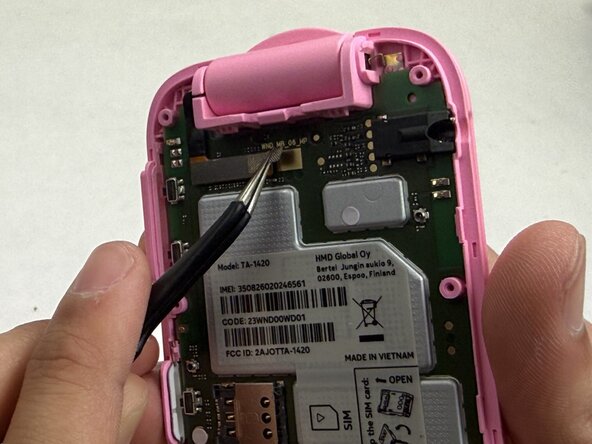
    • The video ribbon is connected to the motherboard with a flat-topped, low profile connector. It is also secured with a piece of tape.

    • Use the tweezers to gently unstick the tape from the motherboard, leaving it stuck to the connector.

    • Use the tweezers to gently pull up on the connector until it disconnects from the motherboard.

    • Be gentle as you apply pressure on the tape and connector. These parts shouldn't take too much force to remove.

    FixBot'a Sor

    Yorum Ekle

  7. HMD Barbie Keypad Replacement: adım 7, 3 resimden 1. HMD Barbie Keypad Replacement: adım 7, 3 resimden 2. HMD Barbie Keypad Replacement: adım 7, 3 resimden 3.
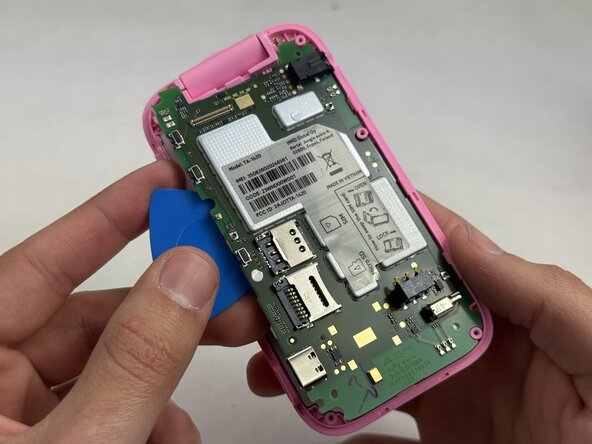
    • Beginning at the corner near where the video ribbon is located, insert an opening pick between the green motherboard and the pink housing.

    • Slowly work your way around the motherboard until it loosens enough that you can use your fingers to remove it.

    FixBot'a Sor

    Yorum Ekle

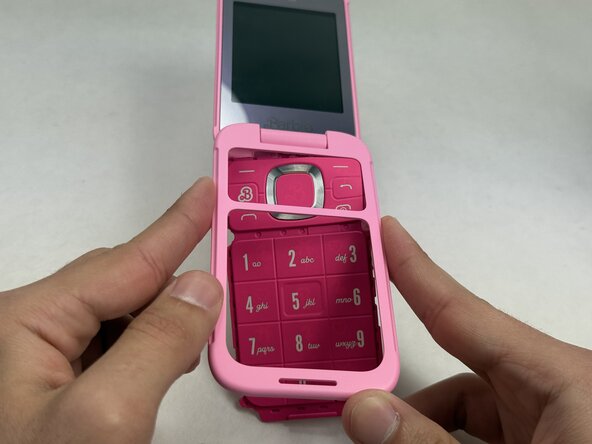
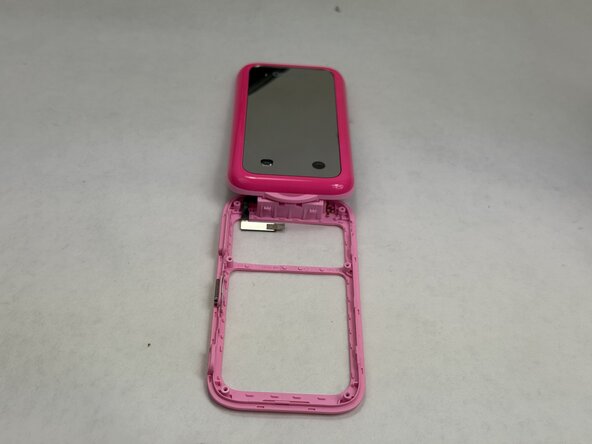
  8. HMD Barbie Keypad Replacement, Keypad: adım 8, 3 resimden 1. HMD Barbie Keypad Replacement, Keypad: adım 8, 3 resimden 2. HMD Barbie Keypad Replacement, Keypad: adım 8, 3 resimden 3.
    • Push the keypad out of the outer casing from the front of the phone, outward.

    • You may now replace the keypad with a new one, inserting it where the old keypad was. Make sure to not obstruct any of the holes for screws with the keypad.

    FixBot'a Sor

    Yorum Ekle

Sonuç

To reassemble your device, follow these instructions in reverse order.

İptal et: Bu kılavuzu tamamlamadım.

Hannah Carvalho

Üyelik tarihi: 03/09/26

571 İtibar

5 adet Kılavuz yazıldı

Ekip

UMass Dartmouth, Team 6-2, Botvin Spring 2026 UMass Dartmouth, Team 6-2, Botvin Spring 2026 üyesi

UMASSD-BOTVIN-S26S6G2

3 Üyeler

5 adet Kılavuz yazıldı

0Kılavuz Yorumları

Yorum Ekle

İstatistikleri Görüntüle:

Son 24 Saat: 0

Son 7 gün: 6

Son 30 gün: 24

Her zaman: 58