Giriş
This guide demonstrates the replacement of the Chromebook's battery. This will require the removal of the front keyboard plate and accessing the laptop's internals. You will need to keep track of up to 20 removed screws in total.
Neye ihtiyacın var
-
-
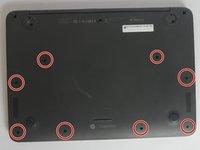
Using the plastic spudger, gently lift the 5 rubber pads away from their seating.
 FixBot'a Sor
-
-
-
Remove the five 6mm screws located under the removed pads using Phillips #00 screwdriver.
-
-
-
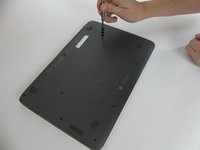
With the Phillips #00 screwdriver, remove the remaining eight 6mm screws. You will now have thirteen 6mm screws removed from the case.
-
-
-
-
To continue removing the back cover, turn the laptop over as displayed.
-
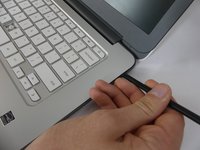
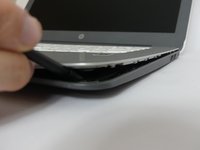
Use the plastic spudger to gently pry around the base of the laptop from the back cover. Continue prying around the entire base of the laptop.
-
-
-
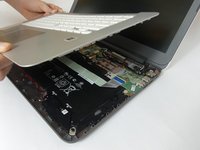
Gently lift the silver base of the laptop from the bottom, but do not remove it.
-
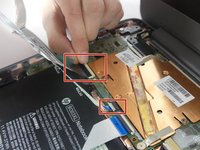
To remove the ribbon cables, lift the latch holding the ribbon cables in place and then pull them free.
-
Remove the keyboard panel from the laptop.
-
-
-
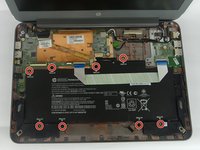
Remove the eight 4mm screws holding the battery in place using the Phillips #00 screwdriver.
-
-
-
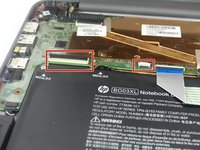
Remove the ribbon cable that runs over the battery by lifting up the plastic latches and pulling the cable away.
-










To reassemble your device, follow these instructions in reverse order.
İptal et: Bu kılavuzu tamamlamadım.
3 farklı kişi bu kılavuzu tamamladı.

Ekip

USF Tampa, Team S3-G6, Nance Fall 2017 USF Tampa, Team S3-G6, Nance Fall 2017 üyesi
USFT-NANCE-F17S3G6
4 Üyeler
5 adet Kılavuz yazıldı
