Ana içeriğe geç
Onarım Topluluğuna Katılın - Hesap Oluşturun

HP Compaq 6710b Wireless Card Replacement

Neye ihtiyacın var

  1. HP Compaq 6710b Wireless Card Replacement, Battery: adım 1, 1 resimden 1.
    • Turn off your computer! Taking out the battery while it's still on is dangerous!

    • Flip the laptop over to the back.

    • Using two hands, push on the tabs while gently taking out the battery.

    FixBot'a Sor
  2. HP Compaq 6710b Wireless Card Replacement, Wireless Card: adım 2, 2 resimden 1. HP Compaq 6710b Wireless Card Replacement, Wireless Card: adım 2, 2 resimden 2.
    • Make sure the computer is off.

    • Using a Phillips #1, unscrew the 5mm screw on the bottom of the laptop

    • Remove the back cover plate.

    • The cover has popping tabs so it might require a small amount of force to remove.

    FixBot'a Sor
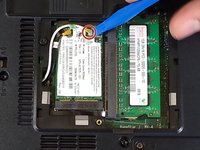
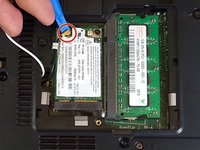
  3. HP Compaq 6710b Wireless Card Replacement: adım 3, 2 resimden 1. HP Compaq 6710b Wireless Card Replacement: adım 3, 2 resimden 2.
    • Using a blue plastic prying tool, gently pry off the 2 connectors.

    • The black cable goes on the connection closer to where the cables originate, while the white cable goes on the farther connection.

    FixBot'a Sor
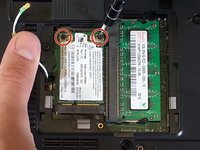
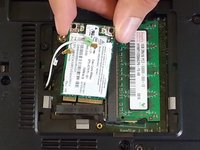
  4. HP Compaq 6710b Wireless Card Replacement: adım 4, 2 resimden 1. HP Compaq 6710b Wireless Card Replacement: adım 4, 2 resimden 2.
    • Using the Phillips #1 screwdriver, unscrew the 2 3mm screws.

    • Adaptor is spring-loaded.

    • You can now take out the adaptor.

    FixBot'a Sor
Sonuç

To reassemble your device, follow these instructions in reverse order.

3 farklı kişi bu kılavuzu tamamladı.

Khulan Orgil

Üyelik tarihi: 04/14/15

1.186 İtibar

6 adet Kılavuz yazıldı

Ekip

Cal Poly, Team 4-2, Maness Spring 2015 Cal Poly, Team 4-2, Maness Spring 2015 üyesi

CPSU-MANESS-S15S4G2

4 Üyeler

6 adet Kılavuz yazıldı

0Kılavuz Yorumları

Yorum Ekle

İstatistikleri Görüntüle:

Son 24 Saat: 2

Son 7 gün: 6

Son 30 gün: 67

Her zaman: 3,014