Ana içeriğe geç
Onarım Topluluğuna Katılın - Hesap Oluşturun

HP Envy 4-1105dx Hard Drive Replacement

Neye ihtiyacın var

    1. HP Envy 4-1105dx  Hard Drive Replacement, Battery: adım 1, 1 resimden 1.
      • Power off the device before beginning disassembly. Disconnect all external devices.

      • Flip the device on its back.

      FixBot'a Sor

      Yorum Ekle

    2. HP Envy 4-1105dx  Hard Drive Replacement: adım 2, 1 resimden 1.
      • Unscrew and remove the one 7.5 mm Phillips-head screw using Phillips #1 screwdriver.

      FixBot'a Sor

      Yorum Ekle

    3. HP Envy 4-1105dx  Hard Drive Replacement: adım 3, 1 resimden 1.
      • Unscrew twelve 6.0 mm Phillips-head screws using Phillips #1 screwdriver.

      FixBot'a Sor

      Yorum Ekle

    4. HP Envy 4-1105dx  Hard Drive Replacement: adım 4, 1 resimden 1.
      • Use the plastic opening tool (which is short and has a thin end for prying open device parts) to pry open the back case of the device.

      FixBot'a Sor

      Yorum Ekle

    5. HP Envy 4-1105dx  Hard Drive Replacement: adım 5, 1 resimden 1.
      • Once the device is open, move the ribbon cable to the side.

      FixBot'a Sor

      Yorum Ekle

    6. HP Envy 4-1105dx  Hard Drive Replacement: adım 6, 1 resimden 1.
      • Use the flat end of a plastic spudger to disconnect the battery cable from its socket in the motherboard.

      FixBot'a Sor

      Yorum Ekle

    7. HP Envy 4-1105dx  Hard Drive Replacement: adım 7, 1 resimden 1.
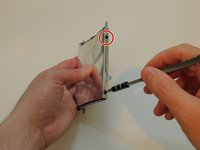
      • Unscrew and remove the three 4.0 mm Phillips-head screws that hold the battery in place, using a Phillips #1 screwdriver.

      FixBot'a Sor

      Yorum Ekle

    8. HP Envy 4-1105dx  Hard Drive Replacement: adım 8, 1 resimden 1.
      • Lift the battery up and remove.

      • Removing the battery can dislodge the touchpad bracket. Place the battery carefully over the alignment pins.

      FixBot'a Sor

      Yorum Ekle

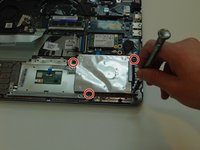
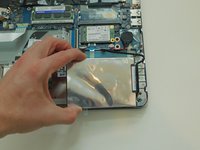
    1. HP Envy 4-1105dx  Hard Drive Replacement, Hard Drive: adım 9, 2 resimden 1. HP Envy 4-1105dx  Hard Drive Replacement, Hard Drive: adım 9, 2 resimden 2.
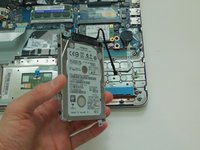
      • Remove the four 4.0 mm screws that hold down the hard drive case using a Philips #1 Screwdriver.

      • Move the hard drive case and hard drive so that you can easily reach the hard drive cable.

      FixBot'a Sor

      Yorum Ekle

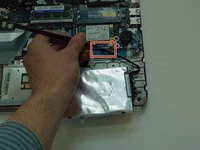
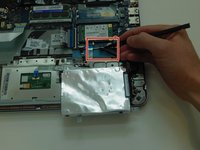
    2. HP Envy 4-1105dx  Hard Drive Replacement: adım 10, 3 resimden 1. HP Envy 4-1105dx  Hard Drive Replacement: adım 10, 3 resimden 2. HP Envy 4-1105dx  Hard Drive Replacement: adım 10, 3 resimden 3.
      • Use the plastic spudger tool to loosen the hard drive SATA cable connection by pushing it away from the motherboard.

      • Once it is loose, pull the hard drive out of the socket.

      • Remove the hard drive from the device.

      FixBot'a Sor

      Yorum Ekle

    3. HP Envy 4-1105dx  Hard Drive Replacement: adım 11, 3 resimden 1. HP Envy 4-1105dx  Hard Drive Replacement: adım 11, 3 resimden 2. HP Envy 4-1105dx  Hard Drive Replacement: adım 11, 3 resimden 3.
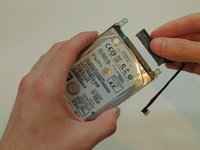
      • Pull out the hard drive cable from the hard drive, and set it aside.

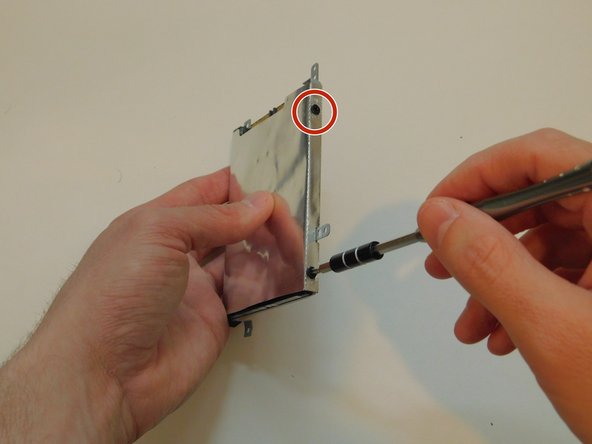
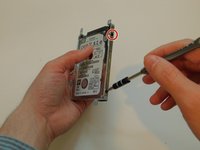
      • Remove the four 3.0 mm screws that attach the hard drive case to the hard drive using a Philips #1 Screwdriver. If the screwdriver is too big, try #0 sized screwdriver.

      FixBot'a Sor

      Yorum Ekle

    4. HP Envy 4-1105dx  Hard Drive Replacement: adım 12, 1 resimden 1.
      • Remove the hard drive from the hard drive case.

      FixBot'a Sor

      Yorum Ekle

Sonuç

To reassemble your device, follow these instructions in reverse order.

İptal et: Bu kılavuzu tamamlamadım.

3 farklı kişi bu kılavuzu tamamladı.

KC Armstrong

Üyelik tarihi: 10/03/17

204 İtibar

2 adet Kılavuz yazıldı

0Kılavuz Yorumları

Yorum Ekle

İstatistikleri Görüntüle:

Son 24 Saat: 0

Son 7 gün: 4

Son 30 gün: 17

Her zaman: 1,174