Ana içeriğe geç
Onarım Topluluğuna Katılın - Hesap Oluşturun

HP G62-223CL Hard Drive Replacement

Neye ihtiyacın var

    1. HP G62-223CL Hard Drive Replacement, Battery Removal: adım 1, 2 resimden 1. HP G62-223CL Hard Drive Replacement, Battery Removal: adım 1, 2 resimden 2.
      • Removing the battery while the laptop is still on may corrupt your files.

      • Turn the device over to expose the bottom of the device.

      • Slide the battery release all the way to the left.

      • There will be a click and the battery will be released from its compartment.

      FixBot'a Sor

      Yorum Ekle

    2. HP G62-223CL Hard Drive Replacement: adım 2, 1 resimden 1.
      • Carefully remove the battery from its compartment.

      FixBot'a Sor

      Yorum Ekle

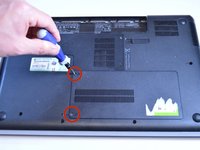
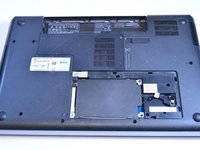
    1. HP G62-223CL Hard Drive Replacement, Hard Drive: adım 3, 2 resimden 1. HP G62-223CL Hard Drive Replacement, Hard Drive: adım 3, 2 resimden 2.
      • Locate the two Phillips head retaining screws which secure the hard drive compartment.

      • Use a Phillips #0 screwdriver to loosen the retaining screws.

      • Remove the panel covering the compartment.

      • Ground yourself before attempting to touch any components. To ground yourself, touch a conductive metal to eliminate any static buildup in your body, which can damage computer components.

      FixBot'a Sor

      Yorum Ekle

    2. HP G62-223CL Hard Drive Replacement: adım 4, 1 resimden 1.
      • Locate the three 6 mm Phillips head screws for the hard drive.

      • Use a Phillips #0 screwdriver to remove the screws.

      FixBot'a Sor

      Yorum Ekle

    3. HP G62-223CL Hard Drive Replacement: adım 5, 1 resimden 1.
      • Remove the hard drive from the compartment.

      • Pull the connector cable from the end of the hard drive.

      FixBot'a Sor

      Yorum Ekle

    4. HP G62-223CL Hard Drive Replacement: adım 6, 1 resimden 1.
      • Locate the two 6 mm Phillips head screws on each side of the hard drive.

      • Use a Phillips #0 screwdriver to remove the screws.

      • Remove the cover from the hard drive.

      FixBot'a Sor

      Yorum Ekle

Sonuç

To reassemble your device, follow these instructions in reverse order.

İptal et: Bu kılavuzu tamamlamadım.

3 farklı kişi bu kılavuzu tamamladı.

Garret Layton

Üyelik tarihi: 01/13/15

687 İtibar

5 adet Kılavuz yazıldı

Ekip

USF Tampa, Team 1-4, Sullivan Winter 2015 USF Tampa, Team 1-4, Sullivan Winter 2015 üyesi

USFT-SULLIVAN-W15S1G4

4 Üyeler

30 adet Kılavuz yazıldı

0Kılavuz Yorumları

Yorum Ekle

İstatistikleri Görüntüle:

Son 24 Saat: 2

Son 7 gün: 11

Son 30 gün: 41

Her zaman: 3,102