Ana içeriğe geç
Onarım Topluluğuna Katılın - Hesap Oluşturun

HP Mini 1000 Keyboard Replacement

Neye ihtiyacın var

  1. HP Mini 1000 Keyboard Replacement, Battery: adım 1, 2 resimden 1. HP Mini 1000 Keyboard Replacement, Battery: adım 1, 2 resimden 2.
    • With the case closed, place the Mini 1000 top-side down on a flat surface.

    • Push both of the battery release latches toward each other.

    FixBot'a Sor

    Yorum Ekle

  2. HP Mini 1000 Keyboard Replacement: adım 2, 1 resimden 1.
    • Lift the battery out of the Mini 1000 from the edge closest to the release latches.

    FixBot'a Sor

    Yorum Ekle

  3. HP Mini 1000 Keyboard Replacement, Keyboard: adım 3, 1 resimden 1.
    • Remove the following two screws:

    • One 6 mm Phillips screw

    • One 4 mm Phillips screw

    FixBot'a Sor

    Yorum Ekle

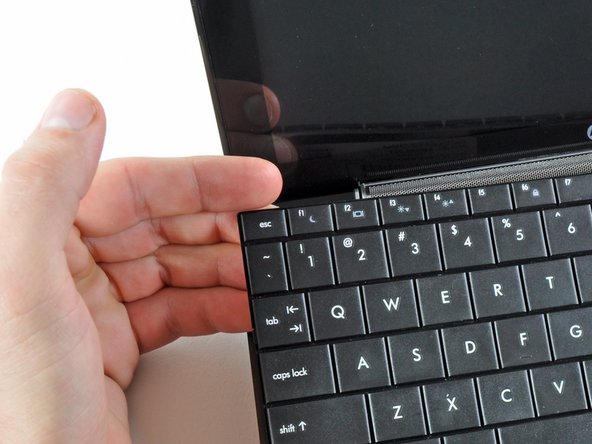
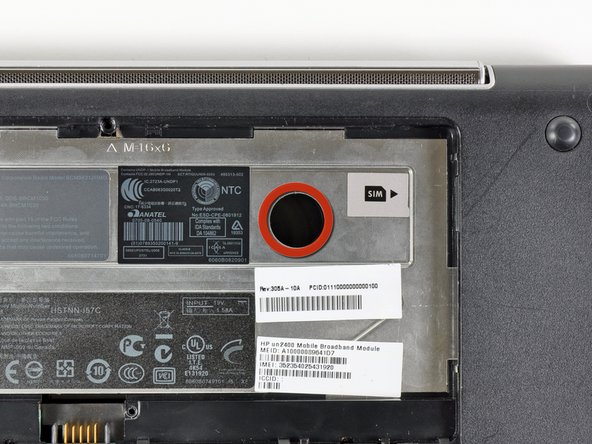
  4. HP Mini 1000 Keyboard Replacement: adım 4, 3 resimden 1. HP Mini 1000 Keyboard Replacement: adım 4, 3 resimden 2. HP Mini 1000 Keyboard Replacement: adım 4, 3 resimden 3.
    • To facilitate the removal of the keyboard, it is recommended to push the keyboard outwards with one hand through the opening (highlighted in the third picture) located on the backside of the Mini 1000.

    • While pushing through the opening with one hand, grasp the left upper edge with the other hand and slightly pull the keyboard towards you.

    • Once an opening has been established, grasp the keyboard and slowly lift it upwards along the upper perimeter of the top edge.

    FixBot'a Sor

    Yorum Ekle

  5. HP Mini 1000 Keyboard Replacement: adım 5, 1 resimden 1.
    • Lift the keyboard out of the upper case, minding the cable that is still connecting it to the motherboard.

    FixBot'a Sor

    Yorum Ekle

  6. HP Mini 1000 Keyboard Replacement: adım 6, 1 resimden 1.
    • Use your fingernail or the flat end of a spudger to flip up the retaining flap on the keyboard cable ZIF socket.

    • Be sure you are prying up on the retaining flap, not the socket itself.

    • Pull the cable out of its socket and remove the keyboard.

    FixBot'a Sor

    Yorum Ekle

Sonuç

To reassemble your device, follow these instructions in reverse order.

İptal et: Bu kılavuzu tamamlamadım.

5 farklı kişi bu kılavuzu tamamladı.

0Kılavuz Yorumları

Yorum Ekle

İstatistikleri Görüntüle:

Son 24 Saat: 1

Son 7 gün: 12

Son 30 gün: 53

Her zaman: 10,374