Ana içeriğe geç
Onarım Topluluğuna Katılın - Hesap Oluşturun

HP Officejet Pro 8620 Power Button Replacement

Neye ihtiyacın var

  1. HP Officejet Pro 8620 Power Button Replacement, Power Button: adım 1, 3 resimden 1. HP Officejet Pro 8620 Power Button Replacement, Power Button: adım 1, 3 resimden 2. HP Officejet Pro 8620 Power Button Replacement, Power Button: adım 1, 3 resimden 3.
    • Locate the power button on the bottom left side of the device.

    • Wedge the opening tool into the small gap between the power button panel and printer.

    • Apply pressure on the opening tool and open the power button panel.

    • Gently remove the power button panel assembly from the printer to access the power button.

    FixBot'a Sor
  2. HP Officejet Pro 8620 Power Button Replacement: adım 2, 2 resimden 1. HP Officejet Pro 8620 Power Button Replacement: adım 2, 2 resimden 2.
    • Press on the power button from the front of the panel to release it.

    FixBot'a Sor
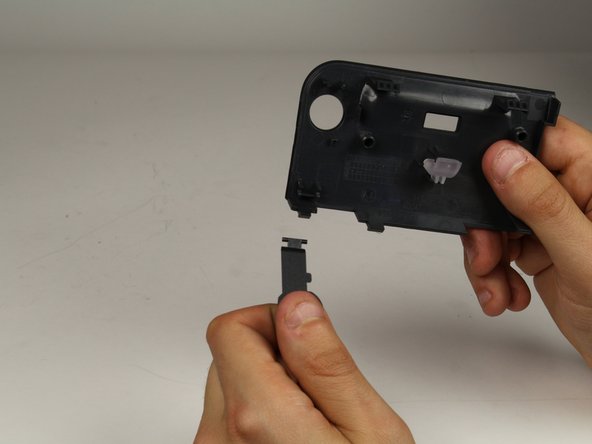
  3. HP Officejet Pro 8620 Power Button Replacement: adım 3, 2 resimden 1. HP Officejet Pro 8620 Power Button Replacement: adım 3, 2 resimden 2.
    • Turn the panel around so you are viewing the back of it.

    • Disconnect the power button from the panel by gently pulling the button out (toward your body).

    • Be careful not to crack the connector of the button panel when pulling the power button

    FixBot'a Sor
Sonuç

To reassemble your device, follow these instructions in reverse order.

Scott

Üyelik tarihi: 01/24/18

635 İtibar

3 adet Kılavuz yazıldı

Ekip

Cal Poly, Team S19-G2, Livingston Spring 2018 Cal Poly, Team S19-G2, Livingston Spring 2018 üyesi

CPSU-LIVINGSTON-S18S19G2

1 Üye

6 adet Kılavuz yazıldı

0Kılavuz Yorumları

Yorum Ekle

İstatistikleri Görüntüle:

Son 24 Saat: 0

Son 7 gün: 5

Son 30 gün: 32

Her zaman: 3,126