Giriş
If your HP Pavilion zv5000 no longer holds a battery charge, powers on, or charges at all, replacing the battery might resolve all of these issues.
-
-
-
Make sure that your device is properly shut down and unplugged from any outlet.
-
Flip Pavilion over so that the bottom faces up and locate the battery in the bottom left corner.
 FixBot'a Sor
-
-
-
-
Press and slide up the battery release tab with your thumb until the battery pops out of place.
-
-



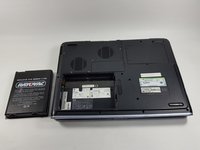
To reassemble your device, follow these instructions in reverse order.
İptal et: Bu kılavuzu tamamlamadım.
Bir başkası bu kılavuzu tamamladı.

Ekip

UMass Dartmouth, Team 4-6, Catania Fall 2016 UMass Dartmouth, Team 4-6, Catania Fall 2016 üyesi
UMASSD-CATANIA-F16S4G6
3 Üyeler
45 adet Kılavuz yazıldı
2Kılavuz Yorumları
White light comes on when it is charging
White light comes on the computer if it is charging
