Ana içeriğe geç
Onarım Topluluğuna Katılın - Hesap Oluşturun

HP Pavilion zv5000 Hard Drive Replacement

Neye ihtiyacın var

    1. HP Pavilion zv5000 Hard Drive Replacement, Battery: adım 1, 1 resimden 1.
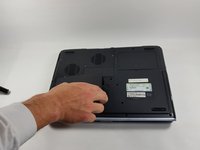
      • Make sure that your device is properly shut down and unplugged from any outlet.

      • Flip Pavilion over so that the bottom faces up and locate the battery in the bottom left corner.

      FixBot'a Sor

      Yorum Ekle

    2. HP Pavilion zv5000 Hard Drive Replacement: adım 2, 2 resimden 1. HP Pavilion zv5000 Hard Drive Replacement: adım 2, 2 resimden 2.
      • Press and slide up the battery release tab with your thumb until the battery pops out of place.

      FixBot'a Sor

      Yorum Ekle

    3. HP Pavilion zv5000 Hard Drive Replacement: adım 3, 2 resimden 1. HP Pavilion zv5000 Hard Drive Replacement: adım 3, 2 resimden 2.
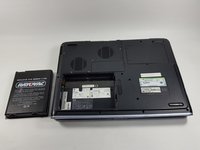
      • Using two fingers, pry the rest of the battery out of the socket.

      FixBot'a Sor

      Yorum Ekle

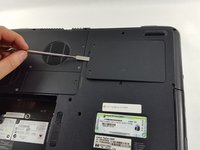
    1. HP Pavilion zv5000 Hard Drive Replacement, Hard Drive: adım 4, 2 resimden 1. HP Pavilion zv5000 Hard Drive Replacement, Hard Drive: adım 4, 2 resimden 2.
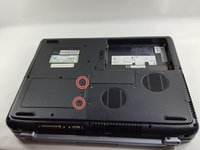
      • Make sure that the Pavilion is completely powered down and unplugged. Failure to do so may result in an electrical shock.

      • Using the Phillips #0 screwdriver, unscrew the two Phillips PM 2.5X6.0mm screws.

      • The two screws do not come out of the hard drive assembly, they simply disconnect the assembly from the laptop.

      FixBot'a Sor

      Yorum Ekle

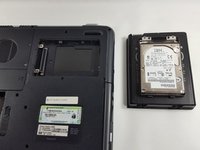
    2. HP Pavilion zv5000 Hard Drive Replacement: adım 5, 2 resimden 1. HP Pavilion zv5000 Hard Drive Replacement: adım 5, 2 resimden 2.
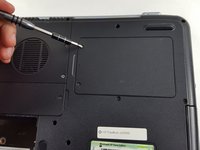
      • Place the spudger underneath the cover of the hard drive and push up gently until the hard drive pops out of place.

      • Completely remove the hard drive from its socket.

      • If the plastic spudger is not sturdy enough to pop the hard drive out of place, try carefully using the metal spudger.

      FixBot'a Sor

      Yorum Ekle

Sonuç

To reassemble your device, follow these instructions in reverse order.

İptal et: Bu kılavuzu tamamlamadım.

Bir başkası bu kılavuzu tamamladı.

Eliza Marks

Üyelik tarihi: 10/18/16

676 İtibar

5 adet Kılavuz yazıldı

Ekip

UMass Dartmouth, Team 4-6, Catania Fall 2016 UMass Dartmouth, Team 4-6, Catania Fall 2016 üyesi

UMASSD-CATANIA-F16S4G6

3 Üyeler

45 adet Kılavuz yazıldı

1Rehber Yorum

My hp pavilion zx5000 has a blue screen and i am unable to do anything. O. S. Is Windows.

Please help

Danny Morris - Yanıt Paylaş

Yorum Ekle

İstatistikleri Görüntüle:

Son 24 Saat: 1

Son 7 gün: 7

Son 30 gün: 36

Her zaman: 3,601