Ana içeriğe geç
Onarım Topluluğuna Katılın - Hesap Oluşturun

HP Pavilion zv5000 Screen Replacement

Neye ihtiyacın var

  1. HP Pavilion zv5000 Screen Replacement, Battery: adım 1, 1 resimden 1.
    • Make sure that your device is properly shut down and unplugged from any outlet.

    • Flip Pavilion over so that the bottom faces up and locate the battery in the bottom left corner.

    FixBot'a Sor

    Yorum Ekle

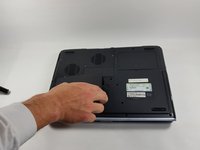
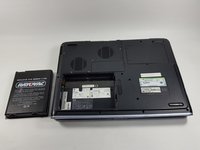
  2. HP Pavilion zv5000 Screen Replacement: adım 2, 2 resimden 1. HP Pavilion zv5000 Screen Replacement: adım 2, 2 resimden 2.
    • Press and slide up the battery release tab with your thumb until the battery pops out of place.

    FixBot'a Sor

    Yorum Ekle

  3. HP Pavilion zv5000 Screen Replacement: adım 3, 2 resimden 1. HP Pavilion zv5000 Screen Replacement: adım 3, 2 resimden 2.
    • Using two fingers, pry the rest of the battery out of the socket.

    FixBot'a Sor

    Yorum Ekle

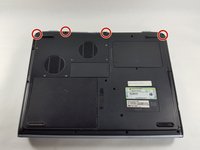
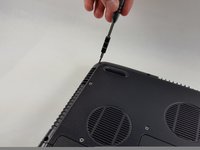
  4. HP Pavilion zv5000 Screen Replacement, Keyboard: adım 4, 2 resimden 1. HP Pavilion zv5000 Screen Replacement, Keyboard: adım 4, 2 resimden 2.
    • Using a Phillips #0 screwdriver, unscrew all four Phillips PM 2.5X13.0mm screws and place in a secure area until the end of the project.

    FixBot'a Sor

    Yorum Ekle

  5. HP Pavilion zv5000 Screen Replacement: adım 5, 1 resimden 1.
    • Flip laptop back over and open as far as it can go.

    FixBot'a Sor

    Yorum Ekle

  6. HP Pavilion zv5000 Screen Replacement: adım 6, 1 resimden 1.
    • Use the flat edge of the plastic spudger inserted under the bottom of the strip cover and pry upwards to un-clip the cover, starting at the right and moving to the left.

    • If the plastic spudger is not doing the trick, try using the metal spudger careful to not pop any keys out.

    FixBot'a Sor

    Yorum Ekle

  7. HP Pavilion zv5000 Screen Replacement: adım 7, 2 resimden 1. HP Pavilion zv5000 Screen Replacement: adım 7, 2 resimden 2.
    • Use hands to completely lift off the strip cover and remove.

    FixBot'a Sor

    Yorum Ekle

  8. HP Pavilion zv5000 Screen Replacement: adım 8, 1 resimden 1.
    • Use the Phillips #0 screwdriver again, unscrew all four Phillips PM 2.5X13.0mm screws from the top of the keyboard and set aside.

    FixBot'a Sor

    Yorum Ekle

  9. HP Pavilion zv5000 Screen Replacement: adım 9, 2 resimden 1. HP Pavilion zv5000 Screen Replacement: adım 9, 2 resimden 2.
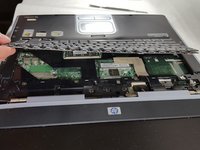
    • Using your hands, lift the keyboard up from the top towards yourself until the keyboard is resting in your hand.

    • Do not aggressively pull at the keyboard for risk of ripping the connector cable.

    FixBot'a Sor

    Yorum Ekle

  10. HP Pavilion zv5000 Screen Replacement: adım 10, 2 resimden 1. HP Pavilion zv5000 Screen Replacement: adım 10, 2 resimden 2.
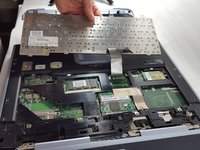
    • Gently slide out the connecting cable from the laptop to the keyboard.

    • Do not aggressively pull at the connecting cable.

    FixBot'a Sor

    Yorum Ekle

  11. HP Pavilion zv5000 Screen Replacement: adım 11, 1 resimden 1.
    • Completely remove the keyboard from the rest of the laptop.

    FixBot'a Sor

    Yorum Ekle

  12. HP Pavilion zv5000 Screen Replacement, Screen: adım 12, 1 resimden 1.
    • Flip the Pavilion back over on its backside.

    FixBot'a Sor

    Yorum Ekle

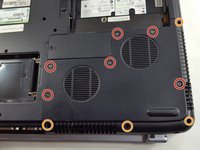
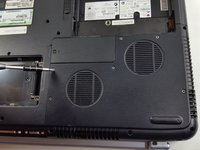
  13. HP Pavilion zv5000 Screen Replacement: adım 13, 3 resimden 1. HP Pavilion zv5000 Screen Replacement: adım 13, 3 resimden 2. HP Pavilion zv5000 Screen Replacement: adım 13, 3 resimden 3.
    • Using the same Phillips #0 screwdriver, unscrew the six Phillips PM 2.5X6.0mm screws.

    • Also remove the four Phillips PM 2.5X13.0mm screws to remove the thermal plate with the same screwdriver.

    FixBot'a Sor

    Yorum Ekle

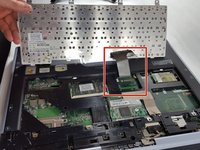
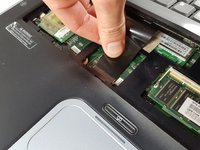
  14. HP Pavilion zv5000 Screen Replacement: adım 14, 2 resimden 1. HP Pavilion zv5000 Screen Replacement: adım 14, 2 resimden 2.
    Bu adımda kullanılan alet:
    Tweezers
    $4.99
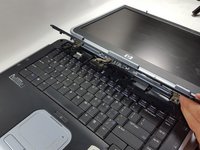
    • Flip the laptop back over and open the lid all the way.

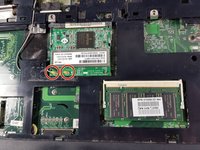
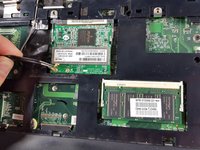
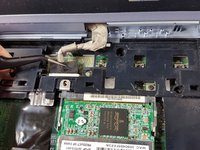
    • Using the flat edge of the plastic spudger, pry straight up to remove the Mini PCI Connector Cables from the board.

    • Tweezers can also be used to gently squeeze and pull up on the Mini PCI Cable Connectors to remove from the board.

    • When reinstalling, place the Mini PCI Connector Cables back in place and gently press straight down until they snap into place.

    FixBot'a Sor

    Yorum Ekle

  15. HP Pavilion zv5000 Screen Replacement: adım 15, 3 resimden 1. HP Pavilion zv5000 Screen Replacement: adım 15, 3 resimden 2. HP Pavilion zv5000 Screen Replacement: adım 15, 3 resimden 3.
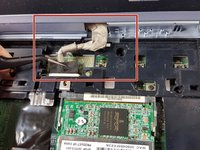
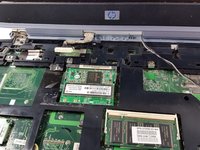
    • Using the tweezers, gently squeeze and pull backwards on the display cable until it is disconnected.

    • To reinsert, simply align the display cable to its proper spot and gently push into place.

    FixBot'a Sor

    Yorum Ekle

  16. HP Pavilion zv5000 Screen Replacement: adım 16, 2 resimden 1. HP Pavilion zv5000 Screen Replacement: adım 16, 2 resimden 2.
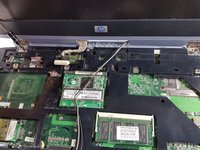
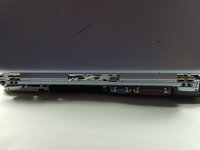
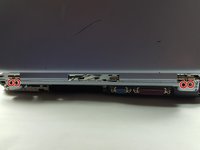
    • Use the Phillips #0 screwdriver again to remove the four Phillips 2.5X13.0mm screws that hold the clips for the screen into place.

    FixBot'a Sor

    Yorum Ekle

  17. HP Pavilion zv5000 Screen Replacement: adım 17, 2 resimden 1. HP Pavilion zv5000 Screen Replacement: adım 17, 2 resimden 2.
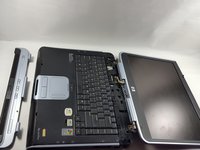
    • Turn the laptop around until the top cover is facing you. Keep the laptop in an open position.

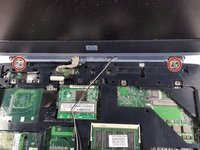
    • Unscrew the four Phillips PM 2.5X6.0mm screws using the Phillips #0 that hold the clips of the screen on to the base.

    FixBot'a Sor

    Yorum Ekle

  18. HP Pavilion zv5000 Screen Replacement: adım 18, 1 resimden 1.
    • Firmly grasp the top of the screen with your hands and pull towards you and upwards to remove the screen from the base.

    FixBot'a Sor

    Yorum Ekle

Sonuç

To reassemble your device, follow these instructions in reverse order.

İptal et: Bu kılavuzu tamamlamadım.

2 farklı kişi bu kılavuzu tamamladı.

Eliza Marks

Üyelik tarihi: 10/18/16

676 İtibar

5 adet Kılavuz yazıldı

Ekip

UMass Dartmouth, Team 4-6, Catania Fall 2016 UMass Dartmouth, Team 4-6, Catania Fall 2016 üyesi

UMASSD-CATANIA-F16S4G6

3 Üyeler

5 adet Kılavuz yazıldı

0Kılavuz Yorumları

Yorum Ekle

İstatistikleri Görüntüle:

Son 24 Saat: 0

Son 7 gün: 5

Son 30 gün: 48

Her zaman: 1,595