Giriş
The RAM may be replaced or updated in order to increase your computer's speed and performance. Before performing any work, always remember to completely turn off and disconnect your computer from any power source.
-
-
Push the unlock tabs on the back on the monitor in and towards each other while sliding the back cover up.
 FixBot'a Sor
-
-
-
-
Locate the RAM in the bottom right hand corner.
-
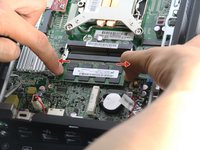
Pull the two silver brackets holding the RAM away from each other.
-



To reassemble your device, follow these instructions in reverse order.
İptal et: Bu kılavuzu tamamlamadım.
4 farklı kişi bu kılavuzu tamamladı.

Ekip

Cal Poly, Team 1-20, Maness Fall 2015 Cal Poly, Team 1-20, Maness Fall 2015 üyesi
CPSU-MANESS-F15S1G20
4 Üyeler
12 adet Kılavuz yazıldı
