Giriş
The maximum dimensions of a new solid state drive are 100.5 x 69.85 x 7.0mm. Before performing any work, always remember to completely turn off and disconnect your computer from any power source.
Neye ihtiyacın var
-
-
-
Push the unlock tabs on the back of the monitor in and towards each other while sliding the back cover up.
 FixBot'a Sor
-
-
-
Pull up on the hard drive bay handle and push it to the left while holding back the metal tab on the bottom.
-
-
-
-
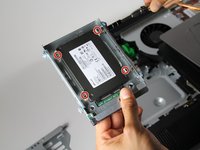
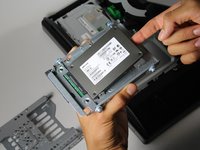
Remove the four 5/16" side screws, with the T15 Torx Screwdriver, and gently take out the drive.
-
-


To reassemble your device, follow these instructions in reverse order.
İptal et: Bu kılavuzu tamamlamadım.
2 farklı kişi bu kılavuzu tamamladı.
Ekli Belgeler

Ekip

Cal Poly, Team 1-20, Maness Fall 2015 Cal Poly, Team 1-20, Maness Fall 2015 üyesi
CPSU-MANESS-F15S1G20
4 Üyeler
12 adet Kılavuz yazıldı
