Ana içeriğe geç
Onarım Topluluğuna Katılın - Hesap Oluşturun

HP Split x2 Screen Replacement

Neye ihtiyacın var

  1. HP Split x2 Screen Replacement, Rear Cover: adım 1, 1 resimden 1.
    • Opening the device voids the manufacturer warranty.

    • Power down the HP Split x2 before beginning the repair

    • Separate the tablet from the keyboard by pushing the slider to the left and lifting the tablet from the keyboard.

    FixBot'a Sor

    Yorum Ekle

  2. HP Split x2 Screen Replacement: adım 2, 3 resimden 1. HP Split x2 Screen Replacement: adım 2, 3 resimden 2. HP Split x2 Screen Replacement: adım 2, 3 resimden 3.
    • Remove the four white caps on the bottom edge of the tablet.

    • Use a tweezer to grasp white caps.

    • The white caps are easily lost. Store them in a secure place.

    FixBot'a Sor

    Yorum Ekle

  3. HP Split x2 Screen Replacement: adım 3, 1 resimden 1.
    • Use a Phillips #000 screwdriver to remove the four 3mm screws.

    FixBot'a Sor

    Yorum Ekle

  4. HP Split x2 Screen Replacement: adım 4, 2 resimden 1. HP Split x2 Screen Replacement: adım 4, 2 resimden 2.
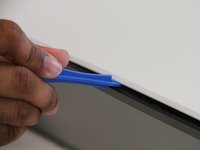
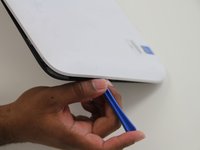
    • Use a plastic opening tool to pry the tabs on the top, left and right sides of the tablet.

    • Only the top and sides have tabs. Remove all tabs before lifting screen.

    FixBot'a Sor

    Yorum Ekle

  5. HP Split x2 Screen Replacement: adım 5, 2 resimden 1. HP Split x2 Screen Replacement: adım 5, 2 resimden 2.
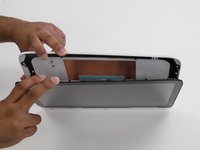
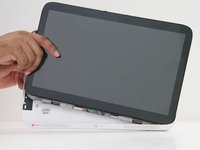
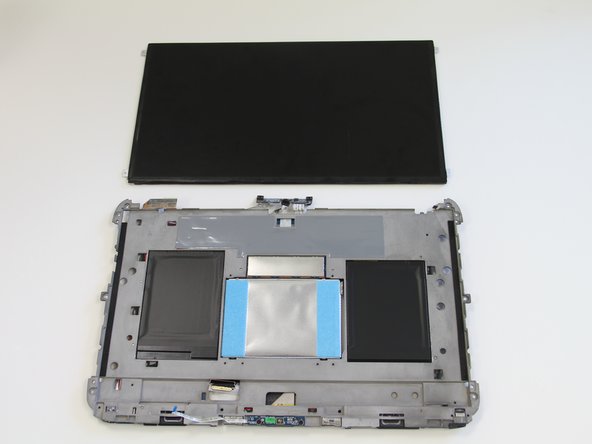
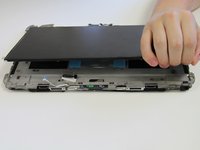
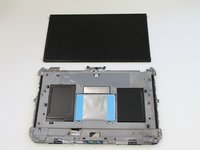
    • Separate the cover and the screen.

    • Gently lift the screen out of the cover.

    FixBot'a Sor

    Yorum Ekle

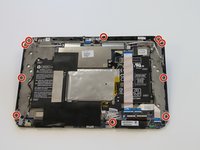
  6. HP Split x2 Screen Replacement, Screen: adım 6, 2 resimden 1. HP Split x2 Screen Replacement, Screen: adım 6, 2 resimden 2.
    • Use a J0 screwdriver to remove the ten 4mm Phillips screws.

    FixBot'a Sor

    Yorum Ekle

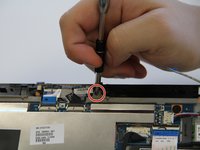
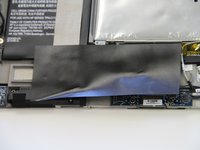
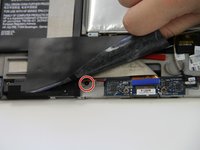
  7. HP Split x2 Screen Replacement: adım 7, 2 resimden 1. HP Split x2 Screen Replacement: adım 7, 2 resimden 2.
    • Peel back the large black tape.

    • Remove the 4mm Phillips screw.

    FixBot'a Sor

    Yorum Ekle

  8. HP Split x2 Screen Replacement: adım 8, 3 resimden 1. HP Split x2 Screen Replacement: adım 8, 3 resimden 2. HP Split x2 Screen Replacement: adım 8, 3 resimden 3.
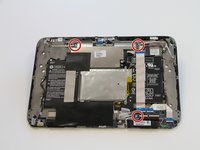
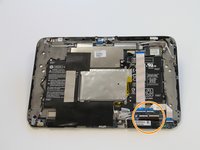
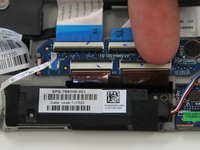
    • Remove three 2 mm zero insertion force (ZIF) connectors. Lift the black tab in front and then remove the ribbon from the rear.

    • Remove two larger zero insertion force (ZIF) connectors. Lift the black tab in front and then remove the ribbon from the rear.

    FixBot'a Sor

    Yorum Ekle

  9. HP Split x2 Screen Replacement: adım 9, 3 resimden 1. HP Split x2 Screen Replacement: adım 9, 3 resimden 2. HP Split x2 Screen Replacement: adım 9, 3 resimden 3.
    Bu adımda kullanılan alet:
    Tweezers
    $4.99
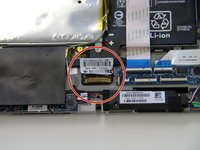
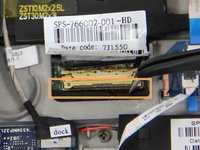
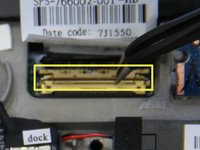
    • The last attachment to the screen is the bronze colored display cable connector.

    • Use a pair of tweezers to lift the metal bar and swing it to the other side on top of the cable.

    • Pull in the direction of the cable to remove the connector.

    FixBot'a Sor

    Yorum Ekle

  10. HP Split x2 Screen Replacement: adım 10, 1 resimden 1.
    • Glue is holding the device together along the edges. The glue is can be very strong. A heat gun may be required to loosen the glue for removal of the digitizer to prevent damage to the screen.

    • Apply pressure to to the sides of the tablet.

    • Separate the digitizer from the the body of the tablet.

    FixBot'a Sor

    Yorum Ekle

  11. HP Split x2 Screen Replacement: adım 11, 2 resimden 1. HP Split x2 Screen Replacement: adım 11, 2 resimden 2.
    • Glue is holding the screen on at the four corners.

    • Lift the screen up, breaking any adhesion forced by the glue.

    • Replace the old screen with a new one.

    FixBot'a Sor

    Yorum Ekle

Sonuç

To reassemble your device, follow these instructions in reverse order.

İptal et: Bu kılavuzu tamamlamadım.

11 farklı kişi bu kılavuzu tamamladı.

Ricky Huitema

Üyelik tarihi: 09/24/15

464 İtibar

2 adet Kılavuz yazıldı

Ekip

Texas Tech, Team 22-5, Rauch Fall 2015 Texas Tech, Team 22-5, Rauch Fall 2015 üyesi

TTU-RAUCH-F15S22G5

3 Üyeler

2 adet Kılavuz yazıldı

5Kılavuz Yorumları

This is not helpful because the one I am working on has no screws.

Matt Brown - Yanıt Paylaş

I also have a Split x2 with no screws

dbmacaulay - Yanıt Paylaş

I want change my screen because My screen is broken but I do not know , where I can buy my screen

Nohora Chitiva - Yanıt Paylaş

ebay or amazon

Andrei Isari - Yanıt Paylaş

Is HP Touch Screen Digitizer Glass for HP Split X2 The same as the screen being replaced here?? I need to know

Nwatu Chineme Edger - Yanıt Paylaş

Yorum Ekle

İstatistikleri Görüntüle:

Son 24 Saat: 10

Son 7 gün: 22

Son 30 gün: 67

Her zaman: 14,035