Ana içeriğe geç
Onarım Topluluğuna Katılın - Hesap Oluşturun

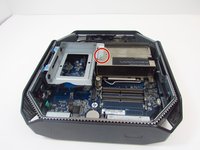
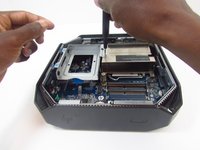
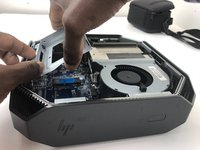
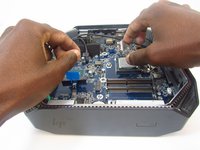
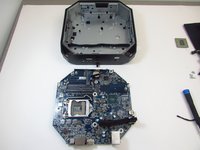
HP Z2 Mini G3 Motherboard Replacement

Neye ihtiyacın var

  1. HP Z2 Mini G3 Motherboard Replacement, Access Panel: adım 1, 1 resimden 1.
    • Turn the device so the back-side of the device is facing you.

    • Be sure that the power is off and the A/C power cord has been disconnected before starting. Removing hardware while the power is on could damage the device or harm yourself.

    • Components of the device are subject to static damage. Work on a hard, grounded surface to prevent damage to the workstation.

    FixBot'a Sor

    Yorum Ekle

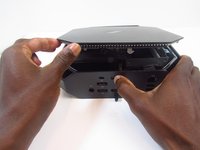
  2. HP Z2 Mini G3 Motherboard Replacement: adım 2, 2 resimden 1. HP Z2 Mini G3 Motherboard Replacement: adım 2, 2 resimden 2.
    • Slide and hold the latch in the direction of the engraved arrow (to the right).

    FixBot'a Sor

    Yorum Ekle

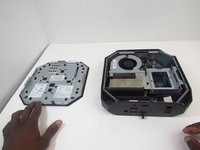
  3. HP Z2 Mini G3 Motherboard Replacement: adım 3, 2 resimden 1. HP Z2 Mini G3 Motherboard Replacement: adım 3, 2 resimden 2.
    • While holding the latch, lift the access panel upwards and towards yourself and set it aside upside-down.

    FixBot'a Sor

    Yorum Ekle

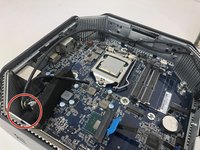
  4. HP Z2 Mini G3 Motherboard Replacement, CPU Fan: adım 4, 1 resimden 1.
    • Rotate the device so the front side is facing you (the side with the power button) and locate the CPU fan.

    FixBot'a Sor

    Yorum Ekle

  5. HP Z2 Mini G3 Motherboard Replacement: adım 5, 1 resimden 1.
    • Swing the fan upward, to a 90-degree angle.

    FixBot'a Sor

    Yorum Ekle

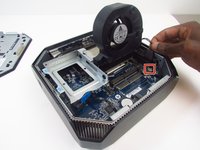
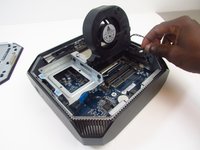
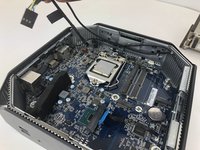
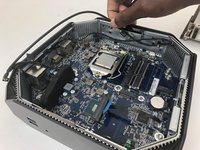
  6. HP Z2 Mini G3 Motherboard Replacement: adım 6, 2 resimden 1. HP Z2 Mini G3 Motherboard Replacement: adım 6, 2 resimden 2.
    • Carefully disconnect the CPU fan by pulling out the wires from the motherboard.

    FixBot'a Sor

    Yorum Ekle

  7. HP Z2 Mini G3 Motherboard Replacement: adım 7, 1 resimden 1.
    • Swing the fan back down and carefully unhook the CPU fan notches by pulling each tab away from the heat sink holes.

    FixBot'a Sor

    Yorum Ekle

  8. HP Z2 Mini G3 Motherboard Replacement: adım 8, 1 resimden 1.
    • Swing the fan up again and pull it out.

    FixBot'a Sor

    Yorum Ekle

  9. HP Z2 Mini G3 Motherboard Replacement, CPU Processor: adım 9, 3 resimden 1. HP Z2 Mini G3 Motherboard Replacement, CPU Processor: adım 9, 3 resimden 2. HP Z2 Mini G3 Motherboard Replacement, CPU Processor: adım 9, 3 resimden 3.
    • Remove the 9mm Torx screw with a T15 Torx screwdriver to release the SSD assembly.

    • Lift the assembly upwards to remove it.

    FixBot'a Sor

    Yorum Ekle

  10. HP Z2 Mini G3 Motherboard Replacement: adım 10, 1 resimden 1.
    • Pull the metal arm out from under the frame and lift it up. The frame should slide back from under the screw.

    FixBot'a Sor

    Yorum Ekle

  11. HP Z2 Mini G3 Motherboard Replacement: adım 11, 2 resimden 1. HP Z2 Mini G3 Motherboard Replacement: adım 11, 2 resimden 2.
    • Lift the frame upward to gain access to the processor

    • Take note of a triangular mark on one of the corners of the processor and bracket it is mounted on. The triangles must be aligned together during reassembly.

    FixBot'a Sor

    Yorum Ekle

  12. HP Z2 Mini G3 Motherboard Replacement: adım 12, 1 resimden 1.
    • Grip the processor on each side, carefully lifting it up.

    • Do not touch the underside of the processor. Doing so may damage the processor and prevent a connection to the motherboard.

    • Be careful inserting the new processor. The connectors on the new one and the motherboard are fragile and damage easily.

    FixBot'a Sor

    Yorum Ekle

  13. HP Z2 Mini G3 Motherboard Replacement, Motherboard: adım 13, 3 resimden 1. HP Z2 Mini G3 Motherboard Replacement, Motherboard: adım 13, 3 resimden 2. HP Z2 Mini G3 Motherboard Replacement, Motherboard: adım 13, 3 resimden 3.
    • Remove the thermal sensor cable from the motherboard.

    • Grab and lift the cable from the chassis to finish removing the thermal sensor.

    FixBot'a Sor

    Yorum Ekle

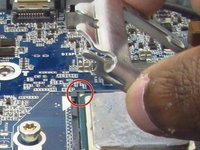
  14. HP Z2 Mini G3 Motherboard Replacement: adım 14, 1 resimden 1.
    • Some models may have a wireless LAN module installed under the GPU fan.

    • In this case, use a T15 Torx screwdriver to remove the 9mm Torx screw from the module and take the component out.

    FixBot'a Sor

    Yorum Ekle

  15. HP Z2 Mini G3 Motherboard Replacement: adım 15, 1 resimden 1.
    • Unplug, then carefully detach the system speaker from the chassis by gripping the frame and pulling back.

    • You do not need to remove the speaker from its frame.

    FixBot'a Sor

    Yorum Ekle

  16. HP Z2 Mini G3 Motherboard Replacement: adım 16, 2 resimden 1. HP Z2 Mini G3 Motherboard Replacement: adım 16, 2 resimden 2.
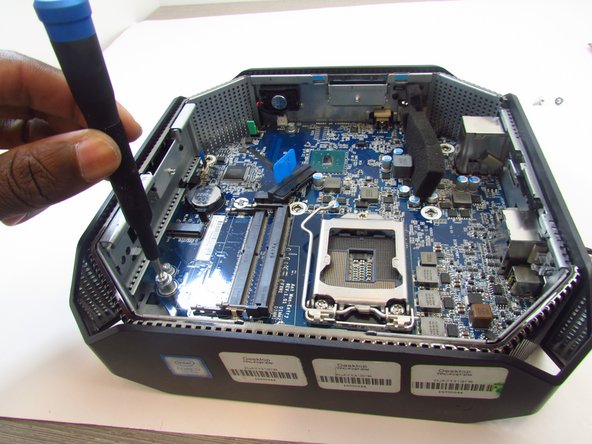
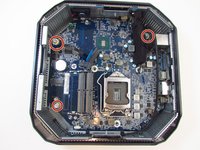
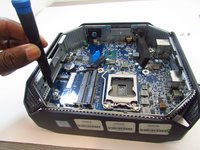
    • Use a T15 Torx screw driver to remove the 9mm and the two 16mm Torx head screws that secure the motherboard to the chassis.

    FixBot'a Sor

    Yorum Ekle

  17. HP Z2 Mini G3 Motherboard Replacement: adım 17, 2 resimden 1. HP Z2 Mini G3 Motherboard Replacement: adım 17, 2 resimden 2.
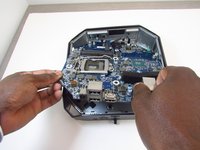
    • Slide the motherboard forward and to the left to clear it from chassis.

    • Carefully pull and lift the motherboard out by holding on to the ports.

    FixBot'a Sor

    Yorum Ekle

Sonuç

To reassemble your device, follow these instructions in reverse order.

İptal et: Bu kılavuzu tamamlamadım.

2 farklı kişi bu kılavuzu tamamladı.

0Kılavuz Yorumları

Yorum Ekle

İstatistikleri Görüntüle:

Son 24 Saat: 4

Son 7 gün: 22

Son 30 gün: 86

Her zaman: 3,862