Giriş
Use this guide to replace the midframe of your HTC HD2.
Neye ihtiyacın var
-
-
-
Carefully pull the rear cover from the back of the phone.
-
Place a finger beneath the small lip on the left side of the battery.
 FixBot'a Sor
-
-
-
Lay the phone down on it's screen.
-
Lift up on the lip and pull the battery from the phone.
-
-
-
-
-
-
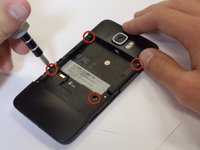
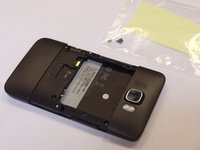
Remove the four black 3.5mm T5 screws from the back of the phone.
-
-
-
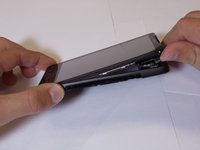
Insert the flat end of a spudger between the midframe and the display.
-
Slide the spudger along the seam between the frame and the display.
-
Using the spudger for leverage, carefully pry the midframe away from the display assembly.
-
As it releases, pull the midframe away from the phone.
-
-





To reassemble your device, follow these instructions in reverse order.
İptal et: Bu kılavuzu tamamlamadım.
4 farklı kişi bu kılavuzu tamamladı.

Ekip

Cal Poly, Team 24-55, Amido Spring 2011 Cal Poly, Team 24-55, Amido Spring 2011 üyesi
CPSU-AMIDO-S11S24G55
5 Üyeler
96 adet Kılavuz yazıldı
