Giriş
This guide is a helpful starting point for almost every hardware related replacement or installation. By exposing the internal components you will be able to repair, replace, or clean out the interior of your phone. While this process does require a few specific tools, they are widely available and do not require any previous experience to use them effectively.
Neye ihtiyacın var
-
-
-
Remove the back of the phone by pushing firmly with your thumbs up towards the camera.
-
Remove both the battery and the SD card (Press SD card in to release)
-
Locate and remove the four Torx screws highlighted in the photo, with the phone laying face down on your work space.
 FixBot'a Sor
-
-
-
Carefully pry the inside back cover from the device using an appropriate size plastic opening tool or small flathead screwdriver.
-
Insert the flat end between the back and front enclosure, working your way around the rim.
-
-
-
-
Gently depress and release the small plastic tabs around the rim in the front enclosure, highlighted here.
-
-
-
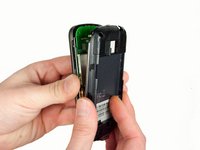
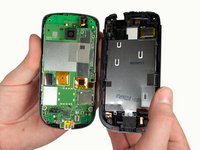
Carefully separate the front and back enclosures once all of the clips have been disengaged.
-
-


To reassemble your device, follow these instructions in reverse order.

Ekip

Cal Poly, Team 3-26, Amido Winter 2012 Cal Poly, Team 3-26, Amido Winter 2012 üyesi
CPSU-AMIDO-W12S3G26
5 Üyeler
42 adet Kılavuz yazıldı
