Ana içeriğe geç
Onarım Topluluğuna Katılın - Hesap Oluşturun

HTC One S Front Facing Camera Replacement

Görüntüleme: 1,7 B

İstatistikleri görüntüle:

Son 24 Saat:
1
Son 7 Gün:
17
Son 30 Gün:
88
Her zaman:
1.735
Yorumlar: 88

88 comments on steps.

Tamamlandı: 0

Hiç kimse bu kılavuzu "tamamlandı" olarak işaretlemedi. İlk mi olacaksın?

Sık Kullanılanlar: 2

2 kişi bu kılavuzu favorilerine ekledi (ve abone oldu). Sıradaki sen olacak mısın?

Gerekli Süre: 20 dakika
Zorluk: Orta
HTC One S Front Facing Camera Replacement

If your front camera isn't working as needed, just replace it! This guide will teach you how.

Neye ihtiyacın var

Aletler

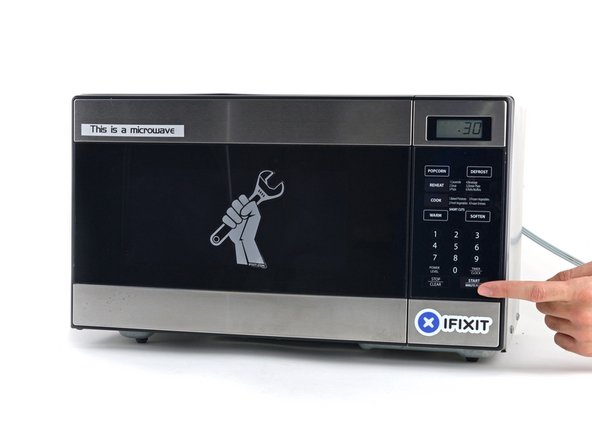
    1. HTC One S Front Facing Camera Replacement, iOpener Heating: adım 1, 2 resimden 1. HTC One S Front Facing Camera Replacement, iOpener Heating: adım 1, 2 resimden 2.
      • We recommend that you clean your microwave before proceeding, as any nasty gunk on the bottom may end up stuck to the iOpener.

      • Place the iOpener in the center of the microwave.

      • For carousel microwaves: Make sure the plate spins freely. If your iOpener gets stuck, it may overheat and burn.

      FixBot'a Sor

      Yorum Ekle

    2. HTC One S Front Facing Camera Replacement: adım 2, 1 resimden 1.
      • Heat the iOpener for thirty seconds.

      • Depending on the wattage of your microwave, more or less time may be required. The iOpener is sufficiently heated when it's barely too hot to touch.

      • Throughout the repair procedure, as the iOpener cools, reheat it in the microwave for an additional thirty seconds at a time.

      • Be careful not to overheat the iOpener during the repair. Overheating may cause the iOpener to burst. Do not attempt to heat over 100˚C (212˚F).

      • Never touch the iOpener if it appears swollen.

      • If the iOpener is still too hot in the middle to touch, continue using it while waiting for it to cool down some more before reheating. A properly heated iOpener should stay warm for up to 10 minutes.

      FixBot'a Sor

      Yorum Ekle

    3. HTC One S Front Facing Camera Replacement: adım 3, 1 resimden 1.
      • Remove the iOpener from the microwave, holding it by one of the two flat ends to avoid the hot center.

      • The iOpener will be very hot, so be careful when handling it. Use an oven mitt if necessary.

      FixBot'a Sor

      Yorum Ekle

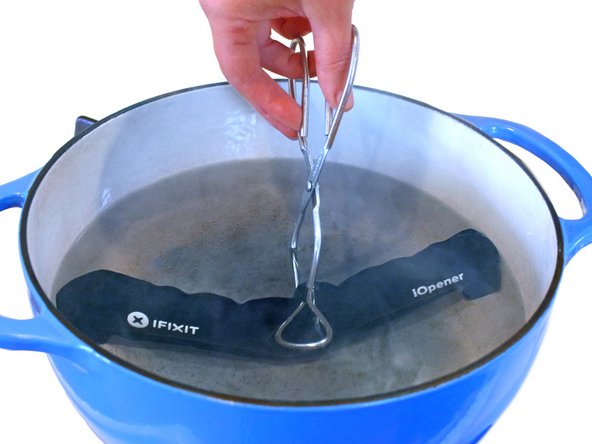
    4. HTC One S Front Facing Camera Replacement, Alternate iOpener heating method: adım 4, 2 resimden 1. HTC One S Front Facing Camera Replacement, Alternate iOpener heating method: adım 4, 2 resimden 2.
      • If you don't have a microwave, follow this step to heat your iOpener in boiling water.

      • Fill a pot or pan with enough water to fully submerge an iOpener.

      • Heat the water to a boil. Turn off the heat.

      • Place an iOpener into the hot water for 2-3 minutes. Make sure the iOpener is fully submerged in the water.

      • Use tongs to extract the heated iOpener from the hot water.

      • Thoroughly dry the iOpener with a towel.

      • The iOpener will be very hot, so be careful to hold it only by the end tabs.

      • Your iOpener is ready for use! If you need to reheat the iOpener, heat the water to a boil, turn off the heat, and place the iOpener in the water for 2-3 minutes.

      FixBot'a Sor

      Yorum Ekle

    1. HTC One S Front Facing Camera Replacement, Rear Case: adım 5, 1 resimden 1.
      • Handling it by the tag, place the heated iOpener across the bottom casing.

      • Let the iOpener sit for at least a minute to soften the adhesive beneath the casing.

      FixBot'a Sor

      Yorum Ekle

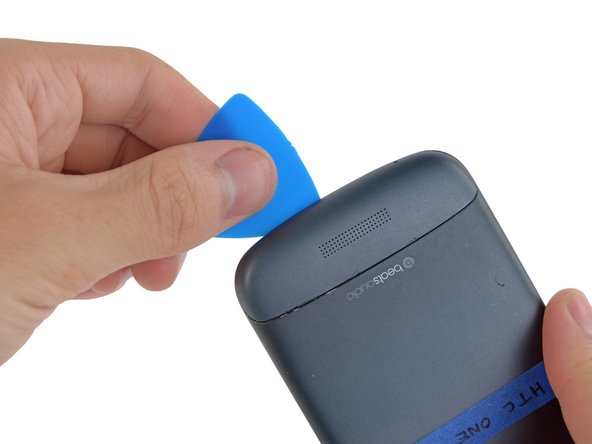
    2. HTC One S Front Facing Camera Replacement: adım 6, 3 resimden 1. HTC One S Front Facing Camera Replacement: adım 6, 3 resimden 2. HTC One S Front Facing Camera Replacement: adım 6, 3 resimden 3.
      • Gently place an opening pick in the corner of the gap between the bottom casing and rear case.

      • Slide the opening pick along the side of the casing, prying it away from the adhesive as you go.

      FixBot'a Sor

      Yorum Ekle

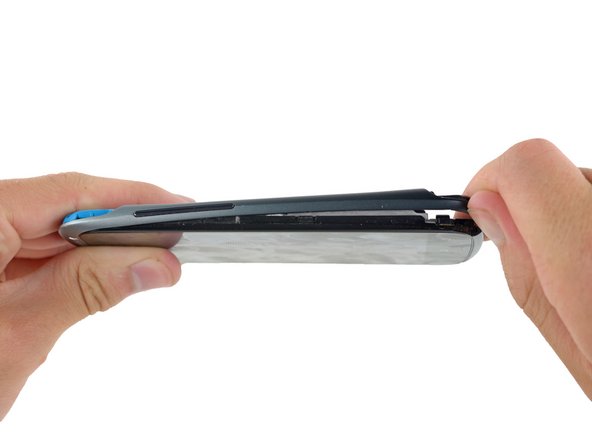
    3. HTC One S Front Facing Camera Replacement: adım 7, 1 resimden 1.
      • Use your fingers to pull the bottom casing off the rest of the phone.

      FixBot'a Sor

      Yorum Ekle

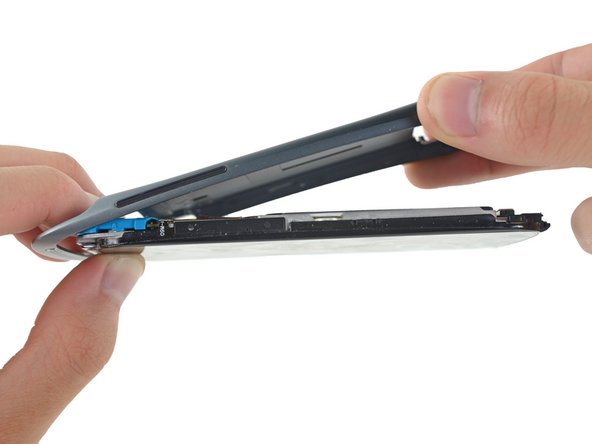
    4. HTC One S Front Facing Camera Replacement: adım 8, 2 resimden 1. HTC One S Front Facing Camera Replacement: adım 8, 2 resimden 2.
      • Starting at the groove near the headphone jack, use a plastic opening tool to lift the top casing.

      FixBot'a Sor

      Yorum Ekle

    5. HTC One S Front Facing Camera Replacement: adım 9, 1 resimden 1.
      • Use your fingers to pull the top casing off of the rest of the phone.

      FixBot'a Sor

      Yorum Ekle

    6. HTC One S Front Facing Camera Replacement: adım 10, 1 resimden 1.
      • Remove the following screws holding the rear case to the rest of the phone:

      • Two 3.15 mm Phillips #00 screws

      • One 4.15 Torx T5 screw

      • One 4 mm Torx T5 screw

      FixBot'a Sor

      Yorum Ekle

    7. HTC One S Front Facing Camera Replacement: adım 11, 3 resimden 1. HTC One S Front Facing Camera Replacement: adım 11, 3 resimden 2. HTC One S Front Facing Camera Replacement: adım 11, 3 resimden 3.
      • Place your fingers on either side of the phone and gently push up on the rear case.

      • It is important to start from the bottom of the phone because the rear case wraps around the front of the phone at the top which makes it impossible to start prying from there.

      FixBot'a Sor

      Yorum Ekle

    8. HTC One S Front Facing Camera Replacement: adım 12, 1 resimden 1.
      • Pull the rear case away from the rest of the phone with your hands.

      FixBot'a Sor

      Yorum Ekle

    1. HTC One S Front Facing Camera Replacement, Battery: adım 13, 2 resimden 1. HTC One S Front Facing Camera Replacement, Battery: adım 13, 2 resimden 2.
      • Using the pointed end of a spudger, lift the battery cable and release the connector.

      FixBot'a Sor

      Yorum Ekle

    2. HTC One S Front Facing Camera Replacement: adım 14, 2 resimden 1. HTC One S Front Facing Camera Replacement: adım 14, 2 resimden 2.
      • Switching to the flat end of the spudger, work your way underneath the battery and peel it away from the adhesive.

      FixBot'a Sor

      Yorum Ekle

    3. HTC One S Front Facing Camera Replacement: adım 15, 1 resimden 1.
      • Remove the battery from the phone.

      FixBot'a Sor

      Yorum Ekle

    1. HTC One S Front Facing Camera Replacement, Motherboard: adım 16, 1 resimden 1.
      • Remove the three 3.15mm Phillips #00 screws from the turquoise case.

      FixBot'a Sor

      Yorum Ekle

    2. HTC One S Front Facing Camera Replacement: adım 17, 2 resimden 1. HTC One S Front Facing Camera Replacement: adım 17, 2 resimden 2.
      • Using a plastic opening tool, lift the turquoise case from the end near the headphone jack.

      FixBot'a Sor

      Yorum Ekle

    3. HTC One S Front Facing Camera Replacement: adım 18, 1 resimden 1.
      • Remove the turquoise cover from the phone.

      FixBot'a Sor

      Yorum Ekle

    4. HTC One S Front Facing Camera Replacement: adım 19, 2 resimden 1. HTC One S Front Facing Camera Replacement: adım 19, 2 resimden 2.
      Bu adımda kullanılan alet:
      Tweezers
      $4.99
      • A camera filter is now free to move, so remove it using tweezers.

      FixBot'a Sor

      Yorum Ekle

    5. HTC One S Front Facing Camera Replacement: adım 20, 3 resimden 1. HTC One S Front Facing Camera Replacement: adım 20, 3 resimden 2. HTC One S Front Facing Camera Replacement: adım 20, 3 resimden 3.
      • Use tweezers to lift the yellow polyimide tape that covers the ZIF connectors.

      FixBot'a Sor

      Yorum Ekle

    6. HTC One S Front Facing Camera Replacement: adım 21, 2 resimden 1. HTC One S Front Facing Camera Replacement: adım 21, 2 resimden 2.
      • Use the pointed end of a spudger to lift the white tab on the largest ZIF connector opposite the USB connector.

      FixBot'a Sor

      Yorum Ekle

    7. HTC One S Front Facing Camera Replacement: adım 22, 3 resimden 1. HTC One S Front Facing Camera Replacement: adım 22, 3 resimden 2. HTC One S Front Facing Camera Replacement: adım 22, 3 resimden 3.
      • Use the pointed edge of a spudger to work the ZIF cable out of its connector.

      • To do this, you may have to slowly work both sides until the whole cable is released.

      FixBot'a Sor

      Yorum Ekle

    8. HTC One S Front Facing Camera Replacement: adım 23, 1 resimden 1.
      • Repeat the procedure from steps 19 and 20 to remove the cables from the remaining ZIF connectors.

      FixBot'a Sor

      Yorum Ekle

    9. HTC One S Front Facing Camera Replacement: adım 24, 2 resimden 1. HTC One S Front Facing Camera Replacement: adım 24, 2 resimden 2.
      • Using the pointed end of the spudger, pop the antenna cable from its connector on the motherboard.

      FixBot'a Sor

      Yorum Ekle

    10. HTC One S Front Facing Camera Replacement: adım 25, 1 resimden 1.
      • Remove the 3.15 mm Phillips #00 screw from the motherboard.

      FixBot'a Sor

      Yorum Ekle

    11. HTC One S Front Facing Camera Replacement: adım 26, 2 resimden 1. HTC One S Front Facing Camera Replacement: adım 26, 2 resimden 2.
      • Remove the motherboard from the rest of the phone.

      FixBot'a Sor

      Yorum Ekle

    1. HTC One S Front Facing Camera Replacement, Front Facing Camera: adım 27, 1 resimden 1.
      Bu adımda kullanılan alet:
      Tweezers
      $4.99
      • Similar to step 18, remove the polyimide tape with tweezers.

      FixBot'a Sor

      Yorum Ekle

    2. HTC One S Front Facing Camera Replacement: adım 28, 1 resimden 1.
      • Following the procedure from steps 19 & 20, open and disconnect the ZIF cable closer to the edge of the logic board.

      • The front camera ZIF connector latch on the cable side instead of being opposite the cable. It is still the white lever.

      FixBot'a Sor

      Yorum Ekle

    3. HTC One S Front Facing Camera Replacement: adım 29, 2 resimden 1. HTC One S Front Facing Camera Replacement: adım 29, 2 resimden 2.
      • Gently remove the front camera with a pair of tweezers.

      FixBot'a Sor

      Yorum Ekle

Sonuç

To reassemble your device, follow these instructions in reverse order.

İptal et: Bu kılavuzu tamamlamadım.

Jay Miley

Üyelik tarihi: 04/22/14

5.496 İtibar

13 adet Kılavuz yazıldı

Ekip

Cal Poly, Team 10-55, Amido Spring 2014 Cal Poly, Team 10-55, Amido Spring 2014 üyesi

CPSU-AMIDO-S14S10G55

4 Üyeler

168 adet Kılavuz yazıldı

0Kılavuz Yorumları

Yorum Ekle

İstatistikleri Görüntüle:

Son 24 Saat: 1

Son 7 gün: 17

Son 30 gün: 88

Her zaman: 1,735