Ana içeriğe geç
Onarım Topluluğuna Katılın - Hesap Oluşturun

HTC Touch Pro 2 Keyboard Replacement

Neye ihtiyacın var

  1. HTC Touch Pro 2 Keyboard Replacement, Battery: adım 1, 3 resimden 1. HTC Touch Pro 2 Keyboard Replacement, Battery: adım 1, 3 resimden 2. HTC Touch Pro 2 Keyboard Replacement, Battery: adım 1, 3 resimden 3.
    • Apply pressure and slide upward to remove back cover.

    • Lift the back cover up away from the phone.

    FixBot'a Sor

    Yorum Ekle

  2. HTC Touch Pro 2 Keyboard Replacement: adım 2, 2 resimden 1. HTC Touch Pro 2 Keyboard Replacement: adım 2, 2 resimden 2.
    • Lift battery upward on the upper right-hand side to remove it.

    • Check the battery to make sure there's no bent corners.

    FixBot'a Sor

    Yorum Ekle

  3. HTC Touch Pro 2 Keyboard Replacement, Housing: adım 3, 2 resimden 1. HTC Touch Pro 2 Keyboard Replacement, Housing: adım 3, 2 resimden 2.
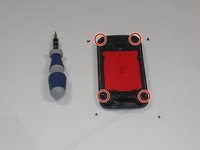
    • Using a T5 screwdriver, remove the four screws in corners as shown.

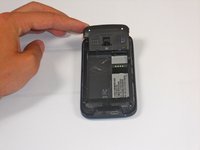
    • Lift the top portion of the rear case.

    • Potential for device damage: There is a ribbon attached on the back of this part that requires caution to remove.

    FixBot'a Sor

    Yorum Ekle

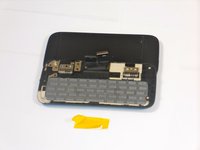
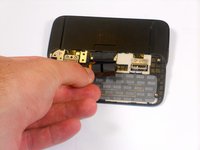
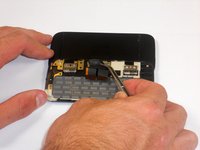
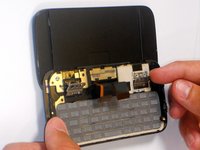
  4. HTC Touch Pro 2 Keyboard Replacement: adım 4, 3 resimden 1. HTC Touch Pro 2 Keyboard Replacement: adım 4, 3 resimden 2. HTC Touch Pro 2 Keyboard Replacement: adım 4, 3 resimden 3.
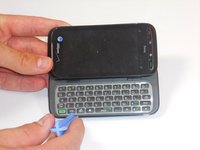
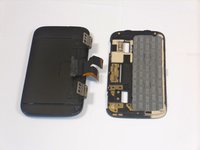
    • Using an IfixIt Plastic Tool, detach the plastic casing from the keyboard. This may require some force.

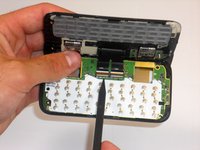
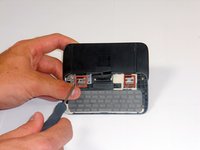
    • Using a spudger or other thin tool, carefully pry up ZIF connectors as shown. This will allow the black ribbons to detach from the keyboard.

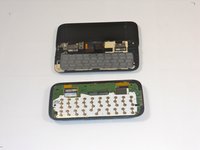
    • Slide the two parts away from each other so that the black ribbons slide through the slots and you will now have housing into two parts.

    FixBot'a Sor

    Yorum Ekle

  5. HTC Touch Pro 2 Keyboard Replacement, Keyboard: adım 5, 3 resimden 1. HTC Touch Pro 2 Keyboard Replacement, Keyboard: adım 5, 3 resimden 2. HTC Touch Pro 2 Keyboard Replacement, Keyboard: adım 5, 3 resimden 3.
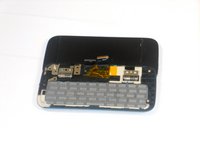
    • Peel off the yellow ribbon shown slowly.

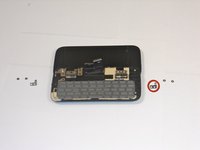
    • Unscrew the fours screws shown in red squares (two in each square) using a 00 screwdriver.

    • After the screws are out, you will be able to easily take off the small metal pieces circled in red.

    FixBot'a Sor

    Yorum Ekle

  6. HTC Touch Pro 2 Keyboard Replacement: adım 6, 3 resimden 1. HTC Touch Pro 2 Keyboard Replacement: adım 6, 3 resimden 2. HTC Touch Pro 2 Keyboard Replacement: adım 6, 3 resimden 3.
    Bu adımda kullanılan alet:
    Tweezers
    $4.99
    • Slowly pull dual black strip off using force.

    • Behind the dual black strip is very sticky piece of grey tape. Use tweezers (preferably ones with ridges) to peel off the tape. Be careful not to rip it.

    FixBot'a Sor

    Yorum Ekle

  7. HTC Touch Pro 2 Keyboard Replacement: adım 7, 2 resimden 1. HTC Touch Pro 2 Keyboard Replacement: adım 7, 2 resimden 2.
    • Lift ZIF connectors up.

    • Carefully lift keyboard frame away from display screen.

    • You now have the keyboard detached.

    FixBot'a Sor

    Yorum Ekle

Sonuç

To reassemble your device, follow these instructions in reverse order.

İptal et: Bu kılavuzu tamamlamadım.

Bir başkası bu kılavuzu tamamladı.

Melinda Phan

Üyelik tarihi: 04/17/11

438 İtibar

9 adet Kılavuz yazıldı

Ekip

Cal Poly, Team 9-64, Walters Spring 2011 Cal Poly, Team 9-64, Walters Spring 2011 üyesi

CPSU-WALTERS-S11S9G64

5 Üyeler

27 adet Kılavuz yazıldı

0Kılavuz Yorumları

Yorum Ekle

İstatistikleri Görüntüle:

Son 24 Saat: 0

Son 7 gün: 8

Son 30 gün: 32

Her zaman: 4,832