Ana içeriğe geç
Onarım Topluluğuna Katılın - Hesap Oluşturun

Hard Drive

Neye ihtiyacın var

  1. Hard Drive, Battery: adım 1, 1 resimden 1.
    • Before proceeding, power down your Laptop and remove the power cable.

    • Close the display and lay it on a flat surface, top-side down.

    FixBot'a Sor

    Yorum Ekle

  2. Hard Drive: adım 2, 1 resimden 1.
    • Unlock the battery by sliding the battery lock to the unlock part.

    FixBot'a Sor

    Yorum Ekle

  3. Hard Drive: adım 3, 1 resimden 1.
    • Slide the middle lock to the right and the battery will pop up.

    FixBot'a Sor

    Yorum Ekle

  4. Hard Drive: adım 4, 1 resimden 1.
    • If you want to replace the battery and nothing else then now is the time to do so.

    • Once the battery hatch is unlocked you can now safely remove the battery.

    FixBot'a Sor

    Yorum Ekle

  5. Hard Drive, Hard Drive: adım 5, 1 resimden 1.
    • Use a Philips J1 driver to remove two screws securing the hard drive cover.

    FixBot'a Sor

    Yorum Ekle

  6. Hard Drive: adım 6, 1 resimden 1.
    • If the hard drive is not located here, then it will be located in the next step.

    • Now you can remove, replace or upgrade the hard drive to an SSD if you need to.

    FixBot'a Sor

    Yorum Ekle

  7. Hard Drive: adım 7, 1 resimden 1.
    • If your hard drive was not located in the previous spot or you have two drives then this one is located here.

    • Use a Philips J1 driver to remove eight screws securing the bottom case.

    FixBot'a Sor

    Yorum Ekle

  8. Hard Drive: adım 8, 1 resimden 1.
    • After removing the bottom panel cover, then you should spot the hard drive right here.

    FixBot'a Sor

    Yorum Ekle

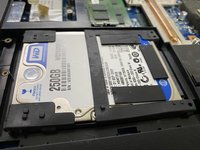
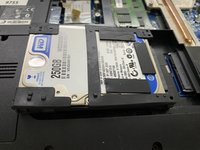
  9. Hard Drive: adım 9, 2 resimden 1. Hard Drive: adım 9, 2 resimden 2.
    • While removing the hard drive, try to be gentle.

    • Now you can simply upgrade, replace or remove the hard drive right here. To remove it, push it from the two corners and it should come off like in the next picture.

    FixBot'a Sor

    Yorum Ekle

Sonuç

To reassemble your device, follow these instructions in reverse order.

İptal et: Bu kılavuzu tamamlamadım.

Bir başkası bu kılavuzu tamamladı.

Regome

Üyelik tarihi: 01/20/23

866 İtibar

7 adet Kılavuz yazıldı

0Kılavuz Yorumları

Yorum Ekle

İstatistikleri Görüntüle:

Son 24 Saat: 0

Son 7 gün: 7

Son 30 gün: 30

Her zaman: 433