Bu çeviri bir makine tarafından oluşturulmuştur ve henüz bir kişi tarafından incelenmemiştir. Bu dili konuşuyor musunuz? İnceleme için.
Giriş
2016 Honda Civic, normal kilitleme/kilidi açma mekanizmasının yanı sıra motoru çalıştırmak için anahtarsız uzaktan kumanda kullanır. Pil olmadan araç çalıştırılamaz. Bu kılavuz, 2016 Honda Civic anahtarsız uzaktan kumandanın içindeki değişim pilinin nasıl değiştirileceğini göstermektedir.
Neye ihtiyacın var
-
-
-
Değişim pilini hazır bulundurduğunuzdan emin olun. 1 adet CR 2032 Lityum pile ihtiyacınız olacak.
-
Uzaktan kumandanın arka kısmındaki düğmeyi kaydırıp anahtarı dışarı çekerek metal anahtarı çıkarın.
 FixBot'a Sor
-
-
-
Anahtarı çıkardıktan sonra 2 adet plastik çubuk göreceksiniz. Burası, uzaktan kumandayı ikiye ayırabileceğiniz yerdir.
-
Üretici madeni para kullanılmasını önermektedir ancak herhangi bir sert alet veya hatta anahtarın kendisi de iş görecektir.
-
Üretici, plastik çubukların ezilmesini önlemek için madeni paranızı veya açma aletinizi bir bezle kaplamanızı önermiştir.
-
-
-
-
Artık hafifçe kaldırarak açabilirsiniz.
-
Eski bataryayı sol taraftan çıkarın.
-
Bataryanın + tarafının yukarıya baktığını unutmayın.
-
-
-
Yeni bir CR 2032 bataryayı önce sağ taraftan yerleştirin ve ardından bataryanın üzerine bastırın. Batarya yerine oturduğunda bir 'klik' sesi gelmelidir.
-
Bataryanın + tarafının yukarıya baktığından tekrar emin olun.
-
-


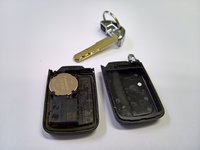
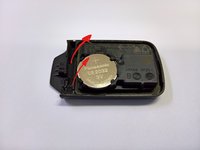
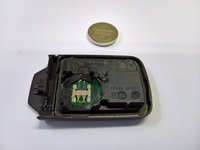


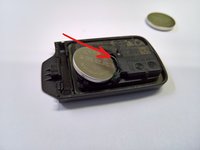

Cihazınızı tekrar birleştirmek için bu talimatları ters sırayla uygulayın.
İptal et: Bu kılavuzu tamamlamadım.
18 farklı kişi bu kılavuzu tamamladı.


