Giriş
Warning: This is for educational purposes only; I'm not liable if the reader makes a mistake that reduces usability of the console. Firmware installations and generally everything involving the HDD is risky, and by following these steps you are taking that risk.
Neye ihtiyacın var
-
-
Before beginning this guide, it is best to read through the steps for the hardware portion, as shown here
-
You will also need a PC running Windows, and a hard drive reader (SATA Data and SATA Power to USB)
-
Seagate drives have been known to cause issues with XBox One software.
-
-
-
Connect the new hard drive to the PC. Make sure that the HDD is in a location where it will not be accidentally disconnected.
-
-
-
-
Press the Windows key/Start menu and type in "CMD", right click, and select 'Run as Administrator"
-
Type the command "cd C:\Users\(Your Name)\Downloads\xboxonehdd-master-6.1\xboxonehdd-master\win"
-
Replace (Your name) with the name of your user profile.
-
-
-
-
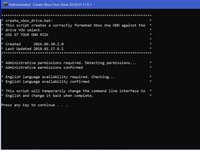
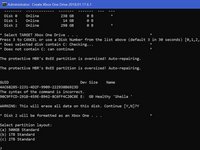
Run the command "create_xbox_drive"
-
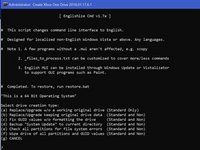
The next steps are to create a drive that has either 500GB, 1TB, or 2TB storage. If at anytime you get confused, there is a readme file in the folder you extracted that can help out as well.
-
-
-
For this tutorial, we are using the first option (a) Replace/Upgrade w/o a working original drive.
-
-
-
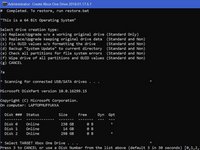
Make sure to choose the right drive to format, Disk 0 is almost always your operating system, DO NOT CHOOSE DISK 0.
-
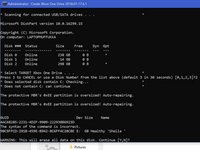
It will ask you to confirm your selection.
-
Then you will need to choose the size of the drive you have created.
-
-
-
Once the command line displays 6 lines of long numbers with "GUID" at the top, the command lines is finished.
-
If this doesn't work, clean the disk with diskpart, link below, and try again.
-
-
-
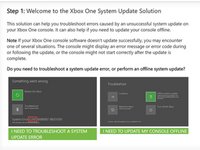
You need to go to the Xbox official site and download a file called OSU 1.
-
Select "I need to update my console offline"
-
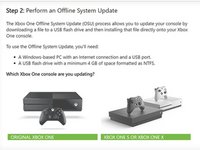
Select "Xbox One S or Xbox One X"
-
Click the green link "OSU1" to start the download.
-
-
-
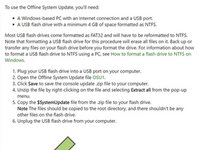
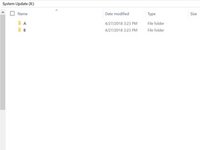
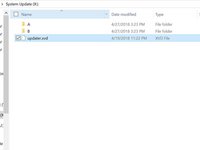
Navigate to the System Update (X) drive, and create 2 folders, one labeled "A" and one "B"
-
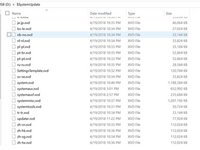
Extract all of the files from OSU1, and copy everything in $SystemUpdate, except for "updater.xvd"
-
Paste these files in the folders "A" and "B" that you created.
-
Copy "updater.xvd" from $SystemUpdate and paste it in the root of System Update (X)
-
-
-
Safely eject the media and put it back into the Xbox
-
Reassemble the XBox and then start it up
-
-
-
Some users have experienced sign in issues after an ssd upgrade. If this occurs, simply reset the console (keep games and apps if need be.) and that should resolve the issue.
-
Those who have their Xbox set to "energy saving" mode for startup may experience a 20-30 second black screen before boot. Changing this setting to "instant on" resolves this issue.
-
Now enjoy 20x faster r/w speeds and loading times a fraction of that of a standard HDD.
-
-
-
You are now finished, enjoy your Xbox!
-
Note: This does work with Solid State Drives.
-

 FixBot'a Sor










To reassemble your device, put the hard drive back in the Xbox One S and reassemble.
İptal et: Bu kılavuzu tamamlamadım.
2 farklı kişi bu kılavuzu tamamladı.

