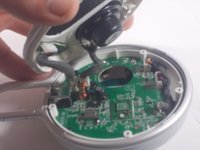
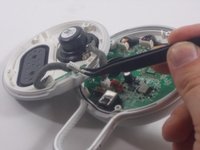
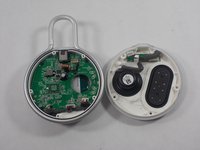
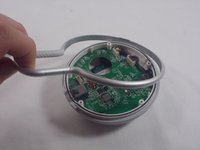
Ana içeriğe geç
Onarım Topluluğuna Katılın - Hesap Oluşturun

JBL Clip 3 Battery Replacement

Neye ihtiyacın var

  1. JBL Clip 3 Battery Replacement, Speaker Grill: adım 1, 2 resimden 1. JBL Clip 3 Battery Replacement, Speaker Grill: adım 1, 2 resimden 2.
    • Insert the iFixit opening tool between the speaker grill and speaker housing and pry around the entire perimeter of the device until the grill releases.

    • A strong adhesive attaches the grill to the housing, and requires some time and patience to break. Use mild heat to loosen the adhesive if necessary.

    FixBot'a Sor

    Yorum Ekle

  2. JBL Clip 3 Battery Replacement, Speaker Housing: adım 2, 2 resimden 1. JBL Clip 3 Battery Replacement, Speaker Housing: adım 2, 2 resimden 2.
    • Use a Phillips #1 screwdriver to remove the five 6.3 mm screws around the perimeter.

    FixBot'a Sor

    Yorum Ekle

  3. JBL Clip 3 Battery Replacement: adım 3, 1 resimden 1.
    • Separate the speaker housing from the rest of the body.

    • This requires minimal force; they are not glued together.

    FixBot'a Sor

    Yorum Ekle

  4. JBL Clip 3 Battery Replacement: adım 4, 2 resimden 1. JBL Clip 3 Battery Replacement: adım 4, 2 resimden 2.
    Bu adımda kullanılan alet:
    Tweezers
    $4.99
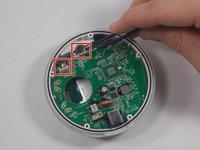
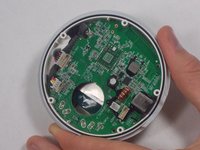
    • Use tweezers to remove the 2 pin and 4 pin connectors from the motherboard.

    FixBot'a Sor

    Yorum Ekle

  5. JBL Clip 3 Battery Replacement, Carabiner Clip: adım 5, 2 resimden 1. JBL Clip 3 Battery Replacement, Carabiner Clip: adım 5, 2 resimden 2.
    • Lift the metal carabiner clip from the speaker housing.

    • They are not glued together and should separate easily.

    • There are alignment tabs on the clip so the whole assembly will only reassemble in one orientation.

    FixBot'a Sor

    Yorum Ekle

  6. JBL Clip 3 Battery Replacement, Speaker Battery: adım 6, 2 resimden 1. JBL Clip 3 Battery Replacement, Speaker Battery: adım 6, 2 resimden 2.
    Bu adımda kullanılan alet:
    Tweezers
    $4.99
    • Use a pair of tweezers to lift the two cable connectors from their motherboard sockets.

    • The wires connecting to the battery are not very long, so be careful when removing them.

    FixBot'a Sor

    Yorum Ekle

  7. JBL Clip 3 Battery Replacement: adım 7, 1 resimden 1.
    • Use a Phillips #1 screwdriver to remove the four screws that secure the motherboard.

    FixBot'a Sor

    Yorum Ekle

  8. JBL Clip 3 Battery Replacement: adım 8, 1 resimden 1.
    • Gently lift the motherboard away from the speaker housing.

    • Take care not to damage the soldered connections when lifting the motherboard.

    FixBot'a Sor

    Yorum Ekle

  9. JBL Clip 3 Battery Replacement: adım 9, 2 resimden 1. JBL Clip 3 Battery Replacement: adım 9, 2 resimden 2.
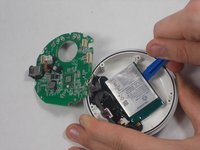
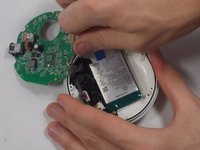
    • Use an opening tool to carefully pry your way around the battery, slowly lifting it off of the epoxy until it fully releases.

    • Avoid puncturing or bending the battery. It is a Lithium cell, so there is a bit of risk involved when completing this step. Be careful and patient, and there will not be any complications.

    • During reassembly, remember to superglue the new battery back into place.

    FixBot'a Sor

    Yorum Ekle

Sonuç

To reassemble your device, follow these instructions in reverse order.

İptal et: Bu kılavuzu tamamlamadım.

6 farklı kişi bu kılavuzu tamamladı.

Kyle Montague

Üyelik tarihi: 03/28/22

265 İtibar

2 adet Kılavuz yazıldı

Ekip

UMass Dartmouth, Team 1-5, Petersen Spring 2022 UMass Dartmouth, Team 1-5, Petersen Spring 2022 üyesi

UMASSD-PETERSEN-S22S1G5

3 Üyeler

10 adet Kılavuz yazıldı

3Kılavuz Yorumları

Thanks, but unless I missed something I don't see the recommended battery to replace with (only that it's a 1000mAh). Under "what you need" there's no mention of battery.

B.Bender - Yanıt Paylaş

Amazon and others sell them. Just Google "JBL Clip 3 battery for sale". Price varies widely.

CalTee - Yanıt Paylaş

Thank you - very helpful guide! Was able to replace my battery with no issues.

JB Zorg - Yanıt Paylaş

Yorum Ekle

İstatistikleri Görüntüle:

Son 24 Saat: 4

Son 7 gün: 50

Son 30 gün: 187

Her zaman: 10,872