Ana içeriğe geç

JVC MP-XP7210D RAM Replacement

  1. JVC MP-XP7210D RAM Replacement, RAM: adım 1, 3 resimden 1. JVC MP-XP7210D RAM Replacement, RAM: adım 1, 3 resimden 2. JVC MP-XP7210D RAM Replacement, RAM: adım 1, 3 resimden 3.
    • Remove the screws of the backplate.

    • See part 2

    • Remove the battery after the screws are removed.

  2. JVC MP-XP7210D RAM Replacement: adım 2, 3 resimden 1. JVC MP-XP7210D RAM Replacement: adım 2, 3 resimden 2. JVC MP-XP7210D RAM Replacement: adım 2, 3 resimden 3.
    • Push and slide to the right.

    • There are 2 locking lugs.

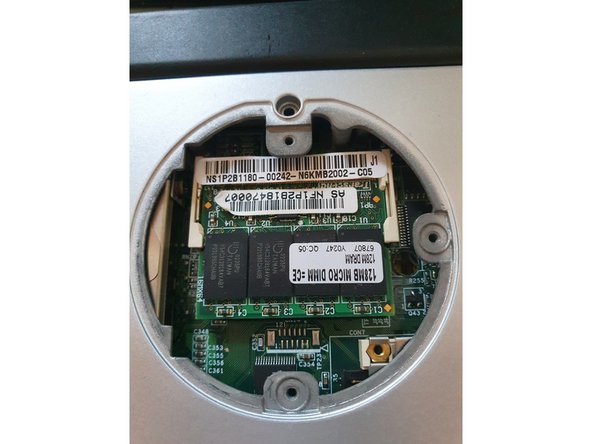
  3. JVC MP-XP7210D RAM Replacement, Remove DIMM: adım 3, 3 resimden 1. JVC MP-XP7210D RAM Replacement, Remove DIMM: adım 3, 3 resimden 2. JVC MP-XP7210D RAM Replacement, Remove DIMM: adım 3, 3 resimden 3.
    • Push both locking lugs to the sides.

    • Pull it out.

    • 128 MB (max. 256MB) PC133

Sonuç

To reassemble your device, follow these instructions in reverse order.

Alex Barblexi

Üyelik tarihi: 03/12/19

318 İtibar

3 adet Kılavuz yazıldı

0Kılavuz Yorumları

Yorum Ekle

İstatistikleri Görüntüle:

Son 24 Saat: 0

Son 7 gün: 0

Son 30 gün: 0

Her zaman: 85