Ana içeriğe geç
Onarım Topluluğuna Katılın - Hesap Oluşturun

Jabra Elite 85h Microphone Replacement

Neye ihtiyacın var

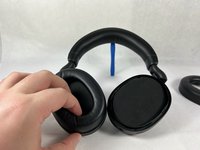
  1. Jabra Elite 85h Microphone Replacement, Ear Cushion: adım 1, 3 resimden 1. Jabra Elite 85h Microphone Replacement, Ear Cushion: adım 1, 3 resimden 2. Jabra Elite 85h Microphone Replacement, Ear Cushion: adım 1, 3 resimden 3.
    • Remove each ear cushion by hooking your fingers along the inside of the ear cushion and pulling up and away from the ear cup.

    • If the cushion does not fully release, move your hand to the opposite side and pull up inn the same manner.

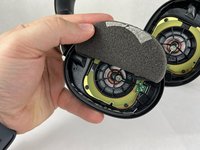
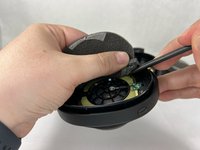
  2. Jabra Elite 85h Microphone Replacement, Speaker: adım 2, 3 resimden 1. Jabra Elite 85h Microphone Replacement, Speaker: adım 2, 3 resimden 2. Jabra Elite 85h Microphone Replacement, Speaker: adım 2, 3 resimden 3.
    • The foam inserts and backing tape are very delicate. Take your time when removing them, and be careful to not rip or tear the material.

    • Using the small plastic spudger to assist, begin lifting up and removing the foam inserts with attached backing tape.

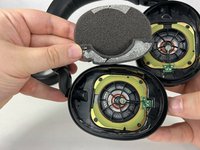
  3. Jabra Elite 85h Microphone Replacement: adım 3, 3 resimden 1. Jabra Elite 85h Microphone Replacement: adım 3, 3 resimden 2. Jabra Elite 85h Microphone Replacement: adım 3, 3 resimden 3.
    • Repeat the previous steps for the other side, removing the foam inserts with care.

  4. Jabra Elite 85h Microphone Replacement: adım 4, 1 resimden 1.
    • Unscrew and remove the four T6 screws holding the speaker in place.

  5. Jabra Elite 85h Microphone Replacement: adım 5, 1 resimden 1.
    • Repeat the previous step for the other side, removing the four T6 screws.

  6. Jabra Elite 85h Microphone Replacement: adım 6, 1 resimden 1.
    • Tilt the headphones over so that the speaker tilts out of the plastic holder.

    • Repeat for both sides.

  7. Jabra Elite 85h Microphone Replacement, Microphone: adım 7, 2 resimden 1. Jabra Elite 85h Microphone Replacement, Microphone: adım 7, 2 resimden 2.
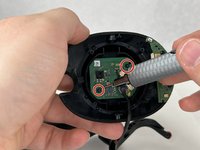
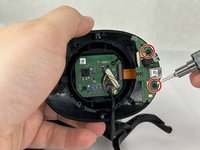
    • Remove the four screws attaching the circuit boards to the headphone enclosure.

    • The microphone is located on the lower circuit board.

  8. Jabra Elite 85h Microphone Replacement: adım 8, 3 resimden 1. Jabra Elite 85h Microphone Replacement: adım 8, 3 resimden 2. Jabra Elite 85h Microphone Replacement: adım 8, 3 resimden 3.
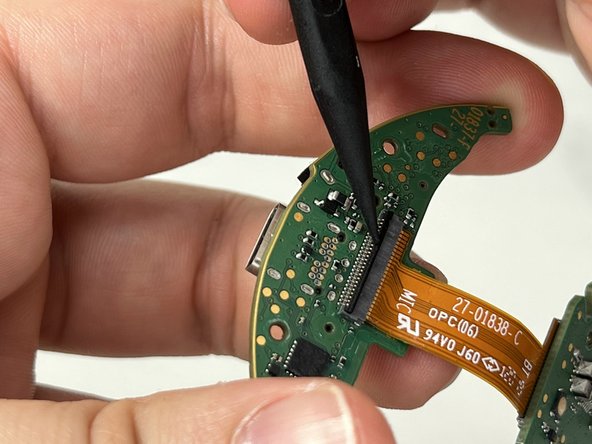
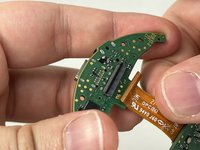
    • Remove the circuit boards from the headphone enclosure.

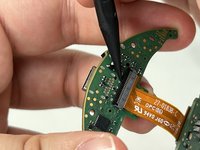
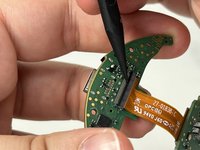
    • Carefully lift the bar located on the lower circuit board that contains the 24-pin ribbon cable. Remove the cable.

Sonuç

If the microphone on your Jabra Elite 85h is not working, replacement could be an appropriate solution.

Bir başkası bu kılavuzu tamamladı.

Ryan Callaghan

Üyelik tarihi: 03/13/23

965 İtibar

4 adet Kılavuz yazıldı

Ekip

UMass Dartmouth, Team 3-4, Petersen Spring 2023 UMass Dartmouth, Team 3-4, Petersen Spring 2023 üyesi

UMASSD-PETERSEN-S23S3G4

4 Üyeler

12 adet Kılavuz yazıldı

0Kılavuz Yorumları

Yorum Ekle

İstatistikleri Görüntüle:

Son 24 Saat: 1

Son 7 gün: 12

Son 30 gün: 45

Her zaman: 1,685