Bu çeviri bir makine tarafından oluşturulmuştur ve henüz bir kişi tarafından incelenmemiştir. Bu dili konuşuyor musunuz? İnceleme için.

Kindle Paperwhite 11. Nesil Sökme

mcvtech ve başka bir katkıda bulunan
En son 15 Ağu 2026 tarihinde güncellendi
Görüntüleme: 18 B
İstatistikleri görüntüle:
- Son 24 Saat:
- 27
- Son 7 Gün:
- 201
- Son 30 Gün:
- 940
- Her zaman:
- 18.235
Yorumlar: 15
6 comments on steps, 9 guide comments.
Go to guide commentsTamamlandı: 16 17
16 kişi bu kılavuzu "tamamlandı" olarak işaretledi. Sıradaki sen olacak mısın?
17 kişi bu kılavuzu "tamamlandı" olarak işaretledi. Siz de dahil - harika iş!
Sık Kullanılanlar: 1 2
1 kişi bu kılavuzu favorilerine ekledi (ve abone oldu). Sıradaki sen olacak mısın?
Siz de dahil olmak üzere 2 kişi bu kılavuzu favorilerine ekledi (ve abone oldu)!
Topluluk-Katkılı Kılavuz
Topluluğumuzdan muhteşem birisi bu kılavuzu hazırladı. Bu kılavuz iFixit elemanları tarafından oluşturulmamıştır.
Giriş
1. adıma git ↓Açması şaşırtıcı derecede kolay; sadece klipsler var! Yaşasın! Başkalarının da onarım rehberleri ile devam edebilmesi adına ilk kılavuzu yayınlayarak başlamak istedim. Ne ile karşılaşacağınızı bilmediğinizde ilk adım her zaman en zorudur, ancak bunu yavaş ve dikkatli bir şekilde deneyin; cihazı kısa sürede açmış olacaksınız!
Neye ihtiyacın var
Aletler


-
-
-
Arka kapağı ekrandan ayırmaya başlamak için bir pena tarzı açma aracı ve/veya siyah ayırma aparatı kullanarak köşelerden birinden başlayın. Köşe gevşediğinde, arka kapağı kanırtıp ayırabildiğinizi fark edeceksiniz; ardından penanızı bir sonraki köşeye doğru kaydırın.
 FixBot'a Sor
-
-
-
Bu aşamada, bir veya daha fazla köşeyi gevşettiğiniz için neredeyse elinizle ayırabilirsiniz; ancak plastik kısımları kırmamak adına, açma aletini her köşenin etrafında dolaştırarak ilerlemeniz en güvenli yöntemdir (klips yapısı için açık kasa fotoğrafına bakın).
-
-
-
Ah, işte içi açılmış bir Kindle... harika bir his. Düşündüğümüzden daha kolaymış. Karışık yapıştırıcılar yok. Arka kasada kablo da yok, sadece klipsleri açın, klipsleri açın... tık, tık, tık.
-
-
-
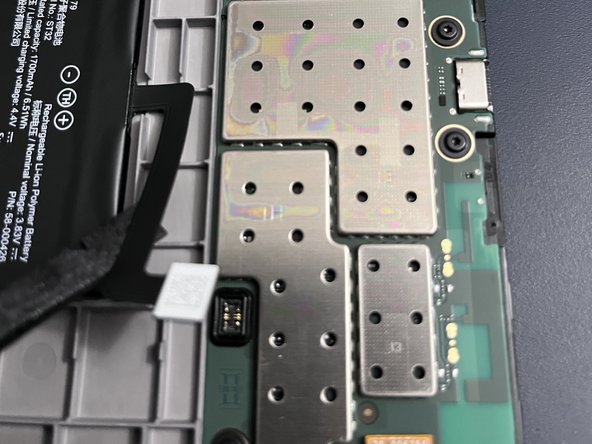
Bundan sonra aklınızda hangi onarım olursa olsun, işe her zaman bataryayı ayırarak başlayın; siyah tamir aleti bu konuda en iyi yardımcınızdır. Kolay gelsin.
-
-
-
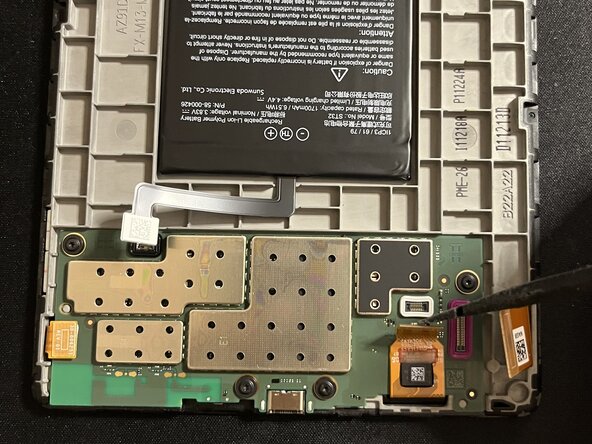
Tüm ribbon kabloları karttan dikkatlice kaldırın. Plastik kanırtma aparatı veya metal bir spudger en iyi sonucu verir. Elektrostatiğe karşı güvenli aletler kullanın.
-
-
-
Sıradaki ribbon kabloyu kaldırırken, alt kısmın yapıştırılmış olduğuna dikkat edin; tedbirli davranın.
-
-
-
-
Kart yapıştırılmış olduğundan, kartın kenarları boyunca ısı tabancası kullanın. Sol alt köşeye özellikle dikkat edin; orada daha güçlü bir siyah yapışkan şeridi bulunur ve yapıştırıcı ısındıktan sonra ana ayırma işleminizi burada gerçekleştireceksiniz. Isıya dayanıklı mat kullanın ve her zaman olduğu gibi aşırı ısıtmamaya dikkat edin. Acele etmeyin.
-
-
-
Kenarlar ve yapıştırıcı ısındıktan sonra, kartı sabit bir pozisyonda destekleyerek alt köşeyi ayırmaya başlayın. Acele etmeyin ve gerektiğinde yeniden ısıtın. Kartın kenarlarını kademeli olarak gevşetmek için elinizdeki en ince düz açma penalarını kullanın ve karta zarar vermemeye özen gösterin. Karta hala bağlı bir kablo olduğu için kartı üstten kaldırmanız gerektiğini unutmayın.
-
-






Cihazınızı yeniden toplamak için bu talimatları ters sırada uygulayın.
İptal et: Bu kılavuzu tamamlamadım.
16 farklı kişi bu kılavuzu tamamladı.


9Kılavuz Yorumları
Amazing. Thank you! I see my screen data ribbon is missing a pin (it snapped off) but I still have it. Not sure i can fix it but perhaps can get a new ribbon. Do you know the part number?
La placa esta pegada al marco? No sale facilmente. Te has quedado en como abrirlo pero luego habria que explicar como quitar la bateria o la placa para cambiar la pantalla
looks like the battery is stuck. Did you manage to remove it (I need to change the eink screen) ?
