Ana içeriğe geç
Onarım Topluluğuna Katılın - Hesap Oluşturun

Konica Minolta DiMAGE Z3 LCD Screen Replacement

Neye ihtiyacın var

  1. Konica Minolta DiMAGE Z3 LCD Screen Replacement, Open the battery chamber: adım 1, 2 resimden 1. Konica Minolta DiMAGE Z3 LCD Screen Replacement, Open the battery chamber: adım 1, 2 resimden 2.
    • Open the battery chamber door by sliding the door to the side of the camera to release the safety catch.

    • Lift the door up to open.

    FixBot'a Sor

    Yorum Ekle

  2. Konica Minolta DiMAGE Z3 LCD Screen Replacement, Insert the batteries: adım 2, 1 resimden 1.
    • Insert the four batteries inside of the battery chamber door.

    • Make sure the positive and negative battery terminals are in the correct position.

    FixBot'a Sor

    Yorum Ekle

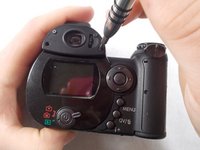
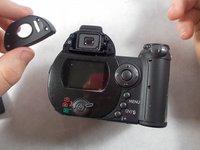
  3. Konica Minolta DiMAGE Z3 LCD Screen Replacement, Remove the viewfinder cover: adım 3, 2 resimden 1. Konica Minolta DiMAGE Z3 LCD Screen Replacement, Remove the viewfinder cover: adım 3, 2 resimden 2.
    • Use a screwdriver to remove the four viewfinder cover screws.

    FixBot'a Sor

    Yorum Ekle

  4. Konica Minolta DiMAGE Z3 LCD Screen Replacement, Remove viewfinder screws: adım 4, 1 resimden 1.
    • Remove the 2 small screws under the viewfinder.

    FixBot'a Sor

    Yorum Ekle

  5. Konica Minolta DiMAGE Z3 LCD Screen Replacement, Remove the screen cover: adım 5, 1 resimden 1.
    • Remove the screen cover by applying slight pressure at the top, then pulling the screen protector away from the camera.

    • Do not apply pressure to the surface of the LCD screen or it may be permanently damaged. If fingerprints are on the LCD monitor, gently wipe with a soft, clean, dry cloth.

    FixBot'a Sor

    Yorum Ekle

  6. Konica Minolta DiMAGE Z3 LCD Screen Replacement, Remove screws from the bottom panel: adım 6, 1 resimden 1.
    • Remove 6 screws on the bottom panel.

    FixBot'a Sor

    Yorum Ekle

  7. Konica Minolta DiMAGE Z3 LCD Screen Replacement, Remove screw from battery chamber: adım 7, 1 resimden 1.
    • Remove 1 screw on the outer side of the battery chamber.

    • This will be under the rubber grip.

    FixBot'a Sor

    Yorum Ekle

  8. Konica Minolta DiMAGE Z3 LCD Screen Replacement: adım 8, 1 resimden 1.
    • Remove 1 screw inside the battery chamber.

    FixBot'a Sor

    Yorum Ekle

  9. Konica Minolta DiMAGE Z3 LCD Screen Replacement: adım 9, 1 resimden 1.
    • Pull the wrist strap away from the front of the camera to remove it.

    • Then carefully pull the back casing apart from the camera.

    FixBot'a Sor

    Yorum Ekle

  10. Konica Minolta DiMAGE Z3 LCD Screen Replacement: adım 10, 1 resimden 1.
    • Remove the 3 screws that attach the LCD screen to the circuit board.

    FixBot'a Sor

    Yorum Ekle

  11. Konica Minolta DiMAGE Z3 LCD Screen Replacement: adım 11, 1 resimden 1.
    • Gently remove the LCD screen from the circuit board.

    • There will be a ribbon cable and some wires attached to the LCD screen.

    FixBot'a Sor

    Yorum Ekle

  12. Konica Minolta DiMAGE Z3 LCD Screen Replacement: adım 12, 1 resimden 1.
    Bu adımda kullanılan alet:
    Tweezers
    $4.99
    • Use tweezers to carefully pull the ribbon cable from the circuit board, not from the LCD screen.

    • Peel back tape on LCD screen to reveal where the wires are attached. Use tweezers to detach the wires from the LCD screen.

    FixBot'a Sor

    Yorum Ekle

Sonuç

To reassemble your device, follow these instructions in reverse order.

İptal et: Bu kılavuzu tamamlamadım.

Hieu Ngo

Üyelik tarihi: 03/22/17

431 İtibar

4 adet Kılavuz yazıldı

Ekip

UMass Dartmouth, Team S7-G4, Julie Spring 2017 UMass Dartmouth, Team S7-G4, Julie Spring 2017 üyesi

UMASSD-JULIE-S17S7G4

4 Üyeler

8 adet Kılavuz yazıldı

0Kılavuz Yorumları

Yorum Ekle

İstatistikleri Görüntüle:

Son 24 Saat: 2

Son 7 gün: 11

Son 30 gün: 48

Her zaman: 1,177