Giriş
This guide will walk readers through the steps toward replacing the SIM card.
Neye ihtiyacın var
-
-
-
Look for a small indentation on the bottom of the phone.
-
Insert the plastic opening tool into the indentation and lift off the back casing.
 FixBot'a Sor
-
-
-
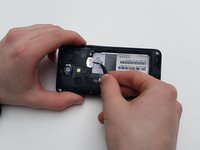
The large white component is the battery. Look for a small indentation under the arrow that says "LIFT."
-
Place the plastic opening tool in the indentation and lift the battery out of the socket.
-
-
-
-



Sonuç
To reassemble your device, follow these instructions in reverse order.

Ekip

University of Kentucky Louisville, Team 1-5, Matravers Spring 2016 University of Kentucky Louisville, Team 1-5, Matravers Spring 2016 üyesi
LOUISVILLE-MATRAVERS-S16S1G5
3 Üyeler
66 adet Kılavuz yazıldı
