Giriş
How to replace the screen in an LG Ally VS740.
Neye ihtiyacın var
-
-
Remove Battery
-
Remove all 6 screws that are on the outer edge of phone
 FixBot'a Sor
-
-
-
Remove backcasing connected to the rest of the phone.
-
Remove the phillip screw from the small white box on the top left corner that’s on the battery platform of the phone.
-
-
-
Remove phone sticker and remove screw under the sticker. Now you can remove the motherboard. Be careful with the tether still connected to it.
-
Remove tether.
-
-
-
-
Remove the keyboard, and the rubber caps behind the phone.
-
To the right hand side of where the keyboard was, remove the four screws shown.
-
-
-
Release clips with prying tool and take off the next layer of the phone.
-
-
-
Release the pop-connectors, and the flex cable at the top by the speaker.
-
. Now you can easily remove the yellow cabling on the phone.
-
-
-
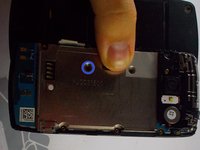
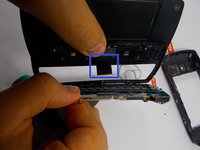
Release jaw connector. Now remove LCD screen. You can now replace the screen.
-




To reassemble your device, follow these instructions in reverse order.
İptal et: Bu kılavuzu tamamlamadım.
5 farklı kişi bu kılavuzu tamamladı.

Ekip

UMass Dartmouth, Team 5-6, Vijaybhaskar Fall 2014 UMass Dartmouth, Team 5-6, Vijaybhaskar Fall 2014 üyesi
UMASSD-VIJAYBHASKAR-F14S5G6
3 Üyeler
12 adet Kılavuz yazıldı
