Ana içeriğe geç
Onarım Topluluğuna Katılın - Hesap Oluşturun

LG CF360 Motherboard Replacement

Neye ihtiyacın var

  1. LG CF360 Motherboard Replacement, Battery: adım 1, 2 resimden 1. LG CF360 Motherboard Replacement, Battery: adım 1, 2 resimden 2.
    • On the back of the phone, place your thumb on the three raised bumps and slide the back cover upward.

    FixBot'a Sor

    Yorum Ekle

  2. LG CF360 Motherboard Replacement: adım 2, 1 resimden 1.
    • Lift and remove the battery.

    FixBot'a Sor

    Yorum Ekle

  3. LG CF360 Motherboard Replacement, Back Cover: adım 3, 2 resimden 1. LG CF360 Motherboard Replacement, Back Cover: adım 3, 2 resimden 2.
    Bu adımda kullanılan alet:
    Tweezers
    $4.99
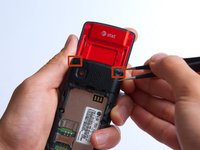
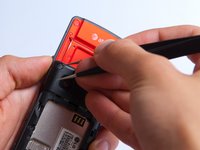
    • Remove the two screw covers at the top of phone with tweezers.

    FixBot'a Sor

    Yorum Ekle

  4. LG CF360 Motherboard Replacement: adım 4, 1 resimden 1.
    • Remove the six Phillips #000 (3mm) screws.

    FixBot'a Sor

    Yorum Ekle

  5. LG CF360 Motherboard Replacement: adım 5, 3 resimden 1. LG CF360 Motherboard Replacement: adım 5, 3 resimden 2. LG CF360 Motherboard Replacement: adım 5, 3 resimden 3.
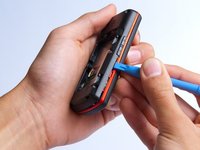
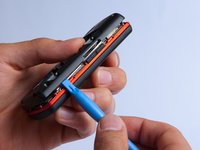
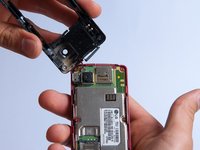
    • Use the plastic opening tool to pry the back cover off. Insert the tool between the back cover and red mid section and go around the entire phone.

    • The plastic side buttons fall out when you take the back cover off.

    • The back cover is connected to the speaker by red and black wires.

    FixBot'a Sor

    Yorum Ekle

  6. LG CF360 Motherboard Replacement: adım 6, 1 resimden 1.
    • Use the tweezers to remove the red and black wires connecting the speaker to the green motherboard by pinching the sides of the plastic base near the motherboard.

    • Set the back cover with the speaker aside.

    FixBot'a Sor

    Yorum Ekle

  7. LG CF360 Motherboard Replacement, Motherboard: adım 7, 2 resimden 1. LG CF360 Motherboard Replacement, Motherboard: adım 7, 2 resimden 2.
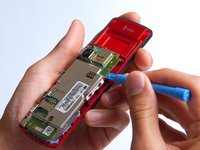
    • Use the plastic opening tool to gently lift the snapped-in motherboard from the front panel.

    • An orange ribbon from the LCD is connected to the underside of the motherboard, so do not force the motherboard from the rest of the phone yet.

    FixBot'a Sor

    Yorum Ekle

  8. LG CF360 Motherboard Replacement: adım 8, 1 resimden 1.
    • Gently remove the blue transparent tape from the connector.

    FixBot'a Sor

    Yorum Ekle

  9. LG CF360 Motherboard Replacement: adım 9, 1 resimden 1.
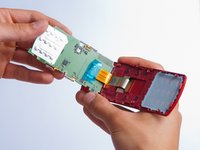
    • With the plastic opening tool, gently pry the LCD connector from the motherboard.

    • Set the motherboard aside.

    FixBot'a Sor

    Yorum Ekle

Sonuç

To reassemble your device, follow these instructions in reverse order.

İptal et: Bu kılavuzu tamamlamadım.

3 farklı kişi bu kılavuzu tamamladı.

Aaron

Üyelik tarihi: 10/15/13

167 İtibar

1 Kılavuz yazıldı

Ekip

Cal Poly, Team 4-27, Amido Fall 2013 Cal Poly, Team 4-27, Amido Fall 2013 üyesi

CPSU-AMIDO-F13S4G27

4 Üyeler

19 adet Kılavuz yazıldı

0Kılavuz Yorumları

Yorum Ekle

İstatistikleri Görüntüle:

Son 24 Saat: 0

Son 7 gün: 6

Son 30 gün: 32

Her zaman: 1,320