Ana içeriğe geç
Onarım Topluluğuna Katılın - Hesap Oluşturun

LG Cosmos Side Case Replacement

Neye ihtiyacın var

  1. LG Cosmos Side Case Replacement, Battery: adım 1, 1 resimden 1.
    • Apply an upward force to slide the back cover off.

    FixBot'a Sor

    Yorum Ekle

  2. LG Cosmos Side Case Replacement: adım 2, 1 resimden 1.
    • Use your finger to push down on the top of the battery and pull it out.

    FixBot'a Sor

    Yorum Ekle

  3. LG Cosmos Side Case Replacement, Rear Case: adım 3, 1 resimden 1.
    • Remove the five 3.0mm Phillips #000 screws along the edge of the rear case.

    FixBot'a Sor

    Yorum Ekle

  4. LG Cosmos Side Case Replacement: adım 4, 1 resimden 1.
    • Use a plastic opening tool to pry the rear case loose.

    FixBot'a Sor

    Yorum Ekle

  5. LG Cosmos Side Case Replacement: adım 5, 1 resimden 1.
    • Once the rear case is loose, lift it from the rest of the phone.

    FixBot'a Sor

    Yorum Ekle

  6. LG Cosmos Side Case Replacement, Motherboard: adım 6, 1 resimden 1.
    • Remove the two 2.9 mm Phillips #000 screws that are slightly off-centered to the right.

    FixBot'a Sor

    Yorum Ekle

  7. LG Cosmos Side Case Replacement: adım 7, 1 resimden 1.
    • Use the plastic opening tool to pry the motherboard loose.

    FixBot'a Sor

    Yorum Ekle

  8. LG Cosmos Side Case Replacement: adım 8, 1 resimden 1.
    • Hold the motherboard from the top and bottom and slowly lift the motherboard until you feel a pull.

    • The flex cable is attached at the bottom of the motherboard and can be damaged if too much lifting force is applied.

    FixBot'a Sor

    Yorum Ekle

  9. LG Cosmos Side Case Replacement: adım 9, 1 resimden 1.
    • Once the motherboard is lifted , rotate the motherboard up 90 degrees to the right.

    FixBot'a Sor

    Yorum Ekle

  10. LG Cosmos Side Case Replacement: adım 10, 1 resimden 1.
    • Use your finger to pull the flex cable out from its connector.

    FixBot'a Sor

    Yorum Ekle

  11. LG Cosmos Side Case Replacement: adım 11, 1 resimden 1.
    • Pull the motherboard away from the rest of the phone.

    FixBot'a Sor

    Yorum Ekle

  12. LG Cosmos Side Case Replacement, Silicon Keypad: adım 12, 1 resimden 1.
    • Lift the silicon keypad away from the rest of the phone.

    FixBot'a Sor

    Yorum Ekle

  13. LG Cosmos Side Case Replacement, Side Case: adım 13, 1 resimden 1.
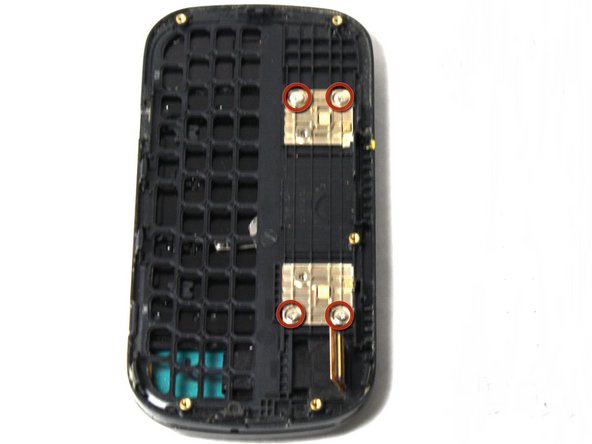
    • Remove the four 2.0mm Phillips #000 screws on the golden squares.

    FixBot'a Sor

    Yorum Ekle

  14. LG Cosmos Side Case Replacement: adım 14, 1 resimden 1.
    • Slowly lift the side case away from the rest of the phone.

    • The flex cable can be torn if it is caught on the frame of the side case.

    FixBot'a Sor

    Yorum Ekle

Sonuç

To reassemble your device, follow these instructions in reverse order.

İptal et: Bu kılavuzu tamamlamadım.

Johnny Phane

Üyelik tarihi: 04/15/13

91 İtibar

5 adet Kılavuz yazıldı

Ekip

Cal Poly, Team 13-63, Johann Spring 2013 Cal Poly, Team 13-63, Johann Spring 2013 üyesi

CPSU-JOHANN-S13S13G63

3 Üyeler

14 adet Kılavuz yazıldı

0Kılavuz Yorumları

Yorum Ekle

İstatistikleri Görüntüle:

Son 24 Saat: 0

Son 7 gün: 5

Son 30 gün: 28

Her zaman: 1,310