Ana içeriğe geç
Onarım Topluluğuna Katılın - Hesap Oluşturun

LG Intuition Camera Replacement

Neye ihtiyacın var

    1. LG Intuition Camera Replacement, Battery: adım 1, 1 resimden 1.
      • Turn the device so the two bottom screws are shown.

      FixBot'a Sor

      Yorum Ekle

    2. LG Intuition Camera Replacement: adım 2, 1 resimden 1.
      • Remove the two 7mm screws holding the back panel of the phone using the P5 bit and magnetic driver.

      FixBot'a Sor

      Yorum Ekle

    3. LG Intuition Camera Replacement: adım 3, 1 resimden 1.
      • Carefully use the plastic opening tool to pry the back panel of the phone from the front screen. This will expose the battery and other parts.

      FixBot'a Sor

      Yorum Ekle

    4. LG Intuition Camera Replacement: adım 4, 1 resimden 1.
      • Use the Phillips #0 screwdriver to remove the 5mm screw holding the metal bracket that protects the battery's ribbon cable.

      FixBot'a Sor

      Yorum Ekle

    5. LG Intuition Camera Replacement: adım 5, 1 resimden 1.
      • Carefully use the plastic opening tool to pry the ribbon cable connecting the battery to the motherboard of the phone.

      FixBot'a Sor

      Yorum Ekle

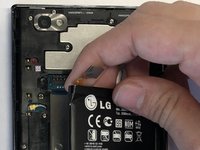
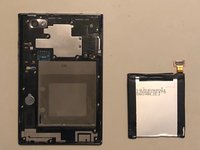
    6. LG Intuition Camera Replacement: adım 6, 2 resimden 1. LG Intuition Camera Replacement: adım 6, 2 resimden 2.
      • Gently raise the battery from its compartment.

      FixBot'a Sor

      Yorum Ekle

    1. LG Intuition Camera Replacement, Plastic Motherboard Shield: adım 7, 1 resimden 1.
      • Remove the thirteen 5mm screws holding the plastic shield covering the motherboard using the Phillips #00 screwdriver.

      FixBot'a Sor

      Yorum Ekle

    2. LG Intuition Camera Replacement: adım 8, 1 resimden 1.
      • Carefully use the plastic opening tool to pry the plastic shield from the motherboard. This will expose the motherboard and ribbon cables for each component.

      FixBot'a Sor

      Yorum Ekle

    1. LG Intuition Camera Replacement, Camera: adım 9, 1 resimden 1.
      • Carefully use the plastic opening tool to pry the ribbon cable below the camera itself from the motherboard.

      FixBot'a Sor

      Yorum Ekle

    2. LG Intuition Camera Replacement: adım 10, 1 resimden 1.
      • Using the ribbon beneath the camera lift it upwards and pull the camera out.

      FixBot'a Sor

      Yorum Ekle

Sonuç

To reassemble your device, follow these instructions in reverse order.

İptal et: Bu kılavuzu tamamlamadım.

Thomas Morrissey

Üyelik tarihi: 10/25/18

616 İtibar

6 adet Kılavuz yazıldı

Ekip

UMass Dartmouth, Team S3-G4, Peak Fall 2018 UMass Dartmouth, Team S3-G4, Peak Fall 2018 üyesi

UMASSD-PEAK-F18S3G4

3 Üyeler

54 adet Kılavuz yazıldı

0Kılavuz Yorumları

Yorum Ekle

İstatistikleri Görüntüle:

Son 24 Saat: 2

Son 7 gün: 4

Son 30 gün: 42

Her zaman: 402