Ana içeriğe geç
Onarım Topluluğuna Katılın - Hesap Oluşturun

LG Optimus 3D Motherboard Replacement

Neye ihtiyacın var

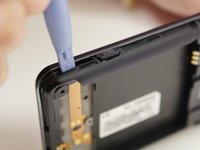
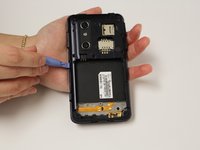
  1. LG Optimus 3D Motherboard Replacement, Back Cover Removal: adım 1, 2 resimden 1. LG Optimus 3D Motherboard Replacement, Back Cover Removal: adım 1, 2 resimden 2.
    • Pry the back cover off of the phone with your fingernail. There is a notch located at the bottom of the phone for improved leverage.

    FixBot'a Sor

    Yorum Ekle

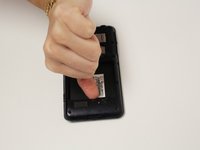
  2. LG Optimus 3D Motherboard Replacement, Battery Removal: adım 2, 3 resimden 1. LG Optimus 3D Motherboard Replacement, Battery Removal: adım 2, 3 resimden 2. LG Optimus 3D Motherboard Replacement, Battery Removal: adım 2, 3 resimden 3.
    • The battery is the large black rectangle towards the bottom half of the phone.

    • There is a semi-circular notch at the bottom edge of the battery. Press against and up on the battery to pop it out.

    FixBot'a Sor

    Yorum Ekle

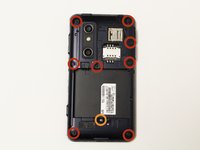
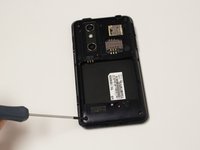
  3. LG Optimus 3D Motherboard Replacement, Screw Removal: adım 3, 2 resimden 1. LG Optimus 3D Motherboard Replacement, Screw Removal: adım 3, 2 resimden 2.
    • Remove 9 screws from the phone. The locations of these screws are circled in the picture.

    • 5.5mm length PH00 screws

    • 4mm length PH00 screws

    FixBot'a Sor

    Yorum Ekle

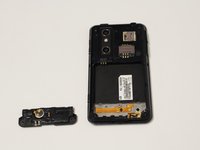
  4. LG Optimus 3D Motherboard Replacement, Bottom Cover Removal: adım 4, 2 resimden 1. LG Optimus 3D Motherboard Replacement, Bottom Cover Removal: adım 4, 2 resimden 2.
    • Gently pull down on the bottom cover to remove it.

    FixBot'a Sor

    Yorum Ekle

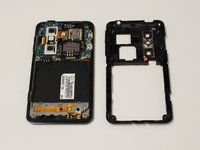
  5. LG Optimus 3D Motherboard Replacement, Mid-Cover Bezel Removal: adım 5, 3 resimden 1. LG Optimus 3D Motherboard Replacement, Mid-Cover Bezel Removal: adım 5, 3 resimden 2. LG Optimus 3D Motherboard Replacement, Mid-Cover Bezel Removal: adım 5, 3 resimden 3.
    • Using a plastic opening tool, gently pry around the perimeter of the device.

    • The ribbons behind the buttons and ports are very delicate. Make sure you do not run your plastic opening tool too deep into the bezel, as you could damage them.

    • The button covers rest under the Mid-Cover Bezel. Remove them and set aside.

    FixBot'a Sor

    Yorum Ekle

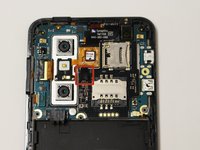
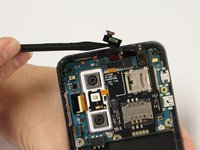
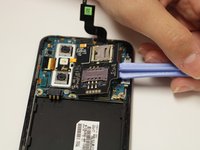
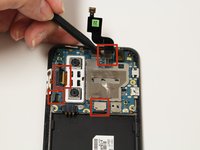
  6. LG Optimus 3D Motherboard Replacement, Ribbon Cable Disconnection: adım 6, 2 resimden 1. LG Optimus 3D Motherboard Replacement, Ribbon Cable Disconnection: adım 6, 2 resimden 2.
    • Using a spudger or plastic opening tool, gently disconnect the ribbon cable attached to the black SIM card board.

    FixBot'a Sor

    Yorum Ekle

  7. LG Optimus 3D Motherboard Replacement, Adhesive Loosening: adım 7, 1 resimden 1.
    • Use a hair-dryer on high, or a heat-gun on low to heat the device and loosen the adhesive which holds down the SD/SIM Card Board.

    • Evenly heat the device in short intervals for about one minute.

    • Do not heat the device for more than 30 seconds at a time to prevent over-heating.

    FixBot'a Sor

    Yorum Ekle

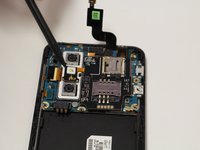
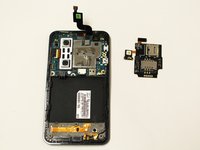
  8. LG Optimus 3D Motherboard Replacement, SD/SIM Card Board Removal: adım 8, 3 resimden 1. LG Optimus 3D Motherboard Replacement, SD/SIM Card Board Removal: adım 8, 3 resimden 2. LG Optimus 3D Motherboard Replacement, SD/SIM Card Board Removal: adım 8, 3 resimden 3.
    • Gently pry the board up to release it from the now soft adhesive. Make sure you pry up the little tab connected to the camera unit as well.

    • If the board is too difficult to separate than more heating may be required.

    FixBot'a Sor

    Yorum Ekle

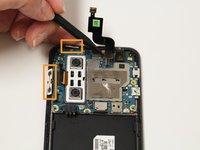
  9. LG Optimus 3D Motherboard Replacement, Disconnect Ribbon Cables: adım 9, 2 resimden 1. LG Optimus 3D Motherboard Replacement, Disconnect Ribbon Cables: adım 9, 2 resimden 2.
    • Using a spudger or plastic opening tool, gently lift the ribbon cables connected to the motherboard.

    • The button tabs, highlighted in orange, are held in with a light adhesive. Gently lift them out of the body of the phone with a spudger.

    FixBot'a Sor

    Yorum Ekle

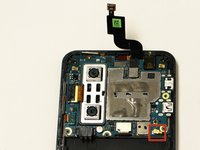
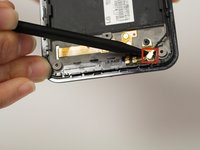
  10. LG Optimus 3D Motherboard Replacement, Disconnect Antenna: adım 10, 2 resimden 1. LG Optimus 3D Motherboard Replacement, Disconnect Antenna: adım 10, 2 resimden 2.
    • Remove the antenna cable by disconnecting both ends.

    • One end connects to the motherboard and the other connects near bottom of the phone.

    FixBot'a Sor

    Yorum Ekle

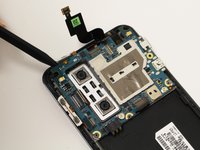
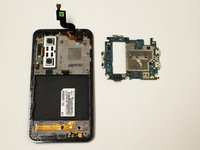
  11. LG Optimus 3D Motherboard Replacement, Remove Motherboard: adım 11, 2 resimden 1. LG Optimus 3D Motherboard Replacement, Remove Motherboard: adım 11, 2 resimden 2.
    • Using a spudger gently lift the motherboard assembly out of the case.

    • Make sure the motherboard does not get snagged on the camera's ribbon cable.

    FixBot'a Sor

    Yorum Ekle

Sonuç

To reassemble your device, follow these instructions in reverse order.

İptal et: Bu kılavuzu tamamlamadım.

3 farklı kişi bu kılavuzu tamamladı.

Dale Pearson

Üyelik tarihi: 09/22/14

784 İtibar

6 adet Kılavuz yazıldı

Ekip

USF Tampa, Team 10-6, Brown Fall 2014 USF Tampa, Team 10-6, Brown Fall 2014 üyesi

USFT-BROWN-F14S10G6

3 Üyeler

12 adet Kılavuz yazıldı

0Kılavuz Yorumları

Yorum Ekle

İstatistikleri Görüntüle:

Son 24 Saat: 1

Son 7 gün: 10

Son 30 gün: 41

Her zaman: 1,853