Ana içeriğe geç
Onarım Topluluğuna Katılın - Hesap Oluşturun

LG Optimus T Motherboard Replacement

Neye ihtiyacın var

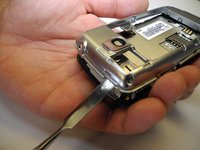
  1. LG Optimus T Motherboard Replacement, Motherboard: adım 1, 3 resimden 1. LG Optimus T Motherboard Replacement, Motherboard: adım 1, 3 resimden 2. LG Optimus T Motherboard Replacement, Motherboard: adım 1, 3 resimden 3.
    • Working on your device while it is turned on may result in electric shock. Make sure to shut down and unplug your device before you begin.

    • Using a prying device, such as a plastic opening tool, remove the phone’s back cover. At the top of the phone, there’s an indentation to put the Spudger into to pop the case off

    FixBot'a Sor
  2. LG Optimus T Motherboard Replacement: adım 2, 1 resimden 1.
    • Remove the battery. There’s an indentation to the left of the camera lens to pull up on the battery with your finger

    FixBot'a Sor
  3. LG Optimus T Motherboard Replacement: adım 3, 1 resimden 1.
    • Use a J0 screwdriver to remove the six 4.5mm screws.

    FixBot'a Sor
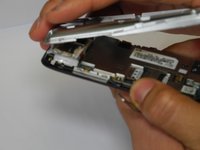
  4. LG Optimus T Motherboard Replacement: adım 4, 2 resimden 1. LG Optimus T Motherboard Replacement: adım 4, 2 resimden 2.
    • You might have difficulty popping the interior case off. You may use the metal spudger here with caution if the plastic opening tool fails

    • Remove interior case. Insert the spudger into the indentations at the top, or bottom of the phone to pry off the interior case.

    FixBot'a Sor
  5. LG Optimus T Motherboard Replacement: adım 5, 1 resimden 1.
    • Pull up on connector tab

    FixBot'a Sor
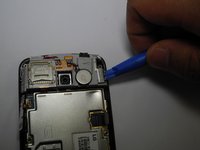
  6. LG Optimus T Motherboard Replacement: adım 6, 2 resimden 1. LG Optimus T Motherboard Replacement: adım 6, 2 resimden 2.
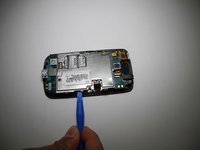
    • Remove SD card mount. Insert the plastic opening tool on the right side to pop off

    FixBot'a Sor
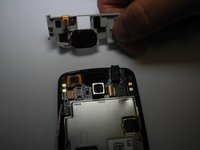
  7. LG Optimus T Motherboard Replacement: adım 7, 2 resimden 1. LG Optimus T Motherboard Replacement: adım 7, 2 resimden 2.
    • Remove metal panel

    • There are four retaining points to insert plastic opening tool and pop off panel

    FixBot'a Sor
  8. LG Optimus T Motherboard Replacement: adım 8, 1 resimden 1.
    • Use a J0 screwdriver to remove the two 1.8mm screws from charging port. (Charging port and motherboard are connected.)

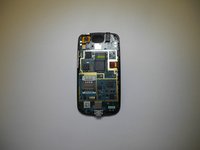
    • Remove motherboard

    FixBot'a Sor
Sonuç

To reassemble your device, follow these instructions in reverse order.

Bir başkası bu kılavuzu tamamladı.

stacey

Üyelik tarihi: 02/07/17

219 İtibar

2 adet Kılavuz yazıldı

Ekip

Ohio State, Team 1-3, Wilder Spring 2017 Ohio State, Team 1-3, Wilder Spring 2017 üyesi

OSU-WILDER-S17S1G3

4 Üyeler

5 adet Kılavuz yazıldı

0Kılavuz Yorumları

Yorum Ekle

İstatistikleri Görüntüle:

Son 24 Saat: 1

Son 7 gün: 5

Son 30 gün: 34

Her zaman: 468