Giriş
CD Drives have various reasons for not working any longer. Luckily, this guide will show how easy it is to install a new one.
Neye ihtiyacın var
-
-
-
Turn off the laptop.
-
Disconnect the charging cable.
-
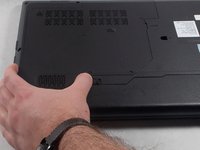
Turn the computer upside down.
 FixBot'a Sor
-
-
-
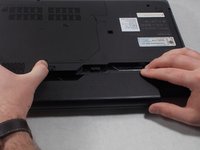
Locate the two switches that lock the battery.
-
Push the right switch outwards to unlock the battery.
-
-
-
-
Push and hold the left switch outwards to unlock the battery.
-
Pull the battery away from the computer.
-
-
-
-
-
Remove the 9mm Phillips #0 screw holding the CD drive in place.
-
-




To reassemble your device, follow these instructions in reverse order.
İptal et: Bu kılavuzu tamamlamadım.
Bir başkası bu kılavuzu tamamladı.

Ekip

UMass Dartmouth, Team S1-G1, Simcock Spring 2018 UMass Dartmouth, Team S1-G1, Simcock Spring 2018 üyesi
UMASSD-SIMCOCK-S18S1G1
3 Üyeler
66 adet Kılavuz yazıldı
