Bu çeviri bir makine tarafından oluşturulmuştur ve henüz bir kişi tarafından incelenmemiştir. Bu dili konuşuyor musunuz? İnceleme için.
Giriş
Yapışkan veya yanıt vermeyen tuşlarla ilgili sorun yaşıyorsanız, yeni bir klavyeye ihtiyacınız olabilir. Bu kılavuz, dizüstü bilgisayarınızın klavyesini nasıl değiştireceğinizi gösterir.
Neye ihtiyacın var
-
-
-
Dizüstü bilgisayarınızı alt kısmı yukarı bakacak şekilde ters çevirin.
-
Yıldız/Phillips #0 tornavida kullanarak iki adet 5 mm'lik siyah vidayı sökün ve bellek panelini çıkarın.
-
Bellek panelini yerinden çıkarın.
 FixBot'a Sor
-
-
-
5 mm'lik iki vidayı Yıldız tornavida kullanarak çıkarın.
-
Dizüstü bilgisayarı ters çevirin ve kapağını açın.
-
-
-
-
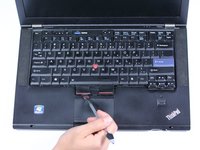
Klavyeyi nazikçe aşağı doğru bastırın ve ekrana doğru kaydırın. Bu işlem, klavyenin alt kısmının kasadan çıkmasını sağlayacaktır.
-
Plastik kanırtma aparatını kullanarak klavyeyi kaldırın ve dışarı kaydırın.
-
-
-
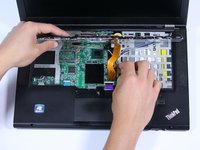
Ribbon kablonun ucundaki tırnağı yukarı doğru kaldırarak turuncu kabloyu yerinden çıkarın.
-
-




Cihazınızı yeniden toplamak için bu talimatları ters sırada uygulayın.
İptal et: Bu kılavuzu tamamlamadım.
11 farklı kişi bu kılavuzu tamamladı.

Ekip

Cal Poly, Team 6-13, Maness Spring 2015 Cal Poly, Team 6-13, Maness Spring 2015 üyesi
CPSU-MANESS-S15S6G13
4 Üyeler
60 adet Kılavuz yazıldı
6Kılavuz Yorumları
This is not the Lenovo Thinkpad T420. You can Tell by the RAM memory Slot Cover and the Position the RAM is put into its slot. the T420 RAM is Vertical Compared with being Horizontal in this Picture. that includes the cover also. Then the Battery Slot is a Dead Giveaway clue. The T420 Battery slot is in the middle. and this Picture has the battery slot to bthe left. Sorry Not Even Close. None of the screws he removes are on the T420. so this is Completely Useless. Thanks
The steps are almost exactly the same though - I've performed them on my own T420. This guide is for the T420s. Just remove the memory panel with the single screw on the base of the laptop, remove the screw with the keyboard emblem next to it, and follow the keyboard removal steps in this guide.
you do know this guide was made for the T420s? it literally says so on the guide. take a moment to read my friend.
I just did this, in combination with this: https://support.lenovo.com/us/en/solutio...
Was pretty easy and working great. I am bit intimidated opening up a laptop or PC, but the “Easy” rating on this gave me the idea to try. Glad I did.
Thanks for your post Jay, the link was not valid any more but i went on that site and looked for the correct Maintenance Manual which helped me complement this guide while changing my keyboard. Here everyone with Lenovos can get this kind of Manuals which are official, very complete, and explanatory with good graphics of the procedures and parts: https://download.lenovo.com/eol/index.ht...
